Search++: A work in progress
-
@guy038 said in Search++: A work in progress:
Thanks for your new
Search++_03release !Thank you for testing it.
BTW, with native N++ search, the
Shift + Entershortcut is also available when you choose theRegular expressionsearch mode ( with the condition that theregexBackward4PowerUser="yes"option is present within theconfig.xmlfile. May be, you could allow it as well inSearch++?Regex backward… I have my doubts, but I can leave it open as something I might try to make available some day. When I’ve thought about it before, I get caught up trying to define exactly what it means to match regular expressions backward. Regular expressions can match different lengths depending on where they start. Is the previous match the one that ends at the latest possible position? The one that begins at the latest possible position? The last one that would have occurred before the current position if you matched forward repeatedly from the beginning of the text? The one that would result from reversing both the text and the regular expression (but then what do you do with backreferences)?
Shift+Enter is a different problem. Enter doesn’t work to find: since the Find and Replace boxes take multiple lines, they consume the Enter key. You can use Alt+F and Alt+R (the underlined characters on the Find and Replace buttons), but those combinations are a bit awkward. I’ve been thinking of just making Shift+Enter and Ctrl+Enter do the functions on the Find and Replace buttons — I think those would be more natural than Alt+F and Alt+R for most people (including me). But then it isn’t obvious how access to backward should work. Beyond all that, there is no standard Windows mechanism for keyboard-only access to the drop-down menus on split command buttons. Once you can get to the button without clicking it, down arrow works to open the menu; but you can’t get there with Alt+underlined letter: that does the click action. I haven’t figured out a good way to deal with all of the keyboard navigation obstacles yet.
Which is a long way of saying I don’t know which of too many possibilities I will eventually decide must take priority for keyboard actions, so I don’t know what I can/will do in that regard.
Personally, I think the
ICUbutton should remain available in future versions !I’ll probably leave the function there… it might be “hidden” (like a Shift-click on Regex) so it doesn’t confuse people who would probably never use it.
- Choose the
Select > Select in Whole Documentoption
=> A selection appears with the bottom message
Selected 207 matches- Without doing anything else, I use the
Ctrl + Cshortcut
After opening an other new tab, I was quite surprised that the
207tibetan chars were not pasted, after aCtrl + Voperation ?!Then, I understood that the selection is effective ONLY IF :
It’s not that selection isn’t effective, it’s that keyboard focus was still in the Search++ dialog. You have to move focus to the document for the Ctrl+C to work.
You can use Ctrl+N (think “Notepad++”) to return focus to the document, or (as you discovered) click on the tab if you’re using the mouse.
This does make me think I should probably have an option, perhaps enabled by default, to return focus to the document automatically after a select operation, since wanting to copy is probably the most common reason for using select.
(I’ve been bitten by this often enough in Columns++, which works the same way. It’s just so easy to forget that focus is in the dialog, not the document.)
Note that if the
Unicode word boundariesis not checked , the(?w)\bregex would also return176matches. Thus, a leading(?w)forces the use of theUnicode word boundariesoption !Hmmm… I’m not sure what’s happening there.
Then, reading https://www.regular-expressions.info/unicodeboundaries.html#grapheme, I realized that, presently, the
\bregex cannot identify the different grapheme positions !Would it be possible to add an option for this specific case
In both Regex and ICU, \X matches a single grapheme cluster. In Regex, (?=\X) matches a grapheme boundary; that doesn’t work in ICU. (It looks like in ICU, \X actually matches from the current position to the end of a grapheme cluster. In Regex, the match must begin and end on a grapheme cluster boundary. The Boost.Regex logic already worked that way, but I replaced/extended it to use the grapheme break algorithm specified by Unicode.) \X partially works in built-in Notepad++ search, too, but it misses some cases and falls apart entirely outside the BMP.
- Choose the
-
Hi, @Coises and All,
Don’t worry about my request for searching for regular expressions in the opposite direction: I can live without that feature !
Regarding the possibility of changing the
Alt + FandAlt + Rshortcuts to some anothers, I’m not really in favor of it because you would break a very oldWindowsstandard !BTW, when in Plain text and with focus on
Search++, let’s suppose we search for the stringand-
Using the
Alt + Fshorcut does move to the next match and, in addition, the shortcutAlt + Shift + Fdoes move to the previous match Nice, indeed ! -
But, if I decide, now, to use the
Enterkey, it wrongly add a line-break after the wordand, in the Find dialog ofSearch++
So, to my mind, it would be better to put the focus on the Find button as soon as you hit the
Alt+ Fshortcut, in order to use, either, theAlt + FOREnterand theALT+ Shift + FORShift + Entershortcuts !
Regarding my selection problem :
Oh… yes, indeed ! The solution was obvious :
Ctrl + Nto switch focus from theSearch++plugin to nativeN++!You said :
This does make me think I should probably have an option, perhaps enabled by default, to return focus to the document automatically after a select operation, since wanting to copy is probably the most common reason for using select.
Yes indeed; this would make sense !
Note that I personally choose the
Ctrl + Shift + Nshortcut for the commandPlugins > Search++ > Search...Thus, as a summary :
-
When focus on
Notepad++, theCtrl + Shift + Nshortcut opens or puts focus on theSearch++plugin ( User shortcut ) -
When focus on
Search++, theCtrl + Nshortcut puts focus onNotepad++( Search++ shortcut ) -
When focus on
Search++, theCtrl + Oshortcut toogles between the Find and the Replace dialog of **Search++( Search++ shortcut ) -
When focus on
Search++, theCtrl + Hshortcut re-opens or puts focus ontheSearch++ Results`( Search++ shortcut ) -
When focus on
Search++ Results, theCtrl + Oshortcut puts focus on theSearch++`plugin ( Search++ shortcut ) -
When focus on
Search++ Results, theCtrl + Shift + Nshortcut closes theSearch++ Resultspanel and puts focus onNotepad++( Search++ shortcut ) -
When focus on
Search++, theCtrl + Shift + Nshortcut closes theSearch++panel and puts focus onNotepad++( User shortcut )
BTW, @coises, why didn’t you choose a single shortcut ( I’m thinking about
Ctrl + H) to toggle between theSearch++plugin and theSearch++ Results? Native notepad++ just use theF7key to shift the focus, back and forth, between theDocumentwindow and theSearch resultspanel !
Regarding the
Unicode Word Boundaries:When I said :
Note that if the
Unicode word boundariesis not checked , the(?w)\bregex would also return176matches. Thus, a leading(?w)forces the use of theUnicode word boundariesoption !There’s nothing weird about this assertion. It just means that the behavior of the
(?w)and(?-w)modifiers act in the same way as the well-known(?s)and(?-s)modifiers which set / unset the. matches new-lineoption, whatever this option is physically checked or not, in nativeN++search !
- Regarding the
Grapheme Boundaries:
No need to add any option ! I’ve just realized that, in
regexmode, the simple regex(?!\X).does match any character which is not aGrapheme-Basechar. Thus, aCountaction would detect, for instance, the total number of accentuated characters associated to a simple latin letter !
I still need to explore all of
Search++'s features and, most importantly, to compile a list of the various properties available with theICUregular expression engine.BR
guy038
-
-
Hello, @coises and All,
Two more points :
- Open the
change.logfile
Let’s suppose that the N++ Find dialog is already opened and that the Find field contains the text
This is a test-
Now, switch back to the
change.logfile -
Select the
Updater (Installer only):text -
Use the
Ctrl + Fshortcut
=> The previous text is updated to the new text to search :
Updater (Installer only):=> OK-
Now, open
Search++( withPlugins > Search++ > Search...or with my shortcutCtrl + Shift + N) -
Type in
This is a testin the Find dialog ofSearch++ -
Click on the
change.logtab -
Select again the
Updater (Installer only):text -
Put the focus again on the
Search++plugin ( withPlugins > Search++ > Search...or with my shortcutCtrl + Shift + N)
=> The text is not uptaded and remains the string
This is a test! To get it updated, you need to close and re-openSearch++Could you provide this N++ search behavior to
Search++, as well ?
When the
Search++dialog is docked, it’s very easy to identify if focus is onNotepad++or onSearch++, thanks to the blue color of the title bar. However, this difference is not so obvious when theSearch++plugin is not docked ! Is there a mean to improve this difference ?Best Regards,
guy038
- Open the
-
@guy038 said in Search++: A work in progress:
Regarding the possibility of changing the
Alt + FandAlt + Rshortcuts to some anothers, I’m not really in favor of it because you would break a very oldWindowsstandard !True. I would not change them; I was thinking about adding Shift+Enter and Ctrl+Enter as alternatives.
- Using the
Alt + Fshorcut does move to the next match and, in addition, the shortcutAlt + Shift + Fdoes move to the previous match Nice, indeed !
That was a “bonus.” It hadn’t occurred to me that Shift would work that way, though now that you mention it, I can see why it does.
- But, if I decide, now, to use the
Enterkey, it wrongly add a line-break after the wordand, in the Find dialog ofSearch++
So, to my mind, it would be better to put the focus on the Find button as soon as you hit the
Alt+ Fshortcut, in order to use, either, theAlt + FOREnterand theALT+ Shift + FORShift + Entershortcuts !The Windows dialog manager doesn’t normally move focus for an Alt+ shortcut to a command button, it just does the command and leaves the focus unchanged. I could probably find a way to override that, but it’s not clear to me that I should. If you started using Alt+F, why not continue that way?
This does make me think I should probably have an option, perhaps enabled by default, to return focus to the document automatically after a select operation, since wanting to copy is probably the most common reason for using select.
Yes indeed; this would make sense !
It will be in the next release.
BTW, @coises, why didn’t you choose a single shortcut ( I’m thinking about
Ctrl + H) to toggle between theSearch++plugin and theSearch++ Results? Native notepad++ just use theF7key to shift the focus, back and forth, between theDocumentwindow and theSearch resultspanel !I suppose I was thinking that since I can’t really make one command that handles all the focus changes — because I don’t know what the user will assign for Search++/Search in the Notepad++ shortcut mapper (if anything at all) — I would have Ctrl+N always go to the document, Ctrl+O always go to the Search dialog (though it’s Find Box unless you’re already in the Find Box, in which case it’s the Replace Box…) and Ctrl+H always go to the results (“hit list”).
It would make at least as much sense to have Ctrl+H toggle between the search dialog and the results list, though. Since you mention it, I’ll probably make that change.
There’s nothing weird about this assertion. It just means that the behavior of the
(?w)and(?-w)modifiers act in the same wayOf course, you are correct.
- Using the
-
@guy038 said in Search++: A work in progress:
- Put the focus again on the
Search++plugin ( withPlugins > Search++ > Search...or with my shortcutCtrl + Shift + N)
=> The text is not uptaded and remains the string
This is a test! To get it updated, you need to close and re-openSearch++Could you provide this N++ search behavior to
Search++, as well ?I did not realize the native dialog worked that way; I assumed it only filled when the dialog wasn’t already open.
I don’t see a reason I couldn’t do this, if it’s what people will ordinarily expect. I would have thought being able to change focus back to the dialog by keyboard without disturbing the contents of the Find box would have been more desirable, but maybe not. Users can always disable the fill option, or I could add an additional setting to let the user decide whether filling only occurs when the dialog wasn’t already open.
Ctrl+I will insert the text selected in the document into the Find (or Replace) box at any time. Since it is an insert, you have to do Ctrl+A, Ctrl+I if you want to replace.
When the
Search++dialog is docked, it’s very easy to identify if focus is onNotepad++or onSearch++, thanks to the blue color of the title bar. However, this difference is not so obvious when theSearch++plugin is not docked ! Is there a mean to improve this difference ?Agreed, the difference is fairly subtle in light mode: the text in the title bar goes grey, and the shadow around the dialog gets a bit less. It’s a bit more visible in dark mode, where the whole title bar changes color.
I have to think about whether there is anything I can do that would make this more visually apparent without being garish or peculiar.
(Note: at present, the Search++ dialog does not fully accommodate changing between dark and light mode within a single Notepad++ session. The Scintilla controls in the regular dialog and in the docking dialog stay however they were when you first opened that type of dialog.)
- Put the focus again on the
-
@guy038 said in Search++: A work in progress:
You said :
This does make me think I should probably have an option, perhaps enabled by default, to return focus to the document automatically after a select operation, since wanting to copy is probably the most common reason for using select.
Yes indeed; this would make sense !
BTW, @coises, why didn’t you choose a single shortcut ( I’m thinking about Ctrl + H ) to toggle between the Search++ plugin and the Search++ Results ?
A few small improvements are in version 0.4:
- Add wide layout for better top/bottom docking. Improve layout handling and make sure non-docking dialogs aren’t sized too small.
- Add settings (checked by default) to focus the document after Select commands and after Show commands. (See help.)
- Make behavior of general navigation commands (Ctrl/Ctrl+Shift + H/N/O) more consistent. (See help.)
-
Nice work so far. Notepad++ already has a solid search system, so making something which actually feels like an upgrade is not small thing.
What is standing out to me is that it follows the way heavy N++ users already search instead of trying to force whole new workflow. The extra scope control feels especially useful when you start doing repeated searches in same session, because built-in search can get a bit messy.
One thing I personally really miss is Find + Mark (highlight/coloring results) style workflow. Being able to keep visual marks in document while refining searches is something I use very often in native N++, so having similar option here would make it even stronger. Related to that, I also really love Bookmark option in native N++, which I am not sure is used regularly by everyone, but to me it is very helpful, being able to quickly jump between important lines makes managing large documents much easier.
It would also be very nice to see these strong features later applied to Find in Files / Find in Directory, like Notepad++ handles it now, because that is where extra scope logic and result control could become even more useful.
Hopefully I will be able to contribute something useful to this community soon also.
-
Hello, @coises and All,
Many thanks for your reactivity and for the
Search++-04release ! I do appreciate that you always keep theHelpfile up to date with the latest version and it’s a pleasure to consult it !Bravo for the Keyboard navigation section, within the
Helpfile and for the Focus section in theSettingsdialog with their default values !
- Regarding updating the
Finddialog when selecting something new in a document :
In your last post, I did not notice that you spoke about the
Ctrl + Ishortcut. So, presently, in order to update the Find region ofSearch++with current selection of current document, we have two possibilites, whenSearch++is on focus :- Use the
Ctrl + Ior the combinationCtrl + A+Ctrl + I
or
-
Use the
Ctrl + Shift + Nshortcut to closeSearch++( Search++ shortcut ) -
Re-use the
Ctrl + Shift + Nshortcut to open againSearch++( User shortcut )
BTW, @coises, the
Helpfile did not mention at all thatCtrl + Ishortcut !Best Regards,
guy038
- Regarding updating the
-
@guy038 said in Search++: A work in progress:
In your last post, I did not notice that you spoke about the
Ctrl + Ishortcut. So, presently, in order to update the Find region ofSearch++with current selection of current document, we have two possibilites, whenSearch++is on focus :- Use the
Ctrl + Ior the combinationCtrl + A+Ctrl + I
or
-
Use the
Ctrl + Shift + Nshortcut to closeSearch++( Search++ shortcut ) -
Re-use the
Ctrl + Shift + Nshortcut to open againSearch++( User shortcut )
BTW, @coises, the
Helpfile did not mention at all thatCtrl + Ishortcut !Thank you again for looking at this so closely.
The help file mentions in this section that there is a context menu on which you can also find keyboard shortcuts:
Right-click in the Find or Replace box, or use the Apps key or Shift+F10, to bring up a context menu. A number of useful commands can be found there, along with their keyboard shortcuts. The bottom section of the context menu lets you select from a history of the last ten strings you have used for searches.
I go on to mention wrapping and zooming, but I never describe the Insert/Exchange sub-menu.
in order to update the Find region of
Search++with current selection of current document, we have two possibilites, whenSearch++is on focusThere are already settings to choose whether to fill the find box at all, and if you choose to fill, to set some limits on how big the selection can be.
Do you now think:
-
there should be another sub-setting for whether or not to replace the contents of the find box when you use the Search++ Search… menu command or the shortcut you’ve set for it to move focus from the document to a search dialog that is already visible? (If so, should it be default checked?)
-
if the main “Fill” box is checked, it should always fill when you use the command/shortcut, regardless of whether the dialog is visible — if someone doesn’t like it, they can just turn off filling altogether (it’s not that hard to use Ctrl+I when you want it)?
-
it should stay like it is (it’s not that hard to use Ctrl+I when you want it)?
My personal feeling is that it would be disconcerting to have what is in the Find field, in a visible dialog, replaced just because I used my keyboard shortcut to navigate to the dialog instead of activating it with the mouse. (If I’ve closed the dialog I probably don’t remember what was in it anyway, so the selected text is as good as anything.) Others might not see it that way — I rarely use auto-fill intentionally. Most often I’m not already looking at the thing I want to find; so just unchecking the box and turning it off completely wouldn’t affect me much.
- Use the
-
@Lachlanmax said in Search++: A work in progress:
Nice work so far. Notepad++ already has a solid search system, so making something which actually feels like an upgrade is not small thing.
Thank you.
One thing I personally really miss is Find + Mark (highlight/coloring results) style workflow. Being able to keep visual marks in document while refining searches is something I use very often in native N++, so having similar option here would make it even stronger.
Would you help me understand what is missing? I assume you have seen the Mark command (the simple one and its family of direction- and scope-controlled commands) on the drop-down for the Find All button, and the mark-related functions on the Tools button menu. What do I need to add? Other than…
Related to that, I also really love Bookmark option in native N++, which I am not sure is used regularly by everyone, but to me it is very helpful, being able to quickly jump between important lines makes managing large documents much easier.
I did leave that out. I’m one of those people who doesn’t use them, so I have little insight into how people do use them.
I take it the essential option here is to set a bookmark on every line that contains a match when using a Mark command. Is that it?
Do you think that is something that can be a setting — that is, something a user would ordinarily either use or not use, so it can go on the Settings dialog and any given user will “set it and forget it”? Or is bookmarking the lines containing matches something a user needs to be able to turn on and off search by search?
Can bookmarks be cleared along with marked text, or do users need independent control of unmarking text and clearing bookmarks?
Should lines containing null matches (which can’t be marked, as there is no text to mark) still be bookmarked?
It would also be very nice to see these strong features later applied to Find in Files / Find in Directory, like Notepad++ handles it now, because that is where extra scope logic and result control could become even more useful.
I’m not sure I understand what this would entail.
(I haven’t yet added the ability to search in files on disk, nor the ability to search all open documents. Those are major steps I still intend to take before I consider this ready for a “stable” release.)
Are you suggesting that some sort of marked text and/or bookmarked lines be maintained in files that have never been opened in Notepad++? It sounds confusing to me; wouldn’t users be completely “flying blind” trying to assess how their searches were actually working?
I can’t help thinking that maybe complex, chained series of searches and replacements in sets of files on disk might be better handled by a separate tool (likely a command line tool which could have an optional GUI interface) that wouldn’t have anything to do with Notepad++. I don’t know if a good, user-friendly program like that exists.
-
Hi, @coises and All,
Regarding selection, I’m thinking about these new options in the
Settingsdialog :- Selections ------------------------------------------------------------------------------------------- □ Fill the Find box from single selection in current document when opening the search++ dialog □ Fill the Find box from single selection in current document when re-activating the search++ dialog □ Fill the Find box from single selection in current document when clicking on the search++ dialog title □ Only if the selection has no more than : 79 characters and 2 lines □ Fill with the word containing the caret if nothing is selectedAnd, by
default, the first and two last options would be checkedDo you think that make sense ? May be, would you prefer to merge the first
3options in this single one :□ Fill the Find box from single selection in current document each time the search++ dialog is invoked
Now, I tested the multi-lines text, below, pasted in a new tab :
Bla blah
This is
a test
to verify
if everything
works correctly
foo bar
Then, the search of the
5consecutive lines, belowThis is a test to verify if everything works correctlyWould select the
5lines above, with search inPlainmodeNow, the search of the
5consecutive lines, belowThis is a test to verify if everything works correctlyOR
SEARCH
This is\Ra test\Rto verify\Rif everything\Rworks correctly\ROR
SEARCH
This is\r\na test\r\nto verify\r\nif everything\r\nworks correctly\r\nWould select the
5lines above, with search inRegexorICUmode
Now using this regex :
(?x)
This[ ]is         \R |
a[ ]test          \R |
to[ ]verify       \R |
if[ ]everything   \R |
works[ ]correctly \R
It would match each entire line, from
2to6, of the new tab, with search inRegexmodeAnd using this regex :
(?x)
This\ is         \R |
a\ test          \R |
to\ verify       \R |
if\ everything   \R |
works\ correctly \R
It would match each entire line, from
2to6, of the new tab, with search inRegexor inICUmode.Seemingly, brackets to enclose the space character
[ ]do not work with theICUregex engine, when using theFree-Spacingmode !?So, all is fine, so far !!
BR
guy038
-
Search++ v0.5 includes various changes:
It is now possible to Count, Find All, Mark or Replace in Open Documents or in Documents in this View.
When the search dialog is narrow (typical if the docking dialog is used and docked to the left or right), the status message can overflow the available space. I added ellipsis to the message and a balloon tip on hover to show the whole message when it overflows.
I changed the default (“smart”) Mark commands so that they don’t search only within marked text when some text is marked. That search is possible (Mark in Marked text is on the Mark submenu), but it’s probably not what someone usually means to do.
I tried to make the command button drop-down menus make a little more sense. They’re probably still confusing. I updated the description in the help; hopefully if someone really wants to understand what it all means, I’ve made it possible.
Experiences, problem reports, suggestions and trauma dumps are still welcome and very much appreciated.
Still not done:
-
@guy038’s disappointment with the Find field not being filled from the document selection in as many situations as he expects remains to be addressed.
-
I haven’t looked at @Lachlanmax’s request to include bookmarking lines yet. Using marked text in multiple documents was also mentioned; the changes in 0.5 possibly address that to some extent, but only for open documents, since I haven’t added any searching of files on disk yet. I’m not sure how I could/would apply the idea of searching in marked text to documents that aren’t open in Notepad++.
-
When accumulating a lot of search results (tens or hundreds of thousands of hits), the search completes and then everything hangs while the results window is filled. It can be confusing and disconcerting.
-
The drop-down menus for the command buttons drop up when the button is near the bottom of the screen. That’s OK, except that the menu then covers the place you just clicked to open it, and if you happen to move the mouse just a pixel before you release the button, it selects the bottom item in the menu.
-
I still haven’t fixed the search results window for dark mode.
-
I still don’t have a convenient method of keyboard access to the command button drop-down menus. (I can and probably will assign some shortcuts to them, but they still won’t be discoverable to anyone who doesn’t read about them in the help.)
-
As @guy038 noted, the icons added to the command buttons when you shift+click to set a different primary action for the button are difficult to make out. The reason for that is that I’m using Unicode symbol characters; eventually I need to replace them with proper icons or owner-drawn buttons.
-
I still haven’t implemented find in files. I’m not sure yet how I will manage the user interface: I don’t want to make the main dialog bigger (I want to keep it practical for docking use).
-
I hope to add the ability to save searches for future use, but I haven’t done that yet.
-
Searching in Open Documents or in Documents in this View loses multiple selections that aren’t a rectangular selection. That’s because Notepad++ loses them when switching tabs, and I think the only safe and robust way for a plugin to access open documents is to temporarily activate them. There might be other things that are lost, too; I need to identify them and save/restore them. (Hidden lines are lost, but that’s for a different reason.)
-
Hidden lines as Search++ uses them don’t work together properly with hidden lines the way Notepad++ uses them. It is not clear to me yet what is possible there; I hate to give up the Show command, as it is a handy way to get the effect of a search results list but right in place, where you can edit what you see.
-
While there is a search progress dialog, it doesn’t always show up when it should. The biggest problem is long searches that don’t find anything. (Those are usually regular expression searches, at their worst resulting in the infamous “too complex” message.) It will be a tricky problem to solve, because the Boost.Regex engine doesn’t have any sort of callback for long operations: once I start a search, my code doesn’t get control again until it either finds something or fails to find anything. I suspect there will be no effective way to solve that without modifying Boost.Regex code.
-
-
@Coises I was though to mention this for 0.4, but FYI it remains in 0.5.
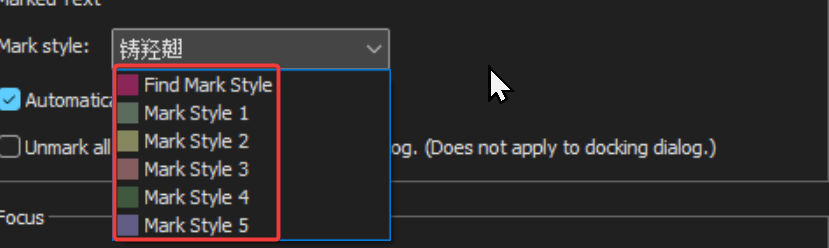
I’ve highlighted tha the “Mark Style” drop down appears to be populated with non-english characters, even though the remaining UI is english. When clicking the dropdown to show values, this value does not exist in the revealed list of choices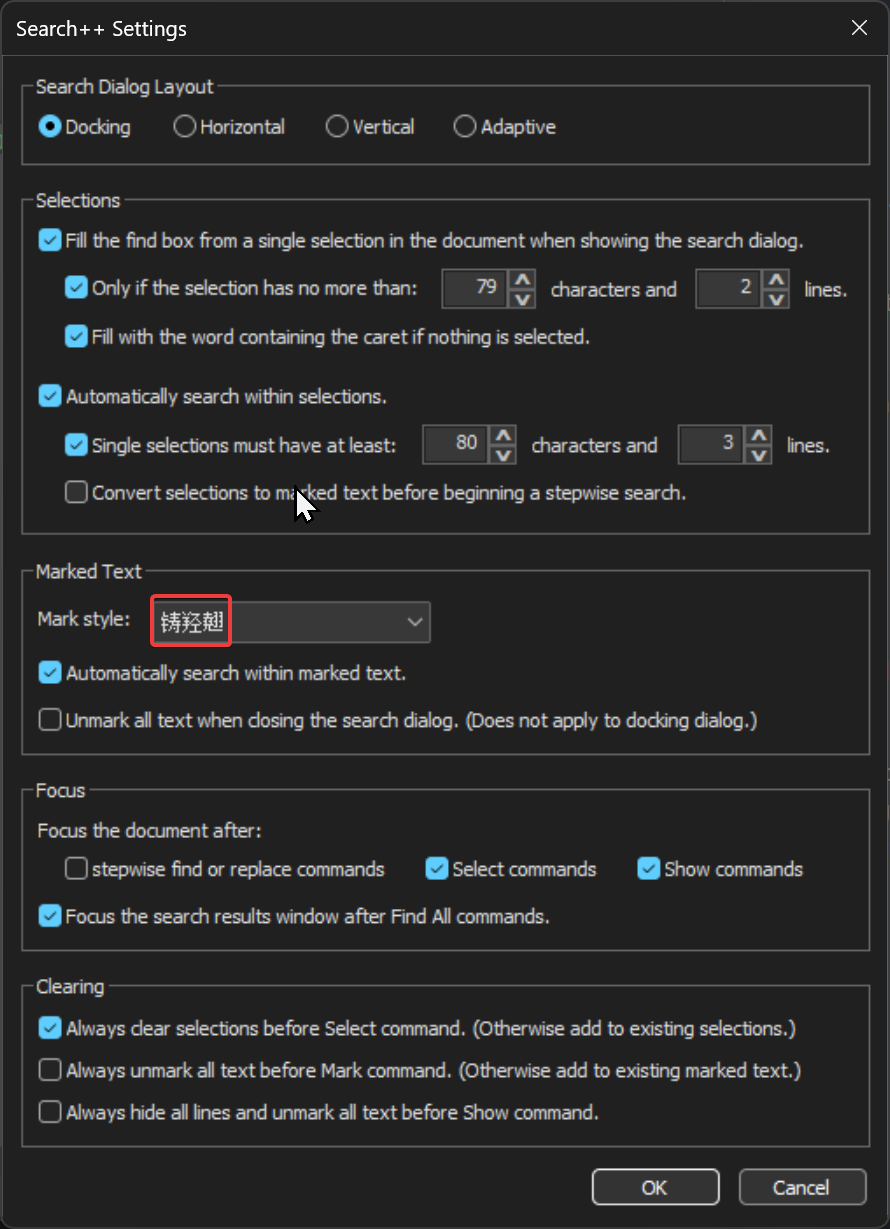
Notepad++ v8.9.3 (64-bit)
Build time: Mar 20 2026 - 00:44:25
Scintilla/Lexilla included: 5.6.0/5.4.7
Boost Regex included: 1_90
pugixml included: 1.15
nlohmann JSON included: 3.12.0
Path: C:\Program Files\Notepad++\notepad++.exe
Command Line:
Admin mode: OFF
Local Conf mode: OFF
Cloud Config: OFF
WinGUp: present
disableNppAutoUpdate.xml: absent
Periodic Backup: ON
Placeholders: ON
Scintilla Rendering Mode: SC_TECHNOLOGY_DIRECTWRITE (1)
Multi-instance Mode: monoInst
asNotepad: OFF
File Status Auto-Detection: cdEnabledNew (for current file/tab only)
Dark Mode: ON
Display Info:
primary monitor: 2560x1440, scaling 100%
visible monitors count: 2
installed Display Class adapters:
0000: Description - NVIDIA GeForce RTX 3080
0000: DriverVersion - 32.0.15.9186
OS Name: Windows 11 Home (64-bit)
OS Version: 25H2
OS Build: 26200.8037
Current ANSI codepage: 1252
Plugins:
CollectionInterface (1.3)
ColumnsPlusPlus (1.3.1)
ComparePlus (2.2)
CSVLint (0.4.7)
CsvQuery (1.2.9)
FWDataViz (2.6.7)
HTMLTag (1.5.6)
HugeFiles (0.4.1)
JsonTools (8.5)
mimeTools (3.1)
MultiReplace (5.0.0.35)
NppConverter (4.7)
NppExport (0.4)
NppXmlTreeviewPlugin (2)
PythonScript (2.1)
Search++ (0.5)
XMLTools (3.1.1.13) -
@Snabel42 said in Search++: A work in progress:
I’ve highlighted tha the “Mark Style” drop down appears to be populated with non-english characters, even though the remaining UI is english. When clicking the dropdown to show values, this value does not exist in the revealed list of choices
Thank you for the report and the screenshots. I couldn’t reproduce it until I changed to dark mode (to match your screenshot).
The control functions perfectly well in light mode and is completely messed up in dark mode.
I will investigate to see if I can find a cause and/or a workaround.
I have the same control in the Search dialog in Columns++, but I never added the Notepad++ message to support dark mode to anything in Columns++. The control works there, regardless of whether Notepad++ is in light or dark mode, so it seems specifically to be connected with the dialog being in dark mode.
-
Hi @coises,
first, I have to say I was a bit shocked when you mentioned the Mark commands under the Find All dropdown, because this is exactly what I wanted and somehow I completely did not see it when I needed it. Maybe I was simply too tired at that moment :)
So for the marking itself, yes, this already covers what I had in mind.
The main thing I was thinking about is really the bookmark workflow.
I take it the essential option here is to set a bookmark on every line that contains a match when using a Mark command. Is that it?
Yes, exactly, this is exactly what I mean.
For me this is most useful when working in larger logs or config files, where I want to quickly jump only between relevant lines after marking.
About whether this should be a setting or per-search option, I would personally prefer it per search.
Sometimes I only want visual marking to better understand the pattern and refine the next search. Other times I want the bookmarks as a temporary navigation layer through the file. Because this changes from task to task, a permanent “set and forget” setting feels a bit too static to me.
For clearing, I still think independent control makes most sense.
There are cases where the visual marks become noisy and I want to remove only them, but still keep the bookmarks for navigation. In other cases I want both gone. So separate control gives the most flexibility.
About the null matches question, I am honestly not fully sure what you mean there, so I would not want to guess wrong.
For the Find in Files / open documents topic, my earlier point was maybe not explained well.
Yes, exactly this is what I meant, sorry that I was not clear enough before.
When you later add the ability to search files on disk and all open documents, I think this workflow will become even stronger. I will happily wait for the full version, because this already looks very promising.
And thanks again for your really great work on this plugin. It already feels like something with a lot of potential.
-
Hello, @coises,
You said :
When the search dialog is narrow (typical if the docking dialog is used and docked to the left or right), the status message can overflow the available space. I added ellipsis to the message and a balloon tip on hover to show the whole message when it overflows.
Could you share a screenshot that illustrates this behavior as I have not been able, so far, to see any
ellipsischar and anyballon tip!
Now, is this a bug or I did not understand the logic ?
Let’s suppose this text in a new tab :
This is a test This is a test This is a test This is a test This is a test This is a test-
Move to this new tab
-
Put the caret on the
4thempty line, without selecting anything else ( IMPORTANT ) -
Run
Plugins> Search++ > Search... -
Select the
Plainbutton -
SEARCH
is -
Check the
Match caseoption ONLY -
Click on the
▼mark of theFind Allbutton -
Choose the
Select > Select Before in Whole Documentor theSelect Beforeoption
=> No message and no matches ??
I was rather expecting the message
Selected 6 matches before current position-
Replace the caret on the
4thempty line , without selecting anything else ( IMPORTANT ) -
Click on the
▼sign of theFind Allbutton -
Choose the
Select > Select After in Whole Documentor theSelect Afteroption
=> Any
isstring is matched in entire document=> Message :
Selected 12 matches after selection??I was rather expecting the message
Selected 6 matches after current positionFinally :
-
Replace the caret on the
4thempty line , without selecting anything else ( IMPORTANT ) -
Click on the
▼sign of theFind Allbutton -
Choose the
Select > Select in Whole Documentoption
=> Any
isstring is matched in entire document=> Message :
Selected 12 matchesThis time, the results are coherent !
Now, @coises, to my mind, it would be interesting to change the layout, below :
Find ▼    Count ▼    Find All ▼

□ Match Case    □ Whole word only
By this one :
Find ▼    Count ▼    Find All ▼

Select ▼    Mark ▼    Show ▼

□ Match Case    □ Whole word only
In addition, this would give some more default values available for the
Select,MarkandShowoptions ! What are your thoughts on this ?
A nice thing regarding the Search
Markfeature is that you can use the native N++Markfeature to perform additional actions :-
You may clear all marked text with the
Clear all marksbutton. Of course, you can simply use theTools > Unmark All Textof Search++ -
You can use the
Copy Marked Textof the Mark dialog. But, while trying to get aSearch++equivalent behavior, I suspected an other bug :((
Let’s use this text in a new tab
This program is free software: you can redistribute it and/or modify it under the terms of the GNU General Public License as published by the Free Software Foundation, either version 3 of the License, or (at your option) any later version.-
Move to this new tab
-
Run
Plugins> Search++ > Search... -
Select the
Regexbutton -
SEARCH
^.+ -
Click on the
▼sign of theFind Allbutton -
Choose the
Select > Select in Whole Documentoption
=> The
4lines are selectedThen, in order to mimic the
Copy Marked Textbutton, you just have to do aCtrl + Caction. So OK, so far !-
Now, click anywhere to cancel the selection
-
Select this
ABCDEstring -
Copy in the clipboard with a
Ctrl + Caction -
Move to the new tab
-
Run
Plugins> Search++ > Search... -
Select the
Regexbutton -
SEARCH
^.+ -
Click on the
▼sign of theFind Allbutton -
Choose the
Mark > Mark in Whole Documentoption
=> The
4lines are marked-Then use the
Tools > Marked text → Selectionsoption=> The
4lines are ALSO selected-
Run a
Ctrl + Caction to put this selection in the clipboard -
Then, run a
Ctrl + Vaction => The clipboard wrongly contains the stringABCDE
So, despite of the
Tools > Marked text → Selectionsaction, nothing can be copied !?
Regarding the marked strings, you probably know that you can go through all of them with the
Ctrl + 0andCtrl + Shift + 0shocrtcuts on main keyboard ( Refer to theSearch > Jump Up > Find Mark StyleandSearch > Jump Down > Find Mark Styleoptions )And indeed, a
Ctrl + 0action moves to the next marked text, whatever that the mark operation was due toNotepad++orSearch++Unfortunately, a
Ctrl + Shift+ 0action does not move to the previous marked text :-(( Could you confirm, @coises ?However, note that commands
Ctrl + 1toCtrl + 5andCtrl+ Shift + 1toCtrl + Shift + 5, to navigate between marked strings, work as expected if you change the Marked Style inSettingsaccordingly.
Last thing :
In the
Toolsmenu, I noticed that theUnmark All Textbutton ONLY clears hhe marked text which is presently defined in theSettingsdialogSo, you could, either :
-
Add a color to identify which marked text will be cleared
-
Simply clears any marked text whatever its style
-
Change the single option :
□ Unmark all textin the two options :
□ Unmark present styled text

□ Unmark all styled text
Best Regards,
guy038
-
-
@guy038 said in Search++: A work in progress:
Could you share a screenshot that illustrates this behavior as I have not been able, so far, to see any
ellipsischar and anyballon tip!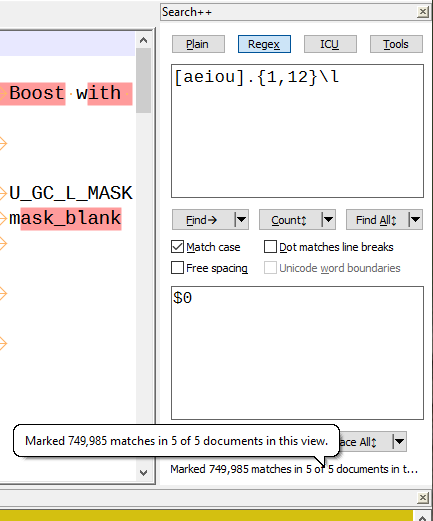
Now, is this a bug or I did not understand the logic ?
=> No message and no matches ??
That is a bug. It should work the same as Mark Before and Mark After. Thank you for catching and reporting it. I’ll fix it.
Now, @coises, to my mind, it would be interesting to change the layout, below :
[…]
In addition, this would give some more default values available for theSelect,MarkandShowoptions ! What are your thoughts on this ?I’m concerned about increasing the minimum size of the dialog and about making it too busy/cluttered. I won’t say I won’t consider it, but… I’m hesitant. It could be an option to add extra buttons, I suppose — the plugin already manages three layouts (horizontal, vertical and wide, the latter being for docking at the top or bottom), I suppose it could manage six (each existing layout in either 5-command-button or 8-command-button form). I’m not saying never… but not now.
-Then use the
Tools > Marked text → Selectionsoption=> The
4lines are ALSO selected-
Run a
Ctrl + Caction to put this selection in the clipboard -
Then, run a
Ctrl + Vaction => The clipboard wrongly contains the stringABCDE
After clicking on a button in a dialog, keyboard focus is on the button. (That’s standard Windows behavior, which I have not attempted to change in this case.) Your Ctrl+C went to the button. You needed to return focus to the document (e.g., Ctrl+N) before you could copy the selection.
I admit this focus thing is an annoyance, but I think it would get even more confusing if I overrode Windows standard behavior in a dozen special cases by putting the focus where I think the user will want it next. (I did it with Select commands, but I’m not even sure that’s a good idea. How many exceptions to normal Windows behavior should I expect users to remember? At what point does keeping track of all the exceptions become more difficult than just keeping track of the focus?)
Unfortunately, a
Ctrl + Shift+ 0action does not move to the previous marked text :-(( Could you confirm, @coises ?I can confirm, and I also see that the same thing happens with text marked using the Mark tab of the built-in search dialog. Search | Jump Up | Find Mark Style does work, but the Ctrl+Shift+0 shortcut does not.
If I change the shortcut to Ctrl+Shift+M, it works. Further testing suggests that Ctrl+Shift+0 does not work as a shortcut when assigned to any command. I haven’t yet checked to see if this is a known issue, or whether it persists without any plugins.
In the
Toolsmenu, I noticed that theUnmark All Textbutton ONLY clears hhe marked text which is presently defined in theSettingsdialogSo, you could, either :
-
Add a color to identify which marked text will be cleared
-
Simply clears any marked text whatever its style
-
Change the single option :
I see your point. The wording suggests that it will remove all marks of any kind, not just the mark style Search++ is using.
Notepad++ treats Find Mark Style differently than the other styles; Search | Clear Styles | Clear all Styles clears styles 1-5, but not the Find Mark Style. (The only way I know to clear that in native Notepad++ is in the Mark dialog.) So there isn’t true Clear All Styles already. (Beyond that, I might add a custom style, like Columns++ uses; I haven’t decided yet if that would be advantageous — having something that doesn’t overlap with anything Notepad++ uses — or just an unnecessary complication.)
I’m pretty sure I will want to stay with the notion that the normal way to use Search++ will be to pick a mark style and stick with it, so any time Search++ refers to a “mark” it means “a mark in the style selected in the settings dialog.” So I don’t really want to introduce any options that break that model by affecting styles other than the one selected.
-
-
In regards to:
Further testing suggests that Ctrl+Shift+0 does not work as a shortcut when assigned to any command. I haven’t yet checked to see if this is a known issue
Maybe see this:
https://community.notepad-plus-plus.org/post/90173
or some of the other postings about Ctrl+Shift+0 in that topic. -
@Alan-Kilborn said in Search++: A work in progress:
In regards to:
Further testing suggests that Ctrl+Shift+0 does not work as a shortcut when assigned to any command. I haven’t yet checked to see if this is a known issue
Maybe see this:
https://community.notepad-plus-plus.org/post/90173
or some of the other postings about Ctrl+Shift+0 in that topic.Thank you, Alan. Good that someone still has memory cells working. (@guy038 and I were both in that discussion, and it seems neither of us remembered.)
Similar to what it sounds like happened to Guy in that thread, I attempted to reset all shortcuts for keyboard languages to None even though they already were all None, except for the last one, which had Ctrl+Space associated with something to do with IME and Chinese (probably came about when I was testing Columns++ search in double byte character sets). I changed it to None (repeatedly), but it changed itself back as soon as I OK’d the change.
None-the-less, even though no visible setting has changed, now Ctrl+Shift+0 works. No rhyme or reason to this corner of Windows, it seems. :-(
-
Hi, @alan-kilborn, @coises and All,
Many thanks @alan-kilborn, for solving the
Ctrl + Shift + 0not working at all ;-)) I completely forgot this old post. Like @coises, I confirm that your memory cells are working perfectly !So, certainly, on my
Windows 10laptop, with your precious advice, I was able to solve this bug, inOctober 2023. But, it happens that I migrated my laptop toWindows 11, at the end ofOctober 2025. And I supposed that this migration reset a lot of parameters, whose this one !Thank you again for helping us find the right post !
Best Regards,
guy038





Hello! It looks like you're interested in this conversation, but you don't have an account yet.
Getting fed up of having to scroll through the same posts each visit? When you register for an account, you'll always come back to exactly where you were before, and choose to be notified of new replies (either via email, or push notification). You'll also be able to save bookmarks and upvote posts to show your appreciation to other community members.
With your input, this post could be even better 💗
Register Login