Very small problem
-
There is a minor problem that only appears in the case of text in Cyrillic. For example, if you take Cyrillic text, where “Simple text” is selected by default and switch to another language (probably any language except MS-DOS Style) and select “Simple text” again, the text will return to its original form.
If you select “MS-DOS Style” and then “Plain Text”, then the original view can only be obtained by closing the file and opening it again.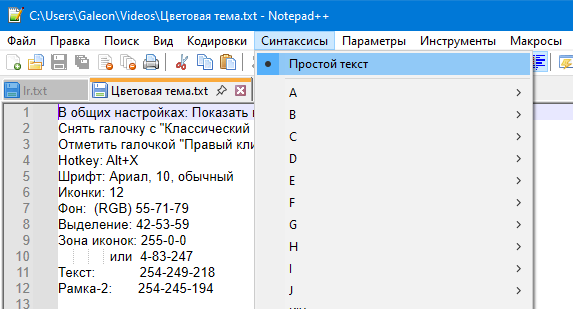
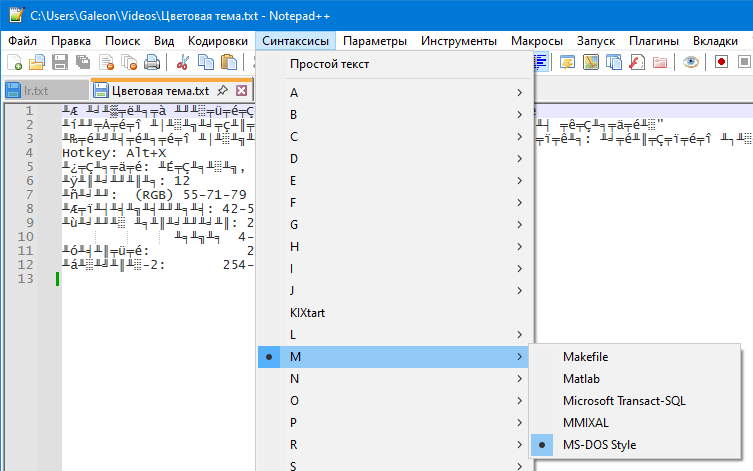
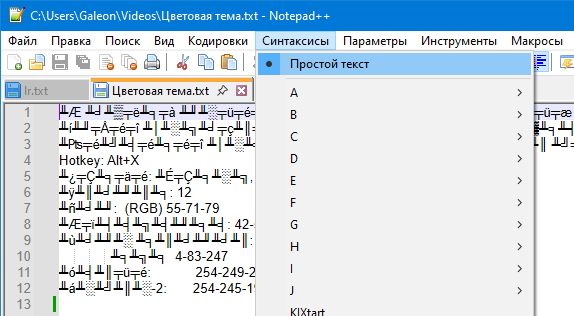
Only after closing the file and opening it again, we get the view as in screenshot 01 (initial view).
-
@Uwo222777 said in Very small problem:
If you select “MS-DOS Style”
MS-DOS style has magic associated with it, part of which deals with encoding.
Which version of Notepad++ are you using (? > Debug Info)? And what’s the encoding of the file before and after your procedure (shown in the bottom right of the status bar)?
Hmm… the manual’s “MS-DOS Style” notes may be out of date: it only mentions the OEM-US version; I believe that v8.7.4 changed that default to Unicode instead of OEM-US, but I’d have to experiment to be sure… I don’t have time to work on that today, but it’s on my TODO list now.
-
@PeterJones
Initially encoding is UTF-8
In screenshots 02 and 03 it remains OEM-US, but after re-opening the file it is UTF-8. Then everything is fine. -
@Uwo222777
Sorry, I forgot to say about the version - 8.9.4 -
@Uwo222777
Of course, the program itself should return the encoding to its original form, but… it doesn’t do this.

Hello! It looks like you're interested in this conversation, but you don't have an account yet.
Getting fed up of having to scroll through the same posts each visit? When you register for an account, you'll always come back to exactly where you were before, and choose to be notified of new replies (either via email, or push notification). You'll also be able to save bookmarks and upvote posts to show your appreciation to other community members.
With your input, this post could be even better 💗
Register Login