Notepad++ release 8.9.5
-
Notepad++ v8.9.5 regression fixes, bug-fixes & new improvements:
Fix updating issue where using v8.9.4 32-bits installer creates duplicate “Uninstall a program” entries. (Fix #17979 )
looks like this regression is fixed for 32bit on x64 OS but i see issue on x86 OS. the registry doesn’t get updated and stays on previous version
-
looks like this regression is fixed for 32bit on x64 OS but i see issue on x86 OS. the registry doesn’t get updated and stays on previous version
Could you provide more detailled info please?
-
@donho
I have one older 32-bit WinOS ready for the test - the installed N++ version info isn’t properly updated on 32-bit Windows (for the test, I upgraded from the v8.9.3 to v8.9.5 on a 32-bit Windows):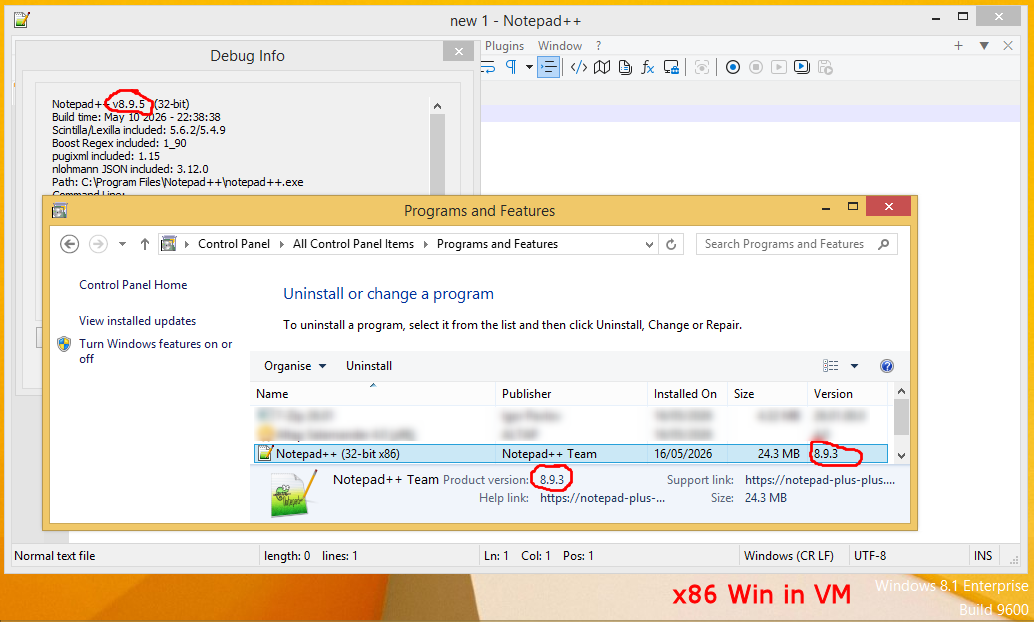
-
@xomx
Thank you for your test.
How about for v8.9.4?
If there’s no issue for v8.9.4, then we can narrow down to conclude the regression comes from v8.9.5. -
-
@Long-Pham @xomx
Could you test the signed installer here:
https://github.com/donho/notepad-plus-plus/releases/tag/TEST -
@xomx
Did you test, what happens if you don’t upgrade, but just do fresh install? -
Could you test the signed installer here:
https://github.com/donho/notepad-plus-plus/releases/tag/TESTTested - ok.
what happens if you don’t upgrade, but just do fresh install?
v8.9.4 & v8.9.5 - no N++ record at all in the Windows installed SW list, had to manually launch the C:\Program Files\Notepad++\uninstall.exe
Fixed version above - ok.
Edit:
I’m not sure with this but maybe it did also something weird/unwanted in WinOS with the NppShell registration - it could not be removed/deleted at all, even after a full Win reboot. So I had N++ uninstalled, Win rebooted but the C:\Program Files\Notepad++\contextMenu\NppShell.dll was still there and locked (it was loaded in the Explorer shell process, even if there was no visible records of such a shell extension like in the NirSoft ShellExView, had to manually unload that dll from the Explorer process, then finally deleted it). -
I’m not sure with this but maybe it did also something weird/unwanted in WinOS with the NppShell registration - it could not be removed/deleted at all, even after a full Win reboot. So I had N++ uninstalled, Win rebooted but the C:\Program Files\Notepad++\contextMenu\NppShell.dll was still there and locked (it was loaded in the Explorer shell process, even if there was no visible records of such a shell extension like in the NirSoft ShellExView, had to manually unload that dll from the Explorer process, then finally deleted it).
Are you talking always about the 32-bits installer?
-
Are you talking always about the 32-bits installer?
Yes, only about this 32-bit installer test in my 32-bit Windows VM. I had to launch there the uninstaller manually (due to the test for @markusbodensee), so it happened I noticed the NppShell leftover file after the N++ uninstallation. It was unexpected, as I did not use the N++ shell context menu at all, so it shouldn’t be loaded into Explorer. Still, it couldn’t be deleted, even right after the Win restart. I had to launch an advanced task manager, manually unload the NppShell.dll module from the Explorer shell process and only then I was able to delete the file.
Even with your latest test-installer, the NppShell leftover is still there after the N++ uninstallation and (normally) undeletable even after Win restart. I don’t see any such problem on my usual x64 Win11 with x64 N++.



Hello! It looks like you're interested in this conversation, but you don't have an account yet.
Getting fed up of having to scroll through the same posts each visit? When you register for an account, you'll always come back to exactly where you were before, and choose to be notified of new replies (either via email, or push notification). You'll also be able to save bookmarks and upvote posts to show your appreciation to other community members.
With your input, this post could be even better 💗
Register Login