Notepad++ release 8.9.6.1
-
Notepad++ release 8.9.6.1 is available:
https://notepad-plus-plus.org/news/v8961-released/
Notepad++ v8.9.6.1 vulnerability fixes:
- Fix bad formed COPYDATASTRUCT makes Notepad++ crash (CVE-2026-48770).
- Fix arbitrary code execution vulnerability via config.xml (CVE-2026-48778).
- Fix arbitrary code execution vulnerability via shortcuts.xml (CVE-2026-48778).
Notepad++ v8.9.6. regression fixes, bug-fixes:
- Fix vulnerability (CVE-2026-46710) of v8.9.4 & v8.9.5 installer. (Implement commit)
- Fix x86 installer regression of not showing installation entry in “Unstall a program” of Control Panel. (Fix community discussion)
- Fix x86 installer regression where context menu not installed or uninstalled correctly. (Fix community discussion)
- Fix UAC prompt display regression (“Notepad++ installer” instead of “Notepad++”) for Notepad++ v8.9.5. (Fix GitHub comment)
- Fix incorrect bevaviour when saving dirty read-only files. (Fix #17956)
- Fix regression where saving a UDL file removed XML declaration. (Fix GitHub comment)
Notepad++ v8.9.5 regression fixes, bug-fixes & new improvements:
- Fix updating issue where using v8.9.4 32-bits installer creates duplicate “Uninstall a program” entries. (Fix #17979)
- Fix v8.9.4 64-bits installer error message caused by MSIX on Win10. (Fix installer regression)
- Fix regression in UDL xml file EOL parsing issue. (Fix #18022)
- Update Scintilla to 5.6.2 & Lexilla to 5.4.9. (Implement #18011)
- Add option to synchronize zoom level across views. (Fix #17862)
- Fix MSI installer writting language info to HKCU instead of HKLM. (Fix MSI issue)
- Fix imported UDLs not appearing in the language menu without restarting Notepad++. (Fix #17909)
- Make “(?)” tooltip in preferences & Find in Files dialogs persitant & reduce display delay. (Fix #17995, #16961)
- Fix visual glitch in Mark dialog when in reduced mode. (Fix #17983)
Notepad++ v8.9.4 crash-fixexs, bug-fixes & new improvements:
- Fix crashes in FindInFiles when nativeLang.xml’s “find-result-hits” contains “%s”. (Fix #17960, CVE-2026-3008, CVE-2026-6539)
- Fix drop-file crash when file path length reaches 259 characters. (Fix #17921)
- Fix crash caused by undoing column editor bad input in virtual space. (Fix #17915)
- Fix bad column editor input in reverse-direction column selection on virtual space. (Fix #17915)
- Update to Scintilla 5.6.1 & Lexilla 5.4.8. (Fix #17920, #17864, #13522, #11746)
- Fix EOL conversion to Windows format not working (Scintilla update related). (Fix #17920)
- Fix rendering corruption in .bat files (Lexilla update related). (Fix #17864)
- Fix quote escaping causing incorrect JSON syntax highlighting (Lexilla update related). (Fix #11746, #13522)
- Fix MSI installation error due to context menu item registration. (Fix #17918)
- Fix NSIS installation stalling caused by context menu registration issue. (Fix #17308, #17885)
- Add NPP_LANG property to install a specific localization file for MSI. (Fix issue reported in comment)
- Fix MSI installer display random Hexadecimal number as name on UAC. (Fix #17967)
- Add version info into MSI file property (as value of “Comments”). (Fix #17803)
- Fix minimized window not restoring in administrator mode. (Fix #17945)
- Fix Unicode search mismatching ANSI character ‘?’. (Fix #17125)
- Fix Column Editor regression with empty fields. (Fix #17912)
- Fix floating dialog content not displaying in certain situations. (Fix #17563)
- Fix visual glitch when toggling group view in Document List. (Fix #14285)
- Support improved C++ 11 raw string literal handling. (Fix #17875)
- Fix visual glitch in the Mark dialog. (Fix #16084, #17886)
For security reason, this version was released in a rush, without nofifying the community.
-
From what I can tell, based on quick experiments, deriving implications to what @donho said and the commits that fix those CVE:
- Fix arbitrary code execution vulnerability via config.xml
<GUIConfig name="commandLineInterpreter">"C:\path\with spaces\to\cli.exe"</GUIConfig>in config.xml will no longer do anything- instead, there is a “open into PowerShell” alongside all the menus that have “open into cmd” (or similar phrasing for that command in the various menus and context menus)
- Fix arbitrary code execution vulnerability via shortcuts.xml
- Any shortcuts that start with
http:will be flagged, and you will be prompted to confirm every time. - Any shortcuts that resolve to an executable location outside of the trusted locations (whether by relying on PATH, or by harcoding the path to the executable), will warn you every time you try to run that command. (Trusted locations include
Program FilesorProgram Files (x86)orwindows\system32orwindows\directories).
:-(
I think the remediation to this one takes things too far. Not all compilers, interpreters, and helper programs live in the Program Files or Windows hiearchies (I personally have another location where I often install such things). And now you are going to ask me to confirm I want to run my external application every single time I try to run it, with no way to say “always allow” to that dialog. This will cause a major headache for anyone who, like me, intentionally runs things that don’t live in
Program Files. That will not result in increased security: that will result in driving users away from Notepad++ if they can no longer use the automation features of the application.For example, Strawberry Perl, the primary Perl interpreter installation for Windows, installs into
c:\strawberryby default, and parts of its toolchain have problems if you install into a directory likec:\program files\with spaces in the filename; there are lots of engineering tools I have used that have problems with spaces in the path as well; and since I also use the gcc that comes with Strawberry Perl, that means that both my Perl interpreter and my C/C++ compiler that I use from Notepad++ will ask me to confirm every time. I’m really not sure that’s a usable workflow for me. Am I not going to ever be able to upgrade beyond Notepad++ v8.9.6? If not, that will be unfortunate. -
Note:
For fixing arbitrary code execution vulnerability viaconfig.xml, “commandLineInterpreter” was removed, but “PowerShell here” command has been added, so I don’t think it’ll be an issue, though users who use “commandLineInterpreter” should be notified.
However, we might have some complains for fixing arbitrary code execution vulnerability viashortcuts.xml, due to the security warning, if the binary is not located under one of the fowing loctions:- C:\Program Files,
- C:\Program Files (x86)
- C:\Windows\System32
- C:\Windows
Unfortunately, I haven’t yet found a way to store the definate “Never show the confirmation dialog” safely. Please let me know if anyone here has some ideas.
-
:-(
How about an empty supressRunAlertDialog.xml besides of notepad++exe to suppress the warning dialog?
-
When installing the latest version (8.9.6.1) I get the following error which I’ve never seen before:
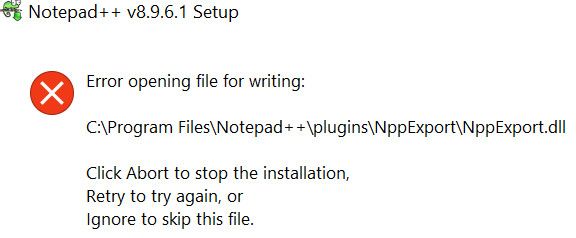
Does anybody have a clue about this?
-
@fml2
Which installer did you use? -
@donho The one I downloaded from the official web site https://notepad-plus-plus.org/downloads/v8.9.6.1/ (64 bit).


Hello! It looks like you're interested in this conversation, but you don't have an account yet.
Getting fed up of having to scroll through the same posts each visit? When you register for an account, you'll always come back to exactly where you were before, and choose to be notified of new replies (either via email, or push notification). You'll also be able to save bookmarks and upvote posts to show your appreciation to other community members.
With your input, this post could be even better 💗
Register Login