Notepad++ Release Candidate v8.9.8.1
-
@donho
I still have the “Edit with Notepad++” context menu after this RC installation.After running “C:\Program Files\Notepad++\contextMenu>regsvr32 /i NppShell.dll”:
This is a wrong switch use,
/iis not intended for the NppShell, should be onlyregsvr32 NppShell.dll.But I see that there is a significant change in the NppShell.dll export table:
previous v8.9.8:
Ordinal   Entry Point   Name
      2   0x0000E690    CleanupDll
      3   0x000055A0    DllCanUnloadNow
      4   0x000055B0    DllGetClassObject
      5   0x00005500    DllMain
      6   0x00005520    DllRegisterServer
      7   0x00005530    DllUnregisterServer
      1   0x00005520    RegisterDll
RC:
Ordinal Entry Point Name 1 0x0000E680 CleanupDll 2 0x00005590 DllCanUnloadNow 3 0x000055A0 DllGetClassObject 4 0x000054F0 DllMain 5 0x00005510 DllRegisterServer 6 0x00005520 DllUnregisterServer -
Thank you @snabel42 @xomx for checking.
This is a wrong switch use, /i is not intended for the NppShell, should be only regsvr32 NppShell.dll.
Yes indeed, it’s better without
/i.But I see that there is a significant change in the NppShell.dll export table:
I just changed the build machine, re-installed VS Studio Community edition from scratch, and re-compiled all the binaries of v8.9.8.1 RC.
From your table, I see
RegisterDllentry is missing.
I’ll update my VSStudio and re-build NppShell.dll to improve it. -
This is a wrong switch use, /i is not intended for the NppShell, should be only regsvr32 NppShell.dll.Yes indeed, it’s better without /i.
/iis for inproc DLL servers having specific DllInstall exported func. That’s why you got that error msg saying that the DLLInstall entry-point was not found, as the NppShell.dll is not designed to use that func.I just changed the build machine, re-installed VS Studio Community edition from scratch,
Do you have any idea what happened there?
-
-
Here’s the old build machine’s state, and it explains why:
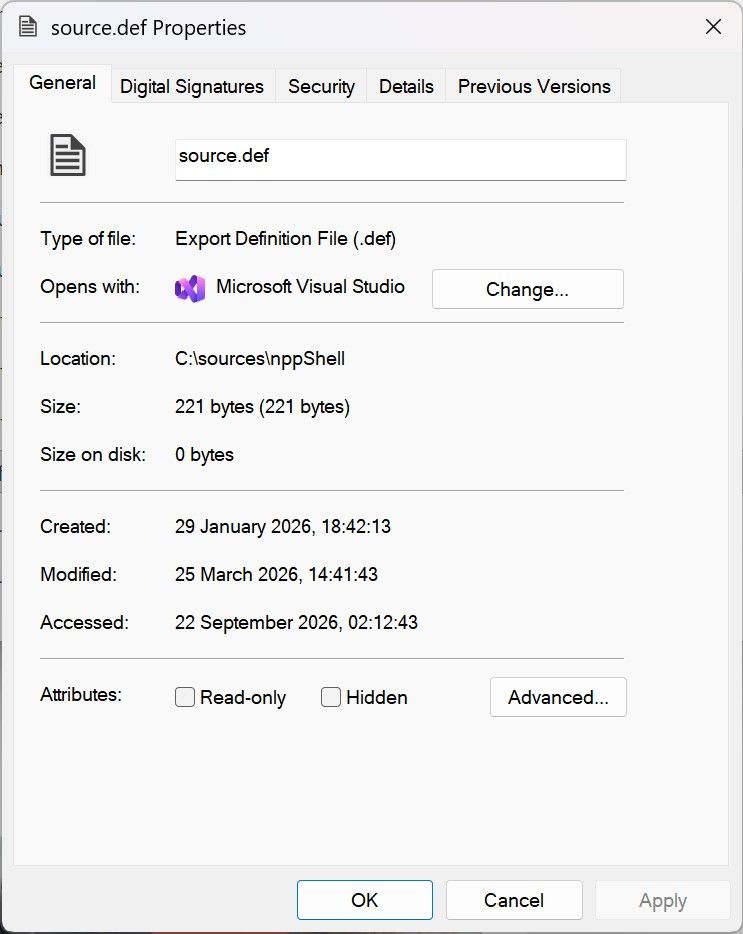
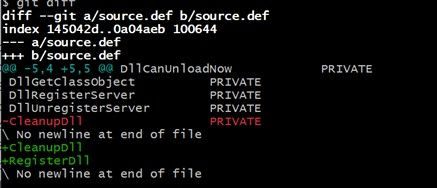
However, though I know that it was me who did this modification, I don’t remember why.
-
Note that I noticed a crash of this RC while I typed “Notepad++” after canceling the save of change.log on “C:\Program Files\Notepad++”. However, I can no more reproduce it.
If you guys can reproduce the crash steadily, please report it here.This problem has been fixed in the latest master, thanks to @donho .
-
Tried the RC this morning. I also don’t see the “Edit with Notepad++” right-click entry after install. Ran the regsvr32 command and hit that exact same DllInstall not found error. Win11 24H2 here.
-
Tried the RC this morning. I also don’t see the “Edit with Notepad++” right-click entry after install. Ran the regsvr32 command and hit that exact same DllInstall not found error. Win11 24H2 here.
Before installing v8.9.8.1 RC, did you uninstall the old version of Notepad++, or you just install RC on a PC without any Notepad++ installation?
Which installer did you use?
-
FYI:
Notepad++ Release Candidate v8.9.8.1 is updated to RC2:
https://github.com/donho/notepad-plus-plus/releases/tag/RC2 -
@donho Typo: “7 Fix Netork Path Warning dialog usability problem.” --> Network

Hello! It looks like you're interested in this conversation, but you don't have an account yet.
Getting fed up of having to scroll through the same posts each visit? When you register for an account, you'll always come back to exactly where you were before, and choose to be notified of new replies (either via email, or push notification). You'll also be able to save bookmarks and upvote posts to show your appreciation to other community members.
With your input, this post could be even better 💗
Register Login