Notepad++ Release Candidate v8.9.8.1
-
Notepad++ Release Candidate v8.9.8.1 is available here:
https://github.com/donho/notepad-plus-plus/releases/tag/ReleaseCandidateChange log:
- Vulnerability: Fix crash caused by “Open file” & “Search on Internet” commands. CVE ID not assigned yet
- Vulnerability: Fix Function List array out-of-bounds risks when parsing functions. CVE ID not assigned yet
- Vulnerability: Fix UAC operations performed without verifying the caller. CVE ID not assigned yet
- Vulnerability: Fix incomplete UNC detection allowing NTLM leak bypass. CVE ID not assigned yet
- Regression: Fix failure to open files via Notepad++ symlink paths. (Fix #18314)
- Fix symlinks setting for Folder as Workspace not remembered across sessions. (Fix #18367)
- Fix continous validation of the same server when loading network path files. (Fix #18319)
- Fix UDL line comments not being correctely detected. (Fix #9193, #18141)
- Fix Unicode text alternation in clipboard by Notepad++ encoding conversion. (Fix #18356)
- Fix incorrect paste behaviour in column mode. (Fix #18355)
- Fix visual glitch in the UDL dialog when main window uses vertical tabs. (Fix #18335)
- Fix GDI leaks of tab context menu. (Fix #18297)
- Fix inaccurate display information in PluginAdmin “Updates” tab. (Fix #18312)
Note that I noticed a crash of this RC while I typed “Notepad++” after canceling the save of change.log on "C:\Program Files\Notepad++". However, I can no more reproduce it.
If you guys can reproduce the crash steadily, please report it here. -
P PeterJones referenced this topic
-
If you guys can reproduce the crash steadily
I cannot steadily reproduce, got it only once (it’s a FASTFAIL exit, disassembly at the fault offset: 000000014041592D int 29h … RtlFailFast)
Event Name: BEX64 Faulting module name: Notepad++.exe, version: 8.9.8.1, time stamp: 0x6aab2c3b Exception code: 0xc0000409 Fault offset: 0x000000000041592d -
There’s no “Edit with Notepad++” context menu after installation.
Can anyone confirm it?Note:
After running “C:\Program Files\Notepad++\contextMenu>regsvr32 /i NppShell.dll”: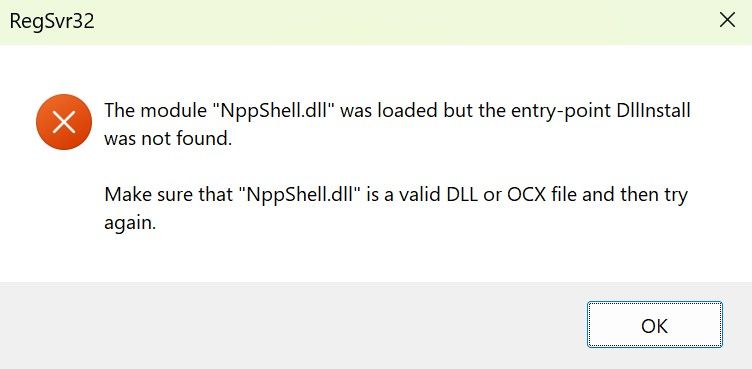
-
@donho I still have “Edit with Notepad++” after updating existing installation with npp.8.9.8.1.Installer.x64.exe
Notepad++ v8.9.8.1 (64-bit)
Build time: Sep 17 2026 - 01:53:48
Scintilla/Lexilla included: 5.6.6/5.5.3
Boost Regex included: 1_90
pugixml included: 1.16
nlohmann JSON included: 3.12.0
Path: C:\Program Files\Notepad++\notepad++.exe
Command Line: “C:\Users\username\Downloads\updated-event.ics”
Admin mode: OFF
Local Conf mode: OFF
Cloud Config: OFF
WinGUp: present
disableNppAutoUpdate.xml: absent
Periodic Backup: ON
Placeholders: ON
Scintilla Rendering Mode: SC_TECHNOLOGY_DIRECTWRITE (1)
Multi-instance Mode: monoInst
asNotepad: OFF
File Status Auto-Detection: cdEnabledNew (for current file/tab only)
Dark Mode: ON
Display Info:
primary monitor: 2560x1440, scaling 100%
visible monitors count: 2
installed Display Class adapters:
0000: Description - NVIDIA GeForce RTX 3080
0000: DriverVersion - 32.0.16.1692
OS Name: Windows 11 Home (64-bit)
OS Version: 25H2
OS Build: 26200.9457
Current ANSI codepage: 1252
Plugins:
CollectionInterface (1.3)
ColumnsPlusPlus (1.3.3)
ComparePlus (3)
CSVLint (0.4.9)
CsvQuery (1.2.9)
FWDataViz (2.6.7)
HTMLTag (1.6.1)
HugeFiles (0.4.1)
JsonTools (8.5)
mimeTools (3.1)
MultiReplace (6.1.0.37)
NppConverter (4.7)
NppExport (0.4)
NppXmlTreeviewPlugin (2)
PythonScript (2.1)
Search++ (0.6.5)
XMLTools (3.1.1.13) -
@donho
I still have the “Edit with Notepad++” context menu after this RC installation.After running “C:\Program Files\Notepad++\contextMenu>regsvr32 /i NppShell.dll”:
This is a wrong switch use,
/iis not intended for the NppShell, should be onlyregsvr32 NppShell.dll.But I see that there is a significant change in the NppShell.dll export table:
previous v8.9.8:
Ordinal   Entry Point   Name
      2   0x0000E690    CleanupDll
      3   0x000055A0    DllCanUnloadNow
      4   0x000055B0    DllGetClassObject
      5   0x00005500    DllMain
      6   0x00005520    DllRegisterServer
      7   0x00005530    DllUnregisterServer
      1   0x00005520    RegisterDll
RC:
Ordinal Entry Point Name 1 0x0000E680 CleanupDll 2 0x00005590 DllCanUnloadNow 3 0x000055A0 DllGetClassObject 4 0x000054F0 DllMain 5 0x00005510 DllRegisterServer 6 0x00005520 DllUnregisterServer -
Thank you @snabel42 @xomx for checking.
This is a wrong switch use, /i is not intended for the NppShell, should be only regsvr32 NppShell.dll.
Yes indeed, it’s better without
/i.But I see that there is a significant change in the NppShell.dll export table:
I just changed the build machine, re-installed VS Studio Community edition from scratch, and re-compiled all the binaries of v8.9.8.1 RC.
From your table, I see
RegisterDllentry is missing.
I’ll update my VSStudio and re-build NppShell.dll to improve it. -
This is a wrong switch use, /i is not intended for the NppShell, should be only regsvr32 NppShell.dll.Yes indeed, it’s better without /i.
/iis for inproc DLL servers having specific DllInstall exported func. That’s why you got that error msg saying that the DLLInstall entry-point was not found, as the NppShell.dll is not designed to use that func.I just changed the build machine, re-installed VS Studio Community edition from scratch,
Do you have any idea what happened there?


Hello! It looks like you're interested in this conversation, but you don't have an account yet.
Getting fed up of having to scroll through the same posts each visit? When you register for an account, you'll always come back to exactly where you were before, and choose to be notified of new replies (either via email, or push notification). You'll also be able to save bookmarks and upvote posts to show your appreciation to other community members.
With your input, this post could be even better 💗
Register Login