Notepad++ release 8.9.9
-
Notepad++ release 8.9.9 is available:
https://notepad-plus-plus.org/news/v899-released/
Notepad++ v8.9.9 vulnerability fixes, new features & bug-fixes:
- Vulnerability: Fix WM_COPYDATA sender authentication bypass. CVE ID not assigned yet
- Vulnerability: Fix WM_COPYDATA privilege escalation allowing launch plugin commands execution. CVE ID not assigned yet
- Vulnerability: Fix heap disclosure. CVE ID not assigned yet
- Vulnerability: Fix TOCTOU risk when saving temp file under UAC. CVE ID not assigned yet
- Vulnerability: Fix out-of-bounds array access via NPPM_MENUCOMMAND. CVE ID not assigned yet
- Vulnerability: Fix heap buffer overflow in SAML decode of MIME Tools plugin. CVE ID not assigned yet
- Update to Scintilla 5.6.9 & Lexilla 5.5.5. (Implement #18595)
- Update to boost 1.92.0. (Implement #18536)
- Improve Find in Files performance. (Fix #15248, #13730)
- Add an option to change dialog font & font size. (Fix #5648, #9914, #10745, #17183)
- Add an option to display the Incremental Search bar at the top. (Fix #18486)
- Remember incremental Search options across sessions. (Fix #18484)
- Enhance the Cliboard history panel UI. (Implement #18531, #18559)
- Fix files not opening via “Edit with Notepad++” when app path use 8.3 path format. (Fix #18530, report)
- Fix space dots ignore display scaling. (Fix #18589)
- Fix Document Switcher persistence issues. (Fix #10574, #10950)
- Fix loss of editor focus when dismissing the Document Switcher with Ctrl+Esc. (report)
- Fix Clipboard History buffer over-read & truncation of UTF-16 surrogate pairs. (Fix #18519, #report)
- Fix auto-completion & call tip persist issue when moving/resizing window. (Fix #18581)
- Fix the current doc hidden due to missing auto-scroll in Windows dialog listview. (Fix report)
- Fix incomplete repainting of Windows dialog list after resizing then sorting. (Fix #16267)
- Fix the ESC key not closing Windows dialog after a document is closed. (Fix #18554)
- Add UDL as a selectable default language for new documents. (Fix #979, #11097, #18325)
- Fix UDL dialog edits scrolling the wrapped document down. (Fix #18105)
- Detect external file modifications in both views instead of only the active view. (Fix #7581)
- Add Structured Text language support. (Fix #18365)
- Fix several memory leaks. (Fixed by #18466, #18467, #18465, #18473, #18482, #18512, #18535)
- Fix Markdown UDL link highlighting being broken by ‘@’ in the URL. (Fix #18009)
- Fix Find-in-Files macro playback ignoring empty filters. (Fix #8170)
- Fix Count and Mark All ignoring zero-length regex matches. (Fix #7896)
- Fix bugs in Function List for C, TypeScript, INI, PowerShell & Bash. (Fix #10162, #18358, #18574, #18174)
- Fix the “inherit” flag for FG/BG not being cleared in Style Configurator. (Fix #14197)
- Set new UDL to use theme FG, transparent BG, no bold/italic/underline by default. (Fix #18387, #5622, #17054)
- Fix spurious NPPN_READONLYCHANGED notification when files are deleted. (Fix #16289)
- Fix call-tip parameter highlighting being confused by commas in string literals. (Fix #8650)
- Fix missing warning display when deleting files from Notepad++ on Windows 7. (Fix report)
- Unify internal list views highlight style. (Fix #18563)
- Update Python & R keyword lists. (Fix #18464, #18445)
Auto-updater will be triggered in about 1 week, if no critical issue found in this release.
-
If the Notepad++ window is already open, then the file (ANY) does not open at all through the context menu. If the Notepad++ window is closed, open it through the context menu. This appeared only in this new version; if you take any older version of Notepad++, then such a problem was not observed.
Notepad++ v8.9.9   (64-bit)
Build time: Nov  6 2026 - 16:19:53
Scintilla/Lexilla included: 5.6.9/5.5.5
Boost Regex included: 1_92
pugixml included: 1.16
nlohmann JSON included: 3.12.0
Path: E:\allTools\Editors\Texts\Notepad++\npp.8.9.9.portable.x64\notepad++.exe
Command Line: "C:\Users\Uzzer\Downloads\Professional (NVIDIA RTX  Quadro) .html"
Admin mode: ON
Local Conf mode: ON
Cloud Config: OFF
WinGUp: present
disableNppAutoUpdate.xml: present
Periodic Backup: ON
Placeholders: OFF
Scintilla Rendering Mode: SC_TECHNOLOGY_DIRECTWRITE (1)
Multi-instance Mode: monoInst
asNotepad: OFF
File Status Auto-Detection: cdEnabled4CurrentFile
Dark Mode: OFF
Display Info:
    primary monitor: 1920x1080, scaling 100%
    visible monitors count: 2
    installed Display Class adapters:
        0000: Description - Intel(R) HD Graphics 4000
        0000: DriverVersion - 10.18.10.3345
        0001: Description - NVIDIA Quadro K620
        0001: DriverVersion - 26.21.14.4166
        0002: Description - NVIDIA Quadro FX 580 (Microsoft Corporation - WDDM v1.1)
        0002: DriverVersion - 8.15.11.8593
        0003: Description - Стандартный VGA графический адаптер
        0003: DriverVersion - 6.1.7600.16385
    - warning, search has been limited to maximum number of adapter records: 4
OS Name: Windows 7 Home Premium (64-bit)
OS Build: 7601.0
Current ANSI codepage: 1251
Plugins:
    ComparePlugin (2.0.2)
    DSpellCheck (1.5)
    Explorer (1.9.9)
    HexEditor (0.9.14)
    HTMLTag (1.6.1)
    ImgTag (2.0.1)
    JSMinNPP (25.11.16)
    mimeTools (3.2)
    NppConverter (4.7)
    NppExport (0.4)
    NppMarkdownPanel (0.9.3)
    NppSnippets (1.7)
    PreviewHTML (1.4.8)
    RegexTrainer (1.2)
    ShtirlitzNppPlugin (1.1.2)
    WebEdit (2.9.0.1)
    _CustomizeToolbar (5.3)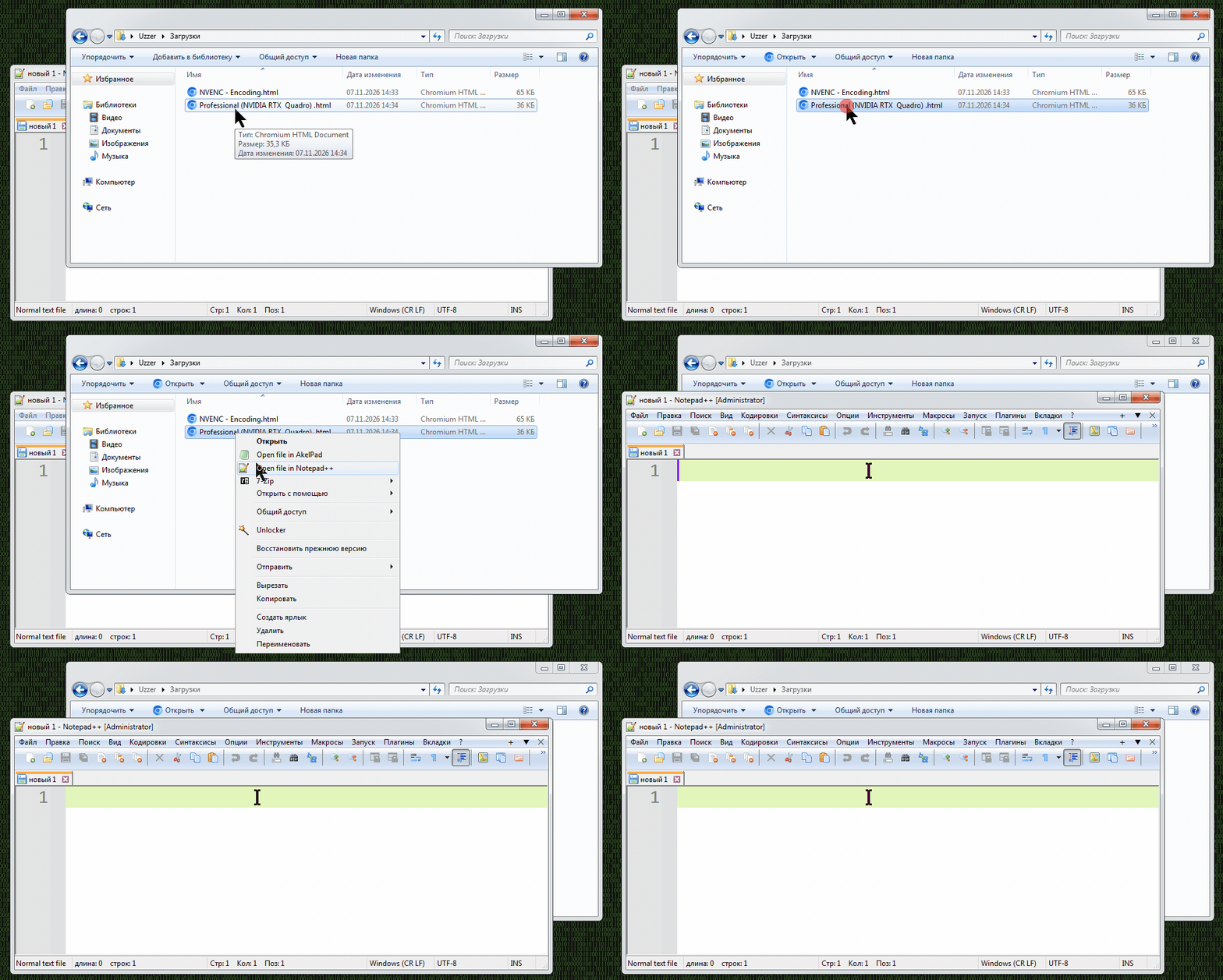
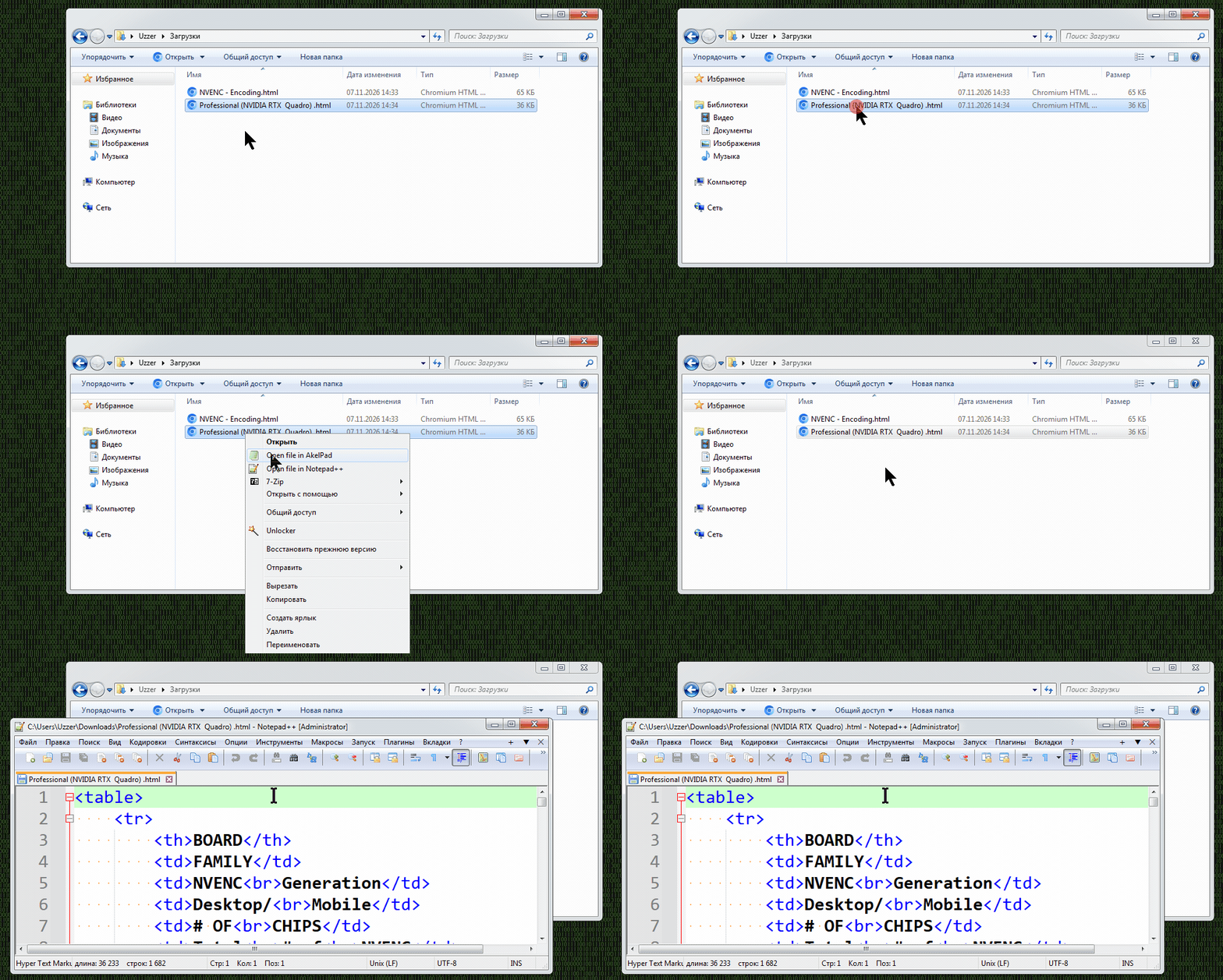
I checked ‘Notepad++ Release Candidate 2 v8.9.9’, and it turned out that this version does not have this problem at all, unlike the final version.
-
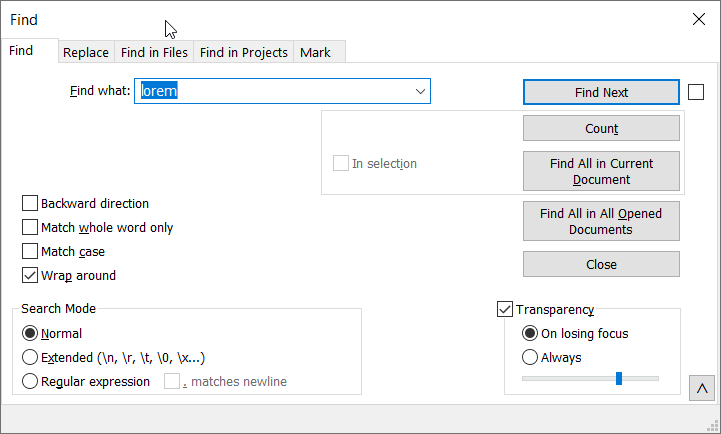
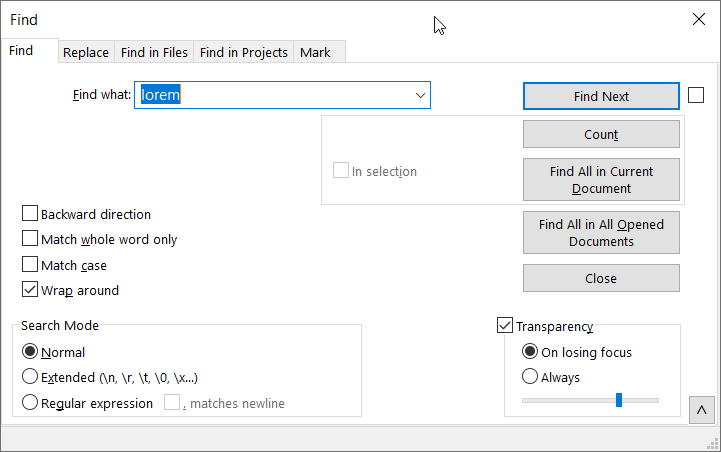
At least in the Find dialog, there is a cosmetic change: A thin, solid black horizontal line now sits just below the “Search Mode” and “Transparency” group boxes. Was the change intentional?
Version 8.9.8.1:
Version 8.9.9:
-
Hello, @peter-fb and All,
I did not notice any change at all, even after modifying the new option in
Settings > Preferences... General > Dialog Font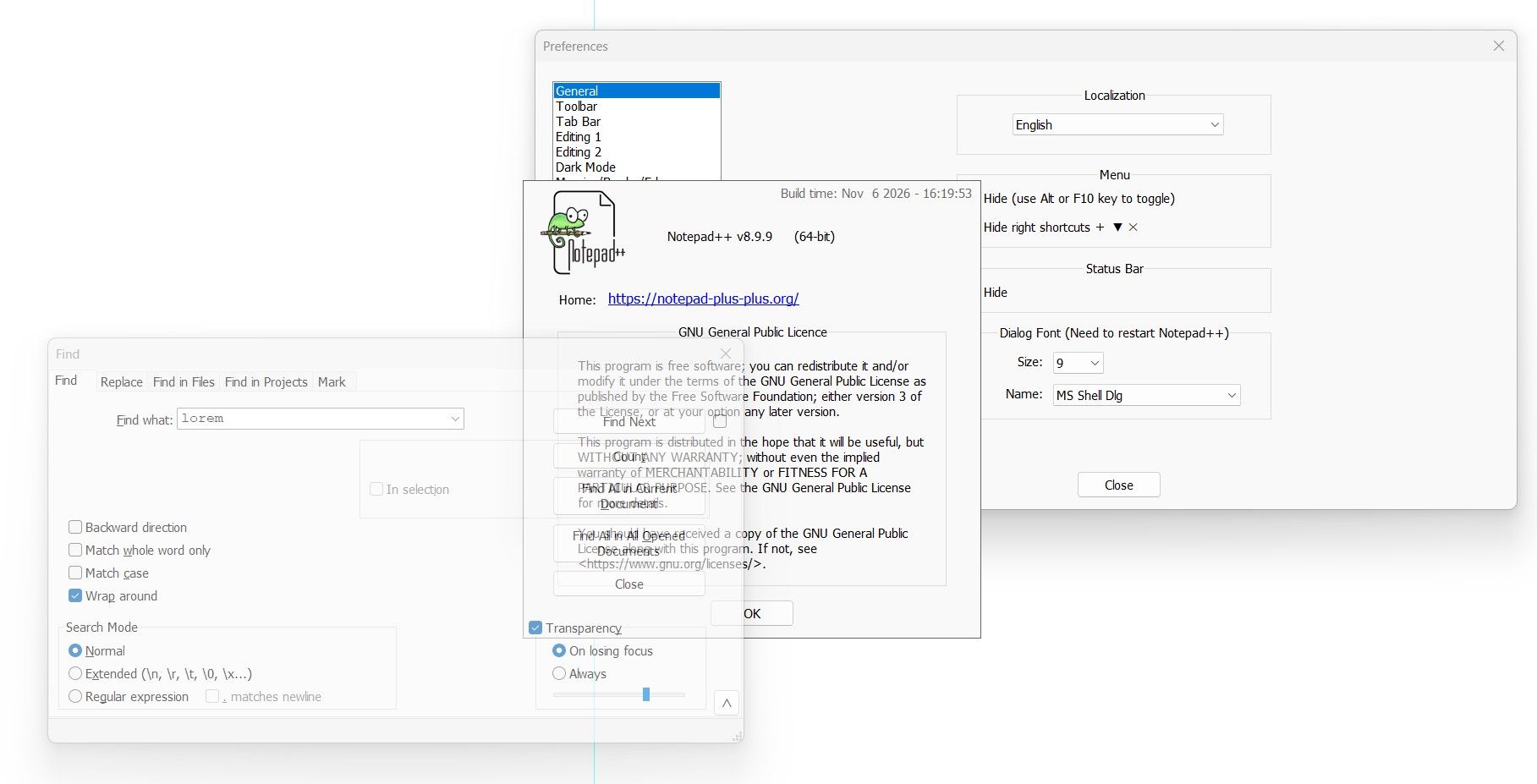
Notepad++ v8.9.9   (64-bit)
Build time: Nov  6 2026 - 16:19:53
Scintilla/Lexilla included: 5.6.9/5.5.5
Boost Regex included: 1_92
pugixml included: 1.16
nlohmann JSON included: 3.12.0
Path: D:\899_x64\notepad++.exe
Command Line:
Admin mode: OFF
Local Conf mode: ON
Cloud Config: OFF
WinGUp: present
disableNppAutoUpdate.xml: present
Periodic Backup: OFF
Placeholders: OFF
Scintilla Rendering Mode: SC_TECHNOLOGY_DIRECTWRITE (1)
Multi-instance Mode: monoInst
asNotepad: OFF
File Status Auto-Detection: cdEnabled4CurrentFile
Dark Mode: OFF
Display Info:
    primary monitor: 1920x1080, scaling 125%
    visible monitors count: 1
    installed Display Class adapters:
        0001: Description - Intel(R) Iris(R) Xe Graphics
        0001: DriverVersion - 32.0.101.7088
OS Name: Windows 11 Pro (64-bit)
OS Version: 25H2
OS Build: 26200.7462
Current ANSI codepage: 1252
Plugins:
    MultiReplace (6.2.0.38)
    Search++ (0.8)
    ColumnsPlusPlus (1.3.3)
    ComparePlus (3)
    Compose (1.1.1)
    NppConverter (4.7)
    NppExport (0.4)
    mimeTools (3.2)
Best Regards,
guy038
-
 G guy038 referenced this topic
-
@guy038 Your Find dialog is transparent, but it seems to look just like mine does in version 8.9.9. The other ones are fine on my side, too.
-
@andrecool-68 ,
If the Notepad++ window is already open, then the file (ANY) does not open at all through the context menu. If the Notepad++ window is closed, open it through the context menu. This appeared only in this new version; if you take any older version of Notepad++, then such a problem was not observed.Are you sure? …{deleted my original answer}see @donho’s answer, below… my memory seems to be wrong; and like Don, when I try to replicate it (rather than going off of memory) with my installed 8.9.9 running in Admin mode, whether I open a protected file or a non-protected file from explorer, Notepad++ opens it just fine. (I was apparently misremembering things)
-
I did not notice any change at all, even after modifying the new option in Settings > Preferences… General > Dialog Font
I am not sure when Notepad++ assigns the font to the various dialogs. It may have already assigned fonts when it created the dialog (maybe even behind the scenes), and not dynamically changed them. If you exit Notepad++ and restart, it should take effect.
When I did:
- Open Notepad++
- Open FIND, take screenshot, close dialog
- Set General > Dialog Font =
Comic Sans MS - Open FIND, it’s still original font
- Exit Notepad++
- Open Notepad++
- Open FIND. it’s Comic Sans MS now, take screenshot
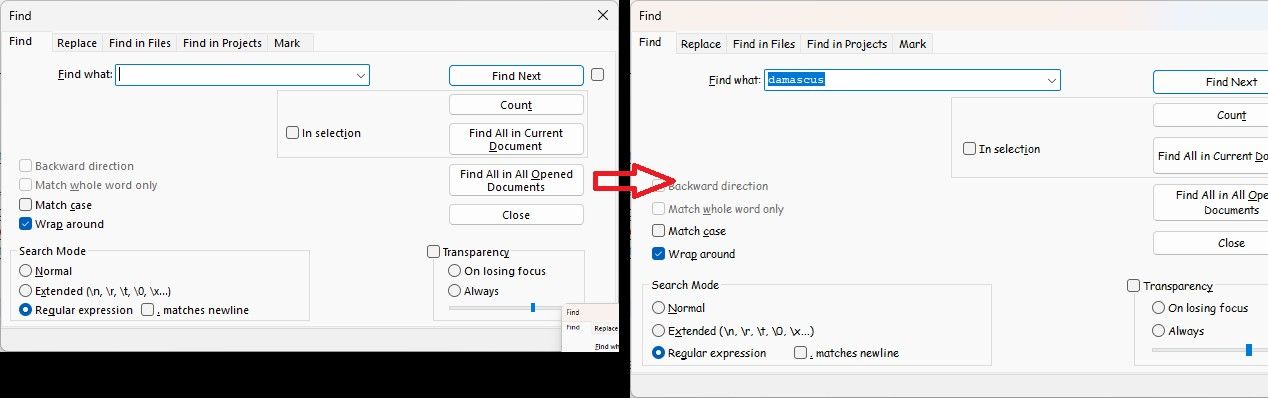
Continuing the procedure:
8. Exit Notepad++
9. Run Notepad++
10. Set General > Dialog Font =Segoi UI
11. FIND => still shows comic sans
12. Exit Notepad++
13. Rerun Notepad++
14. FIND => back to normal UI fontIt appears that, at least for some dialogs, that option requires restarting Notepad++.
-
@andrecool-68 said:
If the Notepad++ window is already open, then the file (ANY) does not open at all through the context menu. If the Notepad++ window is closed, open it through the context menu. This appeared only in this new version; if you take any older version of Notepad++, then such a problem was not observed.
I checked ‘Notepad++ Release Candidate 2 v8.9.9’, and it turned out that this version does not have this problem at all, unlike the final version.Official released Notepad++ v8.9.9 opened in Administrator mode from
C:\Program Files\Notepad++\notepad++.exe,
and I cannot reproduce the bug you reported - File is opened as expected.One thing you should ensure that the opened Notepad++ path should be the one that NppShell.dll points to (Normally
C:\Program Files\Notepad++\notepad++.exe), otherwise the operation will be abandoned for the security reason (harden in v8.9.9). -
The “culprit” is:
https://github.com/notepad-plus-plus/notepad-plus-plus/blame/master/PowerEditor/src/ScintillaComponent/FindReplaceDlg.rc#L93It was introduced at least 16 years ago for being able to use
ALT+yto check/uncheck Transparency checkbox.
So it’s rather a feature, not a bug. -
@donho And it somehow only shows up now with version 8.9.9, not with version 8.9.8.1. Do I understand that correctly?
-
One thing you should ensure that the opened Notepad++ path should be the one that NppShell.dll points to (Normally C:\Program Files\Notepad++\notepad++.exe), otherwise the operation will be abandoned for the security reason (harden in v8.9.9).
I always have the portable version in which there is no NppShell.dll file at all, and for many years I have added Notepad++ via a batch file. These problems only started in the final version.
REM Open file in Notepad++ (Открыть файл в Notepad++) Reg.exe add "HKCR\*\shell\Open file in Notepad++" /v "Icon" /t REG_SZ /d "%~dp0notepad++.exe,0" /f Reg.exe add "HKCR\*\shell\Open file in Notepad++\command" /ve /t REG_SZ /d "\"%~dp0notepad++.exe\" \"%%1\"" /f -
@donho And it somehow only shows up now with version 8.9.9, not with version 8.9.8.1. Do I understand that correctly?
-
@donho, regarding your reply about @peter-fb’s visual difference:
This is the extra / new line that @peter-fb is talking about:
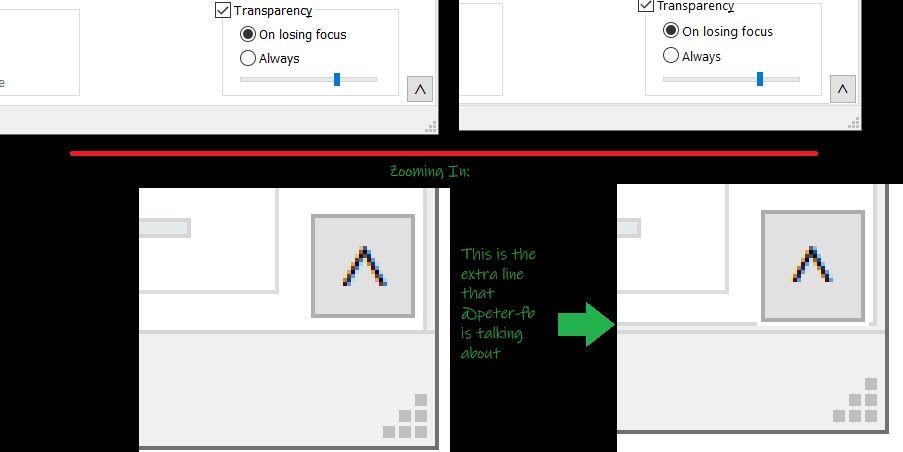
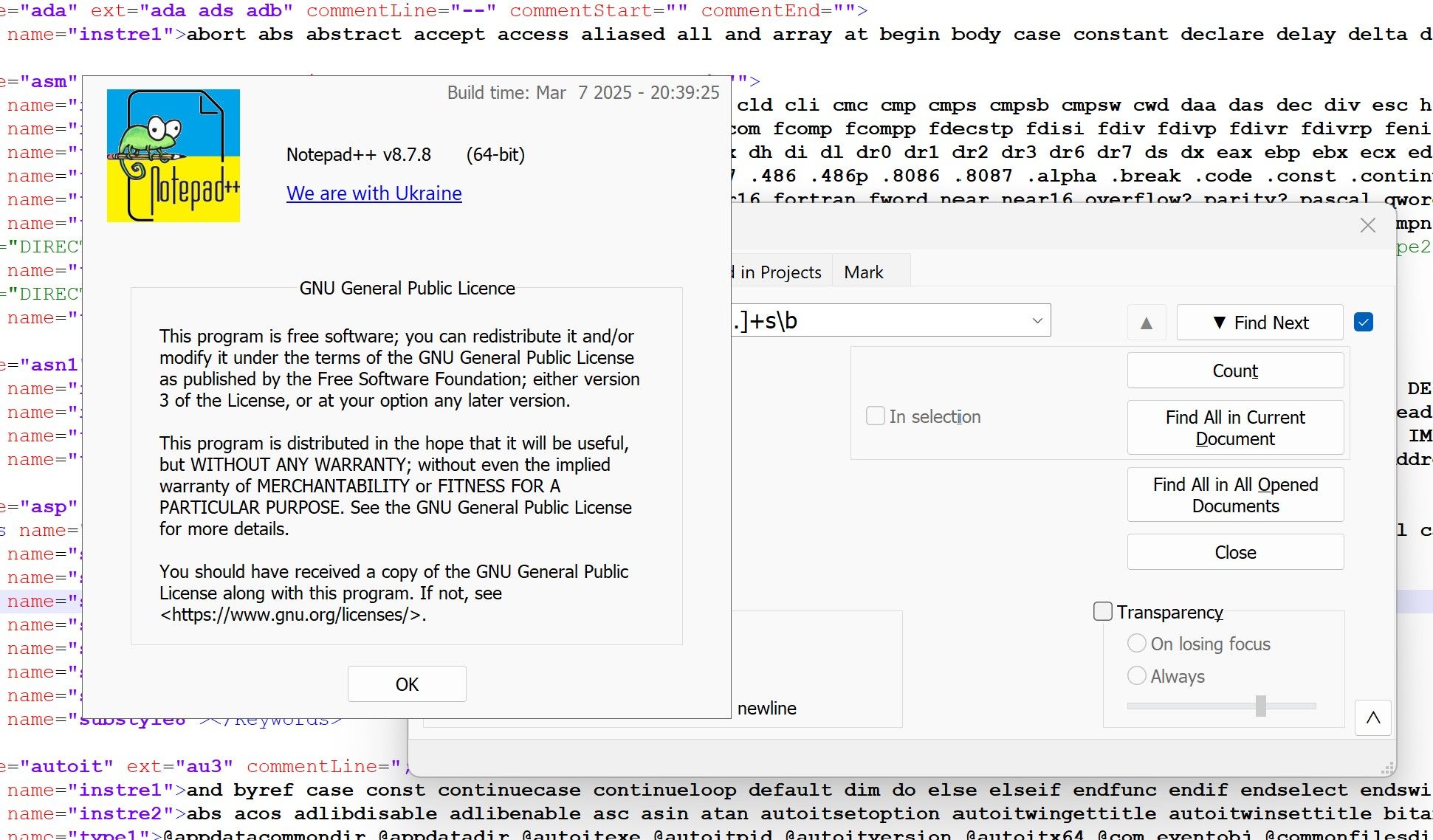
The left images are from @peter-fb’s 8.9.8.1 screenshot (upper is normal, lower is zoomed 4x); the right images are from @peter-fb’s 8.9.9 screenshot (upper is normal, lower is zoomed 4x). I showed a green arrow to the extra line that shows up in the newest version.Your screenshot from 8.7.8 does not have the extra line, either:
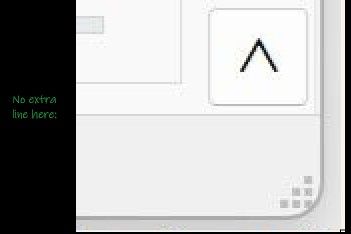
It appears v8.9.9 grew the vertical height of the FIND dialog slightly, and that you can now see the bottom border line for the tab-selector object that used to be hidden under the status bar on that dialog.
-
@PeterJones Thank you so much! You explain it far better than I ever could. Here’s a comparison I just made, but the one you posted is much clearer.
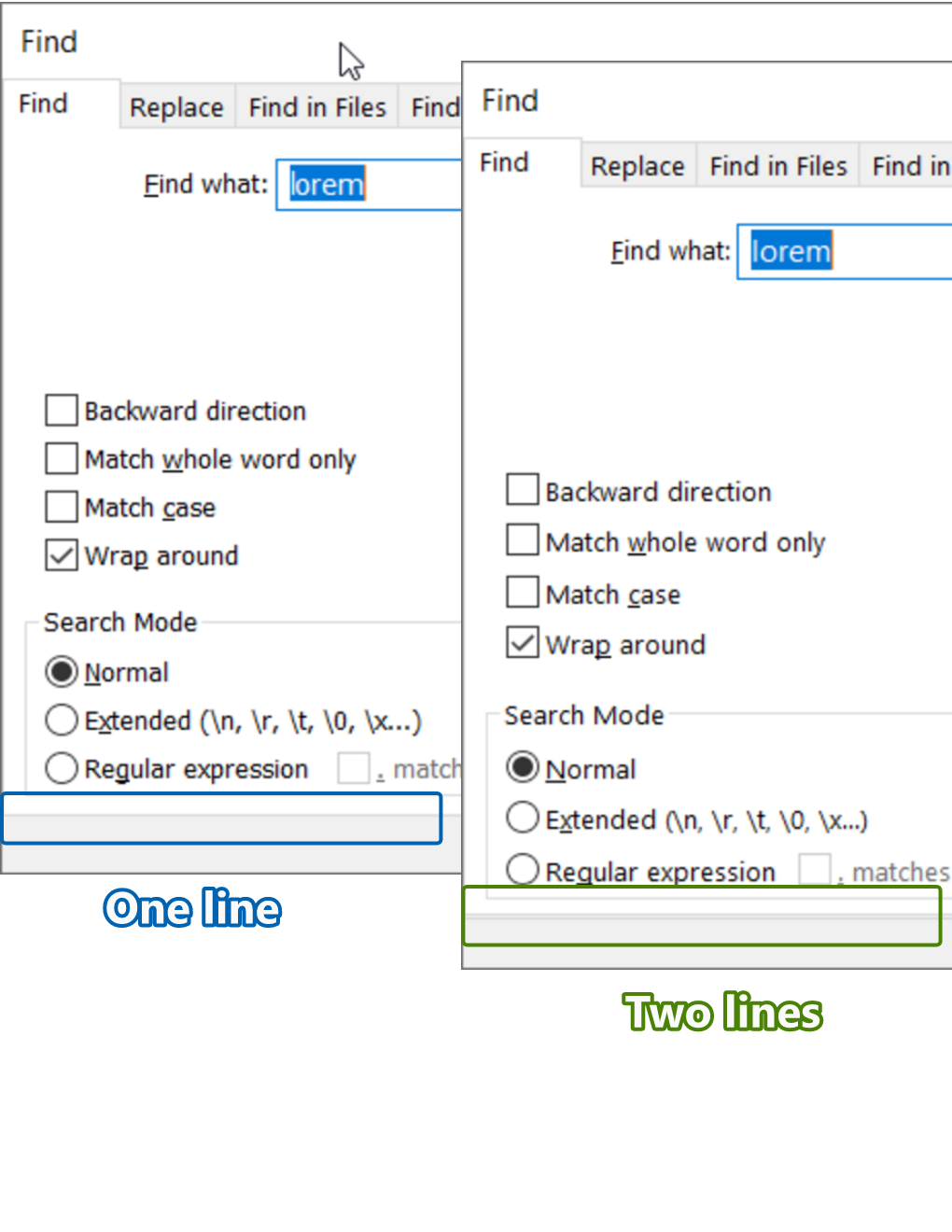
And if I’m completely misunderstanding what Don Ho means, then I’m sorry.
-
I always have the portable version in which there is no NppShell.dll file at all, and for many years I have added Notepad++ via a batch file. These problems only started in the final version.
I have no such problem:
see video:
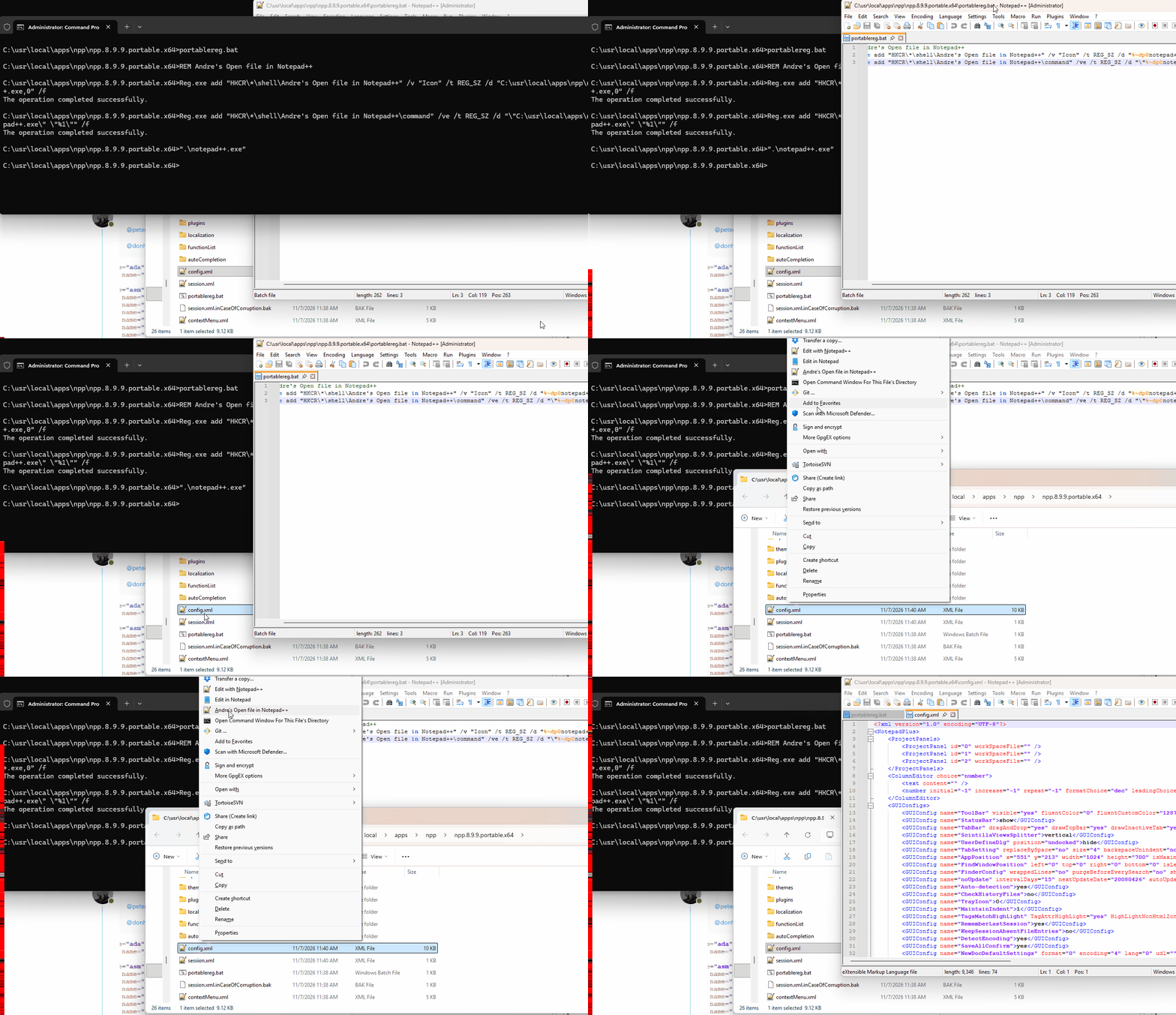
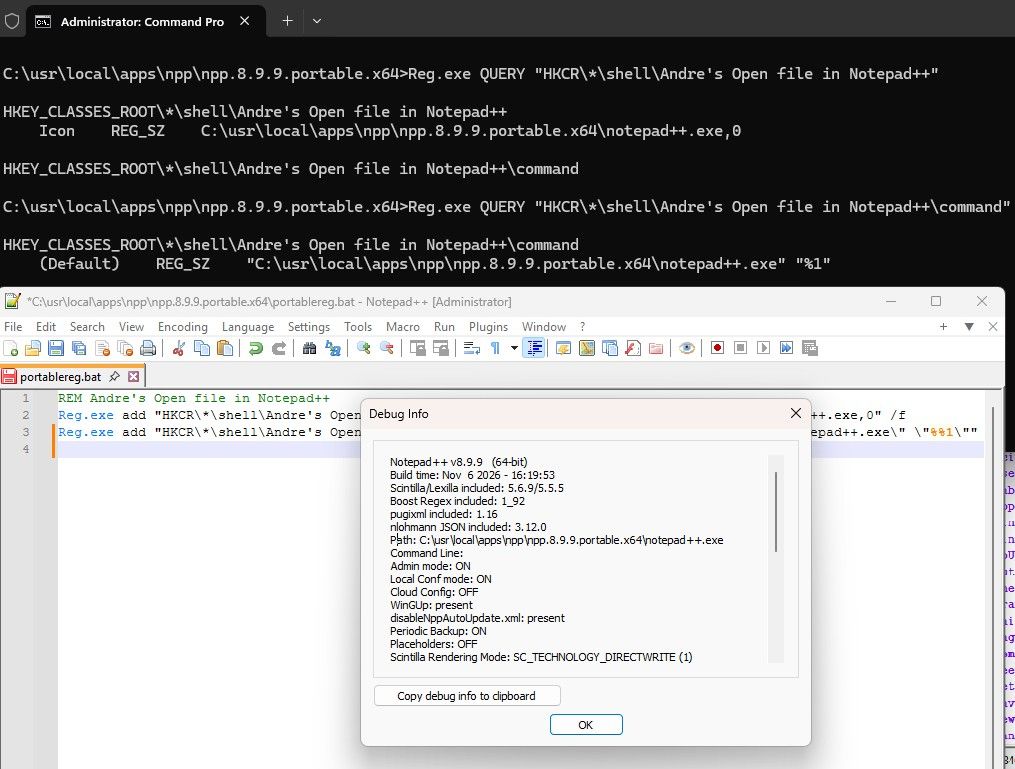
Equivalent to what Don said, you need to make sure that the registry entry and the active Admin Notepad++ have the exact same path (from their own perspective). See my screenshot, where I show both the REG QUERY results for the keys created, and the Debug Info which confirms they are the same:
-
Hello, @peter-fb, @donho, @peterjones and All,
Ah … @peter-fb, I clearly see, now, what you meant !
Indeed, with the last N++
v8.9.9release, here are two snapshots of theFinddialog :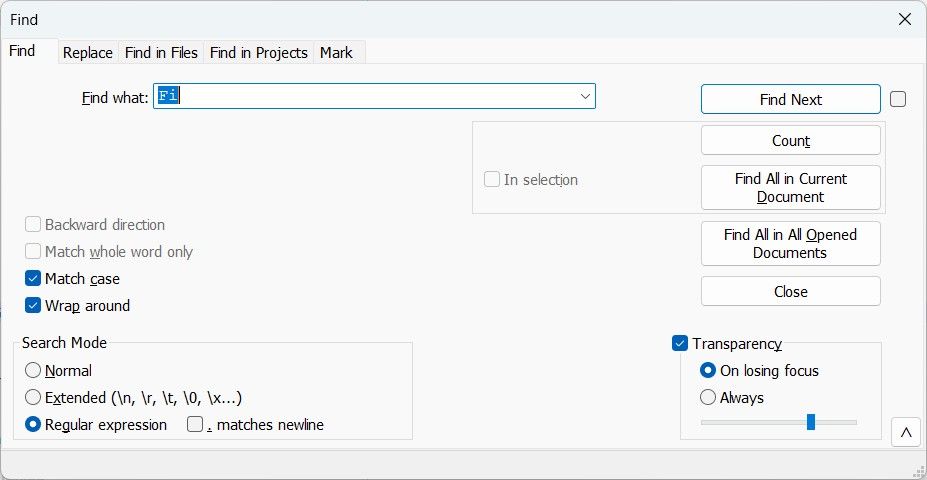
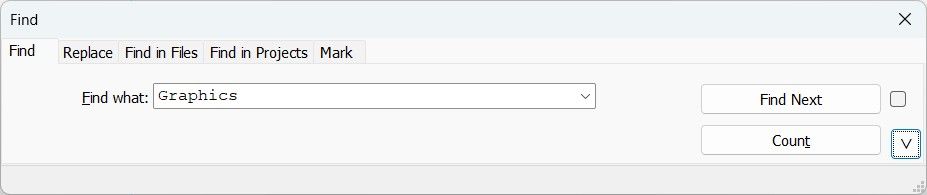
So, you can also notice this problem within the reduced / compact version !
BR
guy038
-
So, you can also notice this problem within the reduced / compact version !
Personally, I wouldn’t call it a “problem”, just a change in appearance.
If anything, I would consider the old to be the problem, and the new to be “correct” (except for maybe the
^button).In the old, the status bar was covering the bottom line of the border for the tabbed subview control. In the new, the bottom border for the tabbed subview is visible, as would be expected.
Here’s a conceptual version:
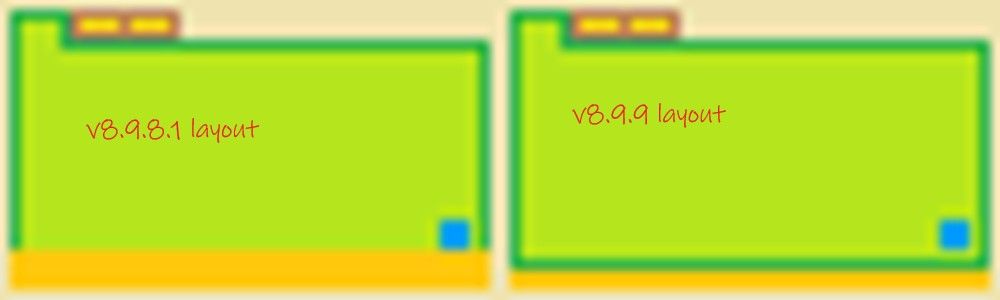
- on the left is the v8.9.8.1 (and earlier) layout
- the bottom edge of the tabbed view (green outline) is covered by the status bar (orange)
- on the right is the v8.9.9 layout
- the bottom edge of the tabbed view is above the status bar, so you can see the entirety of both
Really, that’s not quite it, either, because as you can see in my screenshots, for some environments, the
^button slightly covers the bottom and right edges still:

But your screenshot do not show that.And to me, this is rather unimportant, as I wouldn’t’ve noticed it if @peter-fb hadn’t pointed it out. But I’d prefer it as it is in v8.9.9, rather than the cover-the-border from v8.9.8.1-and-earlier. (If there was a change, I’d say move the button 1 up and 1 left, to make sure that it doesn’t extend over the edge of the border in the different environments… but I don’t really care if that’s not done.)
- on the left is the v8.9.8.1 (and earlier) layout
-
Hi, @peter-fb, @peterjones, @donho and All,
When I said :
So, you can also notice this problem within the reduced / compact version !
Those words went beyond what I was thinking. I should have said :
So, you can also notice the changes within the reduced / compact version !
Do note that, initially, I did even not see where the “problem” was, at first place !
BR
guy038
-
I have no such problem:
see video:
- Deleted the folder npp.8.9.9.portable.x64
- Unpacked the same archive npp.8.9.9.portable.x64.7z
- Installed all the necessary plugins
- Made the necessary settings for notepad++
- Added notepad++ to the context menu via my old bat file
And a “miracle” happened: my notepad++ began to behave as expected when opening files and “folders as a project”. I don’t understand what’s going on at all. About a month ago there was a situation where the “manage plugins” menu item disappeared.
Can anyone tell me what the problem might be?
-
For surety, I tried the right-clicking shell context menu after the v8.9.9 installation in a Win7 VM and it works ok for me as well. Even with your “Admin mode: ON” N++.
Can anyone tell me what the problem might be?
Maybe a previously registered NppShell.dll remained loaded in the Windows Explorer shell, then after you logoff/reboot, the new one (in a new registered location) is finally loaded by rightclick.




Hello! It looks like you're interested in this conversation, but you don't have an account yet.
Getting fed up of having to scroll through the same posts each visit? When you register for an account, you'll always come back to exactly where you were before, and choose to be notified of new replies (either via email, or push notification). You'll also be able to save bookmarks and upvote posts to show your appreciation to other community members.
With your input, this post could be even better 💗
Register Login