• Notepad++ release 8.9.3

    Pinned
    1
    3 Votes
    1 Posts
    355 Views
    No one has replied
  • WHEN GOOGLE IS POSSESSED BY PROFIT

    Pinned
    23
    6 Votes
    23 Posts
    22k Views
    donhoD

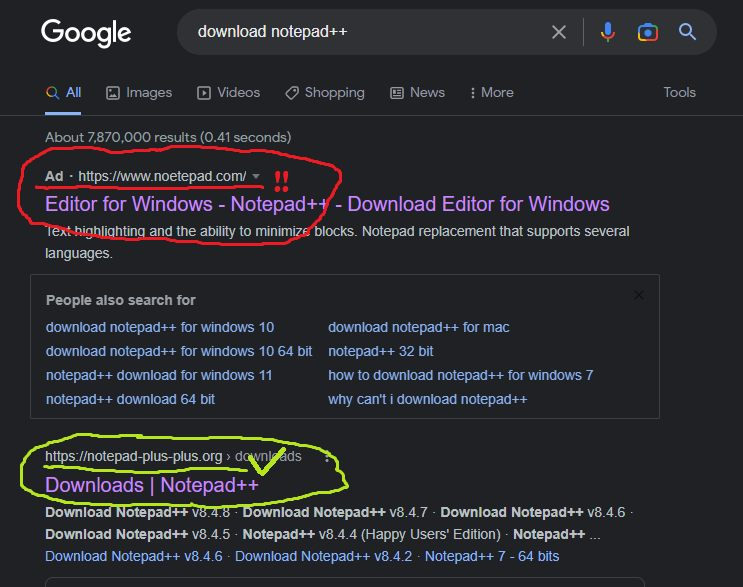
    It seems that malicious ads (promoting a fake Notepad++ website) have returned on the Google search page.
    Below is the email I received this morning:

    Hi Don
    I am a long-time user and admirer of Notepad++. I am based in Australia.

    Today, I went to download a copy of Notepad++ to a new machine. When I searched for “Notepad++” in Google, the first link which came up appears to be a FAKE website located in China:

    https://www[.]notepadplus[.]com[.]cn/en/

    I thought I should let you know, in case this is some kind of hacking attempt.

    Any follow up questions, just let me know.

    Kind regards

    If anyone here has encountered these malicious ads, please use the following link to report them to Google:
    https://support.google.com/ads/troubleshooter/4578507?visit_id=639056285883908601-3926234762&rd=1

  • To all the monetizing companies...

    Pinned
    10
    26 Votes
    10 Posts
    53k Views
    Clod TwothousandC

    @donho I created an account just to upvote, but I didn’t have the reputation. There is no information on how to gain reputation (that I could find). I was probably not going to do whatever was required anyway. It would have been nice to allow new users to allow to upvote useful posts, without jumping hoops.

  • Notepad++ v8.9.1 Release

    20
    6 Votes
    20 Posts
    13k Views
    PeterJonesP

    @leleganja said in Notepad++ v8.9.1 Release:

    Why do I get these errors when I install Notepd++ with both v8.9.2 and v8.9.1?

    At first glance: it appears that whatever account that is being used to install Notepad++ doesn’t have write-permission to the temp directory that the installer created. That is odd, given that the installer usually asks for Admin privileges to install. But maybe your computer is set up so the Admin account(s) don’t have write permission to the indiviudal user file-areas.

    Try creating a directory someplace where both your normal user and your admin user have write access, and then temporarily set %TMP% to point to that directory. When you run the installer, it should use that new directory instead, and should (I would think) have write-permission there. (My experiments showed it used the alternate location if I set the %TMP% user variable, but not if I set the %TEMP% variable, so you only need to change %TMP%. If you don’t know how to change that variable: click the START menu, type system environtment which will find the Edit the system environment variables option, which you use; click Environment variables button, then in the User variables section, edit TMP to point to the new directory you created; after doing OK a few times, then you can run the installer, and it should use that directory. When done installing, don’t forget to set TMP back to %USERPROFILE%\AppData\Local\Temp in the same manner.)

  • Notepad++ Old Releases Download

    2
    6 Votes
    2 Posts
    185 Views
    PeterJonesP

    @donho ,

    Thanks for doing that. It’s good to be able to grab older versions, for historical purposes / comparisons, and for people who are trying to use Notepad++ on machines that still have ancient OS installed and cannot be upgraded (like a bunch of early 2000s electronic-measurement equipment that I used to use)

  • Notepad++ v8.9.3 Release Candidate

    13
    6 Votes
    13 Posts
    1k Views
    donhoD

    FYI:
    I just updated RC4 binaries with the fix:
    https://github.com/notepad-plus-plus/notepad-plus-plus/commit/9b558895e744601842ffdaff4679467863b9722d

    Sorry for the inconvenience.

  • v8.9.3 Release Candidate will be available in about one week (2026-03-14)

    1
    4 Votes
    1 Posts
    698 Views
    No one has replied
  • Notepad++ v8.9.2 Release

    11
    1 Votes
    11 Posts
    10k Views
    CoisesC

    @PeterJones said in Notepad++ v8.9.2 Release:

    https://github.com/notepad-plus-plus/notepad-plus-plus/issues/17540

    Thanks. I should know better… I forgot to search closed issues, not just open ones.

  • Upcoming Migration & Possible Interruptions

    1
    4 Votes
    1 Posts
    260 Views
    No one has replied
  • Notepad++ v8.9.2 Release Candidate

    2
    3 Votes
    2 Posts
    669 Views
    donhoD

    FYI, v8.9.2 RC has been updated to RC2:
    https://github.com/donho/notepad-plus-plus/releases/tag/RC2
    See original announcement for more information.

  • Notepad++ community on nodebb.org

    33
    6 Votes
    33 Posts
    11k Views
    donhoD

    @PeterJones
    Fixed.
    Thank you for reminding me!

  • v8.9.2 Release Candidate will be available in about 3 days (2026-02-12)

    1
    3 Votes
    1 Posts
    586 Views
    No one has replied
  • Planned Migration: Notepad++ Hosting Change in 30 Minutes

    1
    6 Votes
    1 Posts
    751 Views
    No one has replied
  • Notepad++ v8.9.1 Release Candidate

    1
    5 Votes
    1 Posts
    950 Views
    No one has replied
  • FYI: Notepad++ 8.9.1 RC will be available in about 9 days

    1
    2 Votes
    1 Posts
    592 Views
    No one has replied
  • Notepad++ release 8.9

    26
    4 Votes
    26 Posts
    12k Views
    A

    @donho I updated from 8.8.8 and after the first launch of Notepad++ the error “Load lang.xml failed!” occured once (exe-installer on latest Windows 11).

  • Notepad++ 8.9 RC is available

    8
    4 Votes
    8 Posts
    2k Views
    donhoD

    FYI
    For the security reason, the https://download.notepad-plus-plus.org/ will be shutdown for some days.
    It might be back online next year.

  • Notepad++ 8.8.8 release

    25
    1 Votes
    25 Posts
    16k Views
    DustyMarieD

    @Andrea-Gaviraghi More results from allowing updates on MSI package. The 8.8.8 MSI pulls the update from Notepad++ and it then installs the 8.8.9 executable. So again, the computer shows 2 installs, when only the newest is really installed. This process should be a lot cleaner…

  • Notepad++ v8.8.9: Vulnerability-fix

    33
    3 Votes
    33 Posts
    53k Views
    S

    @donho
    Sometimes there are users (like me) that do some silly thing, that are not expected.

    In version 8.6 a new style had been introduced: “Multi selected text colour”. The effect for me was, that in column-select mode the selection was shown only partially (last line only). It took me some time to find out what was my fault. I use a personalised style, where the default background colour happens to have the value “C0C0C0”, the same value as the background for this new style. Therefore I could not see the selection because it had the same bg-colour as the rest of my text. For “Selected text colour” I use the value “A0A0A0”; after applying this value to the new style, it worked again.

    I know, it is really a very special case, but it may happen. A similar situation might arise with other changes in the future. For these cases it would help to have a backup for comparison.

  • FYI: Notepad++ v8.9 Release Candidate will be available on 20th Dec.

    1
    2 Votes
    1 Posts
    375 Views
    No one has replied