Help w/ console.run editor output
-
Hello,
I’m trying to get output from an .exe call to return to the new editor window, but its only posting to the console window. Below is some “test” code to demonstrate the issue. Thanks for any help!from Npp import editor, notepad, console
import timeconsole.clear()
console.show()notepad.new()
time.sleep(0.3) # Delay 300ms to allow above cto complete
console.run(r’C:\Software\dcmtk-3.6.9-win64-dynamic\bin\echoscu.exe -v -aet TEST -aec TEST123 127.0.0.1 105’, editor)
console.run(r’cmd.exe /c “C:\Software\dcmtk-3.6.9-win64-dynamic\bin\echoscu.exe -v -aet TEST -aec TEST 127.0.0.1 105”‘, editor)
console.run(r’cmd.exe /c ping localhost’, editor)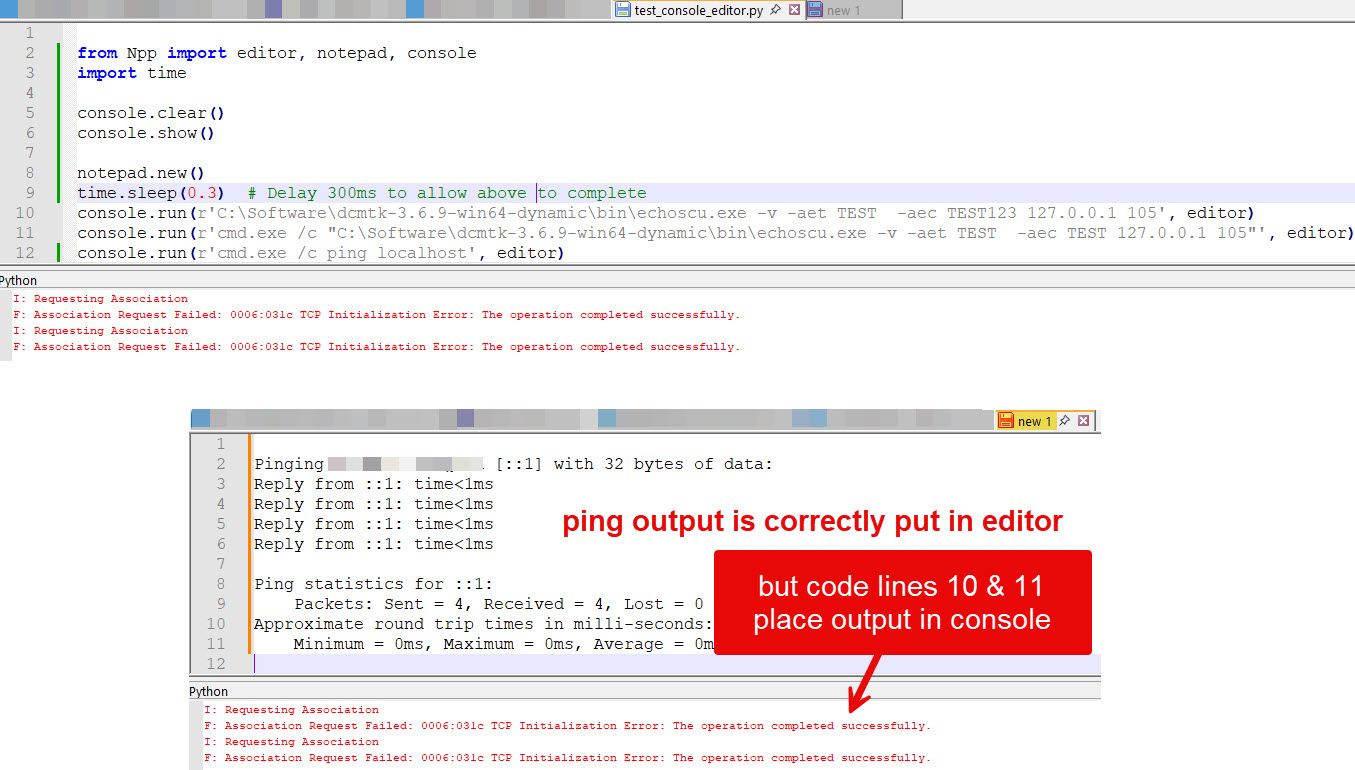
-
The editor object used in the console is the same class as the normal editor object.
from Npp import console

console.clear()

print("hello")

content = console.editor.getText()
notepad.new()
editor.setText(content)
But if you are working with external programs, the subprocess module might be a better alternative
-
@Ekopalypse Great, that will suffice for what I’m trying to do. Thank you!


Hello! It looks like you're interested in this conversation, but you don't have an account yet.
Getting fed up of having to scroll through the same posts each visit? When you register for an account, you'll always come back to exactly where you were before, and choose to be notified of new replies (either via email, or push notification). You'll also be able to save bookmarks and upvote posts to show your appreciation to other community members.
With your input, this post could be even better 💗
Register Login