Help replacing some numbers
-
First of all, sorry for my English, I’m not a native speaker.
So tried looking for a way to solve this but i didnt found it and i cant solve it alone (im kinda dumb).I have a big file with thousands of lines like this
“DETAILED_FUTURE_REGEN” “Abdullah” “” “Fusseini” “01/07/2006” “21” “” “3” “18” “15” “180” “78” “0” “MIDFIELDER_CENTRAL” “” “Accra” “120” “145” “1174”
“DETAILED_FUTURE_REGEN” “Othmane” “” “Hamama” “03/07/2006” “769” “” “1” “7” “11” “182” “75” “1” “DEFENDER_LEFT_SIDE” “” “Rambouillet” “75” “135” “886”
“DETAILED_FUTURE_REGEN” “Martinho” “Paíto” “Martins Mukana” “05/07/2006” “35” “” “3” “18” “16” “170” “70” “1” “DEFENDER_LEFT_SIDE” “” “Maputo” “120” “140” “1489”
“DETAILED_FUTURE_REGEN” “Javi” “” “Paredes” “05/07/2006” “796” “” “1” “5” “15” “175” “72” “3” “DEFENDER_LEFT_SIDE” “” “Oviedo” “120” “145” “1741”And i need that the antepenultimate “” to always be “75” to make the lines like this
“DETAILED_FUTURE_REGEN” “Abdullah” “” “Fusseini” “01/07/2006” “21” “” “3” “18” “15” “180” “78” “0” “MIDFIELDER_CENTRAL” “” “Accra” “75” “145” “1174”
“DETAILED_FUTURE_REGEN” “Othmane” “” “Hamama” “03/07/2006” “769” “” “1” “7” “11” “182” “75” “1” “DEFENDER_LEFT_SIDE” “” “Rambouillet” “75” “135” “886”
“DETAILED_FUTURE_REGEN” “Martinho” “Paíto” “Martins Mukana” “05/07/2006” “35” “” “3” “18” “16” “170” “70” “1” “DEFENDER_LEFT_SIDE” “” “Maputo” “75” “140” “1489”
“DETAILED_FUTURE_REGEN” “Javi” “” “Paredes” “05/07/2006” “796” “” “1” “5” “15” “175” “72” “3” “DEFENDER_LEFT_SIDE” “” “Oviedo” “75” “145” “1741”Usually the number in the “” that i want to be 75 is either 120 or 140 but i dont know how to replace it without changing other ocurrences that also have 120/140
Thank you in advance.
-
Hello, @manuel-rodríguez and All,
Easy with regular expressions !
So :
-
Open your file within Notepad++
-
Move to the very beginning of your file (
Ctrl + Home) -
Open the Replace dialog (
Ctrl + H) -
Untick all box options
-
SEARCH
"\d+(?=" "\d+" "\d+"$) -
REPLACE
"75 -
Tick the
Regular expressionsearch mode -
Click once the
Replace Allbutton or several times on theReplacebutton
Note :
-
This regex searches for a double-quote character, followed with consecutive digits chars (
\d+), but ONLY IF it is followed with two other zones of digits, surrounded by double-quotes and separated with aspacechar, till the end of current line$ -
In case of match, it replaces the double-quote, followed with the digits zone, by
"75
Here you are !
Best Regards,
guy038
-
-
@guy038 Hello buddy, sorry to @ you. The method you told me years ago was working everytime but now it doesnt.
Do i have to change something? As you can it says that there were 0 occurrences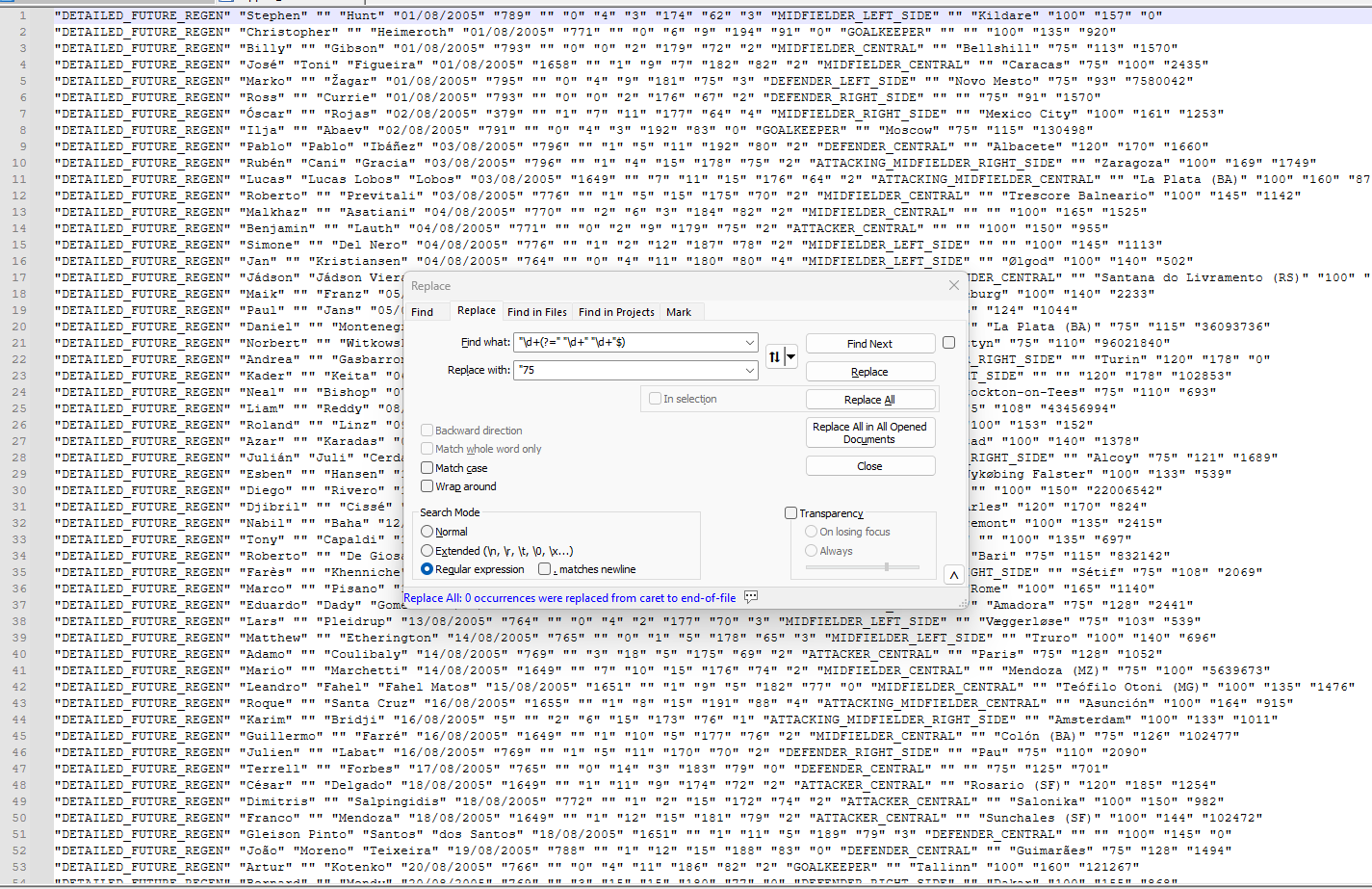
-
@Manuel-Rodríguez Based on what is in the screen shot the search/replace it should have worked for you.
One possibility is that there are now one or more spaces at the end of the lines. Instead of searching for
"\d+(?=" "\d+" "\d+"$)you would search for"\d+(?=" "\d+" "\d+" *$)I added a space followed by a*just before the$.Also, I see that you have
Wrap aroundturned off. If you started a search/replace from anywhere other than line 1 then the search/replace would start at whatever line you are on and would go to the end of the file. EnablingWrap aroundallows the search/replace to jump from the last line back to the first. -
@mkupper said in Help replacing some numbers:
“\d+(?=” “\d+” “\d+” *$)
Your right about now having spaces in the end of the lines, i guess that must be the error. I have tried “\d+(?=” “\d+” “\d+” *$) both with wrap around on and off but it doesnt work.
Any way to delete all these spaces?EDIT: nwm I used Blank operations-> trim trailing space and then “\d+(?=” “\d+” “\d+”$) and its fine now. Ty both for your help!
-
Hello, @manuel-rodríguez, @mkupper and All,
Manuel, could you provide us of an example of your file ( let’s say between
10and30lines ), like you did in your first post ?When replying and pasting your text in your post, if possible, use the
</>icon, named code, in the header line. It always better to get true literal text !See you later,
BR
guy038
-
@guy038 I think the OP has left. He had written “I used Blank operations-> trim trailing space and then “\d+(?=” “\d+” “\d+”$) and its fine now. Ty both for your help!”
We won’t know exactly what character(s) the trailing spaces were but now know the original issue was space characters of some sort.
In hindsight, I should have used
\h*instead of*in my original proposed fix as\hmatches the various horizontal space characters plus is less likely to introduce errors as people manually copy from what they read in a forum post on a screen into a regular expression.



Hello! It looks like you're interested in this conversation, but you don't have an account yet.
Getting fed up of having to scroll through the same posts each visit? When you register for an account, you'll always come back to exactly where you were before, and choose to be notified of new replies (either via email, or push notification). You'll also be able to save bookmarks and upvote posts to show your appreciation to other community members.
With your input, this post could be even better 💗
Register Login