block comment color
-
I find the color of block comment text (orang) on a white background, in python, makes reading difficult.
I opened the style configurator but could find reference to only single line comment text color (green).
Is there a way to change the color of python block comment text?
Thanks.
-
@Jim-Julian said in block comment color:
Is there a way to change the color of python block comment text?
As Python has no “block comment”, only “line comment”…I’m going to give you an answer of “No”.
-
@Alan-Kilborn That, I know, and yet, many if not most use single/double quotes to comment blocks of text.
From Google AI:
“It’s important to note that using triple-quoted strings as comments is generally discouraged by the
Python community, especially when the commented code contains triple-quoted strings. The preferred method is to use consecutive single-line comments with #.”The column editor makes block commenting a lot easier, however, I just tried that and the text font changed for the commented text.
How do I change that. The font is too small.Also, the combination of orange on white is hard too read but is used with Triple, Triple Double, F Triple, F Triple Double. What are they? I’d like to change those.
-
@Jim-Julian said in block comment color:
How do I change that. The font is too small.
The font for COMMENT LINE text is usually the same size and font-face as the Python language as a whole, and if it’s blank, it inherits the size and font-face from Style Configurator > Global Styles > Default Style. By default, the COMMENT LINE size and font-face are left blank, so either you are using a Theme which sets those (some themes foolishly set font faces and font sizes, rather than letting that get properly inherited from a user’s preference) or you changed them yourself at some point.
Also, the combination of orange on white is hard too read
Then change it.
but is used with Triple, Triple Double, F Triple, F Triple Double. What are they? I’d like to change those.
- TRIPLE =
''' text in triple single quotes''' - TRIPLE DOUBLE =
""" text in triple double quotes""" - F TRIPLE =
f'''formatted text with {varname} syntax in triple single quotes''' - F TRIPLE DOUBLE =
f"""formatted text with {varname} syntax in triple double quotes"""
- TRIPLE =
-
@PeterJones Regarding the font issue: I use default settings to keep things simple. However, yoour suggestion is heard. Thanks for your assistance.
-
@Jim-Julian said in block comment color:
I opened the style configurator but could find reference to only single line comment text color (green).
Is there a way to change the color of python block comment text?
Thanks.
@PeterJones mentioned the (orange) triple strings. I’ll mention the (green) block comments.
The lexer does style block comment text.
Python has no multiline comment like C like languages unfortunely.
/*
 comment can span multiple lines
*/
The Python lexer does have block comments if that can be defined as such.
# comment line
## old code
## old code
The
##isSCE_P_COMMENTBLOCKstyle which in Style Configurator described asCOMMENT BLOCK. It may not be noticeable as bothSCE_P_COMMENTLINEandSCE_P_COMMENTBLOCKdefault to same style settings.Changed
COMMENT BLOCKin Style Configurator to grey shows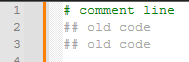
So now more customization can be done to improve the view.




Hello! It looks like you're interested in this conversation, but you don't have an account yet.
Getting fed up of having to scroll through the same posts each visit? When you register for an account, you'll always come back to exactly where you were before, and choose to be notified of new replies (either via email, or push notification). You'll also be able to save bookmarks and upvote posts to show your appreciation to other community members.
With your input, this post could be even better 💗
Register Login