How to Hide Fold Lines in Notepad++?
-
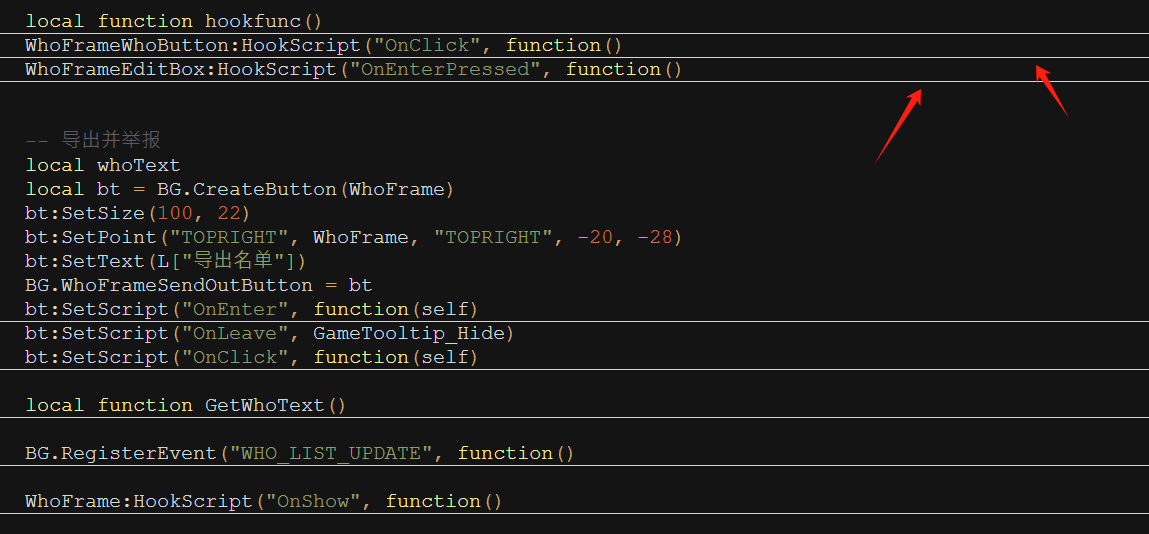
I’m using Notepad++ and noticed that when I fold code sections, a horizontal fold line appears next to the collapsed block. I find it a bit distracting and would like to hide it completely.
I’ve checked the settings but couldn’t find an option to remove it. I also tried modifying the theme colors, but the line is still visible.
Does anyone know if there’s a way to hide these fold lines, either through settings, themes, or a plugin?
Thanks in advance for any help!
-
Go to Plugin Admin, type
foldinto the Search box and keep clicking Next until you seeFolding Line Hider. Check the checkbox and click the Install button. After Notepad++ restart, it should be active at hiding the fold lines.Description of the plugin:
This Notepad++ plugin can hide the unsightly folding lines, and for convenience, you can fold and unfold the current level using the Alt + Left/Right keys.
Author: leonardchai@gmail.com
Homepage: https://github.com/leonardchai/FoldingLineHider

Hello! It looks like you're interested in this conversation, but you don't have an account yet.
Getting fed up of having to scroll through the same posts each visit? When you register for an account, you'll always come back to exactly where you were before, and choose to be notified of new replies (either via email, or push notification). You'll also be able to save bookmarks and upvote posts to show your appreciation to other community members.
With your input, this post could be even better 💗
Register Login