It changes the encoding every time I open it.txt file
-
How to disable automatic encoding change when opening .txt file?
-
@Maxim-Fox said in It changes the encoding every time I open it.txt file:
How to disable automatic encoding change when opening .txt file?
If the problem is specifically that Notepad++ is opening files as UTF-8 when you expected them to be in your system code page (aka ANSI), look at Settings | Preferences… | New Document and see if you have UTF-8 selected and the Apply to opened ANSI files box checked. If you do, try unchecking that box.
Aside from that, I don’t think there is a way to stop Notepad++ from attempting to determine the encoding of a file. Windows does not store the encoding of a file with the file. No program can know, for sure, what encoding was used for an arbitrary text file. Notepad++ tries to figure out what it must be, but I don’t believe it offers any way to intervene in that process other than to select a different encoding one you have loaded the file.
-
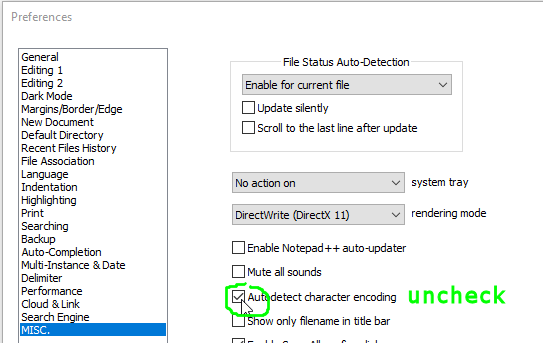
-
The problem with uncheckmarking Auto detect character encoding is that most times you want Notepad++ to autodetect the encoding.
It’s only when it does it wrongly that you don’t want it to. :-)




Hello! It looks like you're interested in this conversation, but you don't have an account yet.
Getting fed up of having to scroll through the same posts each visit? When you register for an account, you'll always come back to exactly where you were before, and choose to be notified of new replies (either via email, or push notification). You'll also be able to save bookmarks and upvote posts to show your appreciation to other community members.
With your input, this post could be even better 💗
Register Login