Some files no longer load. Many files are missing in the document list.
-
I try to load a file I use often and it opens a workspace. I tried to view the file but it won’t show up. I’ve never used workspaces before, but I did get a list of files by experimenting. I tried to open it but nothing happens. This just suddenly happened. I don’t know what’s going on.
Notepad++ v8.8.2 (64-bit)
Build time : Jun 26 2025 - 01:12:36
Scintilla/Lexilla included : 5.5.7/5.4.5
Boost Regex included : 1_85
Path : C:\Program Files\Notepad++\notepad++.exe
Command Line : “C:\Users\johnd\dx\DXSub1\Portuguese\Portuguese general.txt”
Admin mode : OFF
Local Conf mode : OFF
Cloud Config : OFF
Periodic Backup : OFF
Placeholders : OFF
Scintilla Rendering Mode : SC_TECHNOLOGY_DIRECTWRITE (1)
Multi-instance Mode : monoInst
File Status Auto-Detection : cdEnabledOld (for all opened files/tabs)
Dark Mode : OFF
Display Info :
primary monitor: 1920x1080, scaling 100%
visible monitors count: 1
installed Display Class adapters:
0001: Description - Intel® UHD Graphics 630
0001: DriverVersion - 31.0.101.2130
OS Name : Windows 11 Pro (64-bit)
OS Version : 24H2
OS Build : 26100.4351
Current ANSI codepage : 1252
Plugins :
JsonTools (8.3.1)
mimeTools (3.1)
NppConverter (4.6)
NppExport (0.4)
NPPJSONViewer (2.1)
NppSnippets (1.7.1)
PythonScript (2.1)
![alt text])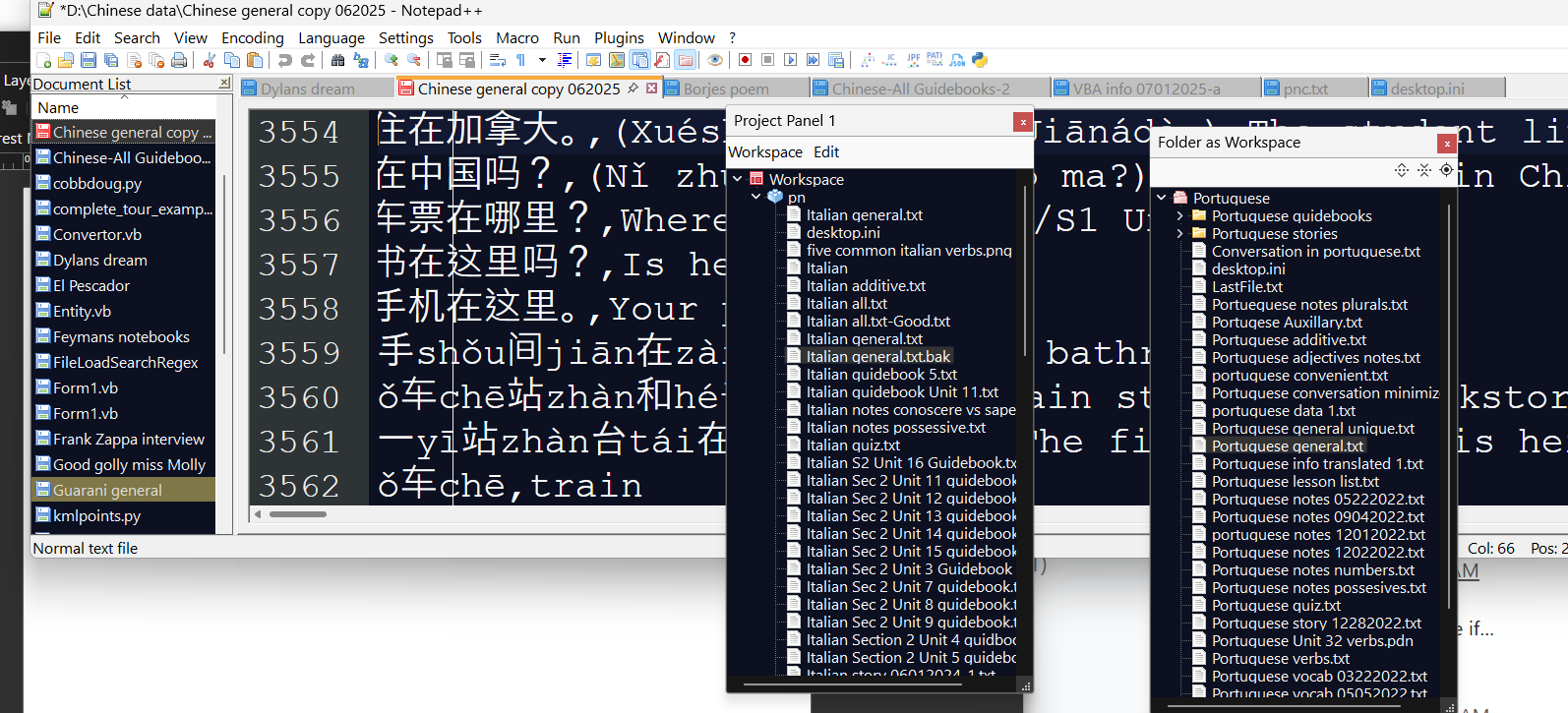
-
I had delayed responding, because I’m not sure I understand exactly what’s going on for you. I was hoping someone else understood your post better, so they could provide help. But since it’s been a few days with no response, I will chime in saying, “I am confused”.
I try to load a file I use often and it opens a workspace
How do you load the file? Windows Explore double-click? Windows Explorer right-click and picking Edit with Notepad++? Notepad++'s File Open or toolbar equivalent? Double clicking on the filename in the View > Folder as Workspace’s panel? Double clicking on the filename in the View > Project Panels > Project Panel N? Something else I haven’t thought of?
I cannot think of any way to get any of those actions to launch the project/workspace panel or folder-as-workspace panel. (Those last two had to manually open the panel first, before double clicking, and double clicking would still open the file.)
About the only thing I can think that would change Notepad++ to automatically open a “workspace” instead of a file would be if you had set Settings > Preferences > MISC’s Workspace file ext: to an extension that happened to match your file’s extension (in this case, I think you want
Portguese general.txt, and it would really surprise me if you’d set that extension setting totxt); but if you did that, and the content of your file was the right XML to match a workspace definition, then Notepad++ would open that workspace instead of opening a file. But that doesn’t quite sound like your symptoms, and it would be really confusing to me.I think you need to explain more step-by-step what you are doing – maybe even with screenshots at various points along the way, so we know exactly how you got to where you are.


Hello! It looks like you're interested in this conversation, but you don't have an account yet.
Getting fed up of having to scroll through the same posts each visit? When you register for an account, you'll always come back to exactly where you were before, and choose to be notified of new replies (either via email, or push notification). You'll also be able to save bookmarks and upvote posts to show your appreciation to other community members.
With your input, this post could be even better 💗
Register Login