How to remove empty strings by notepad++?
-
Dear Sir,
I tried to remove empty strings in my text using replace \r\n (extended symbols) to remove empty strings, but the new text had correct strings about 260 rows, then all strings were glued in one string. Coding Utf-8.
How it may be?
Your,
Radmir. -
@Раке ,
extended search
\r\nfinds every line ending, whether or not the line was empty.if by “empty strings” you mean “lines that contain no characters other than the line ending”, the easiest way to remove them is Edit > Line Operations > Remove Empty Lines. If you want to remove “lines that contain no characters other than spaces and tabs and the line ending”, then Edit > Line Operations > Remove Empty Lines (Containing Blank Characters)
The equivalent can also be done in regular expression search-and-replace, but since it’s a built-in feature, just use the menu command.
-
@PeterJones
Your answer is the best solution for my problem, exuse me, I tried to use “search and relace” and can’t guess to use native “edit” feature…
Thanks,
Rake. -
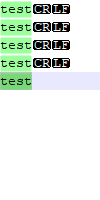
@Раке if you still prefer using a Regex-based Search and Replace, you can add a Start of Line anchor (and perhaps the whitespace character class with a quantifier) to get similar results. For example, a search of
^\s*\r\nwill remove all “empty” lines, including ones with various types of whitespace.Sample start text:
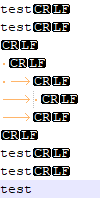
After running the S/R with the above Regex:



Hello! It looks like you're interested in this conversation, but you don't have an account yet.
Getting fed up of having to scroll through the same posts each visit? When you register for an account, you'll always come back to exactly where you were before, and choose to be notified of new replies (either via email, or push notification). You'll also be able to save bookmarks and upvote posts to show your appreciation to other community members.
With your input, this post could be even better 💗
Register Login