EV GLOBAL SIGN BROCKEN
-
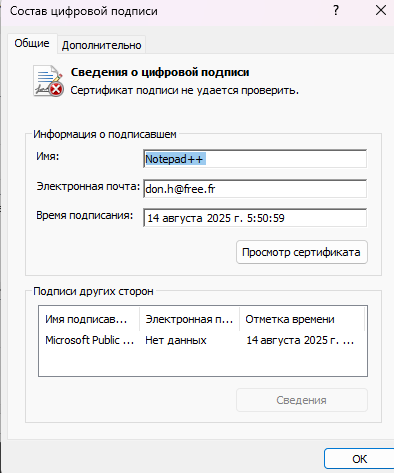
Please fix EV SIGN
-
The certificate / signature is not broken – it is signed using a CA (Certificate Authority) Certificate that you don’t have. You just need to follow the instructions linked to as the self-signed-certificate link in the Release Announcement, which links to the official website instructions: https://notepad-plus-plus.org/news/v883-self-signed-certificate/ . Or the online user manual has an entire section on how to install the CA cert on your machine.
(GlobalSign refused to let the developer get a certificate issued in the “Notepad++” name, so he made this new CA cert to “bridge the gap” until he is able to get some paperwork filed with his local government to register “Notepad++” as an organization, so that hopefully GlobalSign will be willing to use the “Notepad++” name on the certificate; government beaurocracy can be slow, so it might be a while, which is why the CA cert needs to be installed in the interim.)
-
UPDATE: With the release of v8.8.7, Notepad++ is once again signed by a GlobalSign-issued certificate, as well as the Notepad++ self-signed certificate.


Hello! It looks like you're interested in this conversation, but you don't have an account yet.
Getting fed up of having to scroll through the same posts each visit? When you register for an account, you'll always come back to exactly where you were before, and choose to be notified of new replies (either via email, or push notification). You'll also be able to save bookmarks and upvote posts to show your appreciation to other community members.
With your input, this post could be even better 💗
Register Login