🐛 [ISSUE REPORT] Notepad++ Freezes When Using Find in Files with Network Drives
-
Find in Files should complete search on network drives like local drives
❌ Actual Behavior:
Freezes completely when searching network folders
Requires Task Manager to force close
CPU spikes to 100% during freeze
🔧 Reproduction Steps:
Open Notepad++ v8.6.4 (32-bit)
Press Ctrl+Shift+F (Find in Files)
Set directory to \NAS\shared\code\
Search for “functionName”
Freeze occurs at ~2 minutes
[3. SYSTEM INFO]
OS: Windows 10 Pro 22H2 (Build 19045.4529)
Hardware: Dell XPS 15 (i7-11800H, 32GB RAM)
Network: 1Gbps Ethernet to Synology NAS
Plugins: Explorer 1.9.1, JSON Viewer 2.5
[4. EVIDENCE]
📷 Screenshot of freeze
📜 Relevant Log Snippet:[2024-07-15 14:22:08] FindInFiles: Start @ \NAS\shared\code\
[2024-07-15 14:24:11] WARNING: Thread timeout (120000ms)
[5. ADDITIONAL NOTES]
💡 Workarounds:Works fine with local drives (C:, D:)
Using “Everything” search tool as alternative
moderator edit: removed spam link hidden on punctuation mark
-
Downvoted because there was a spam link on the comma between the
C:andD:near the end.This is most likely pure AI fabrication, or at least human-made junk to justify the spam link.
However, on the off-chance that AI or human derived their spam wrapper from some real report they found somewhere, I am leaving this “report” here, in case someone can replicate the “findings”.
update:
Notepad++ v8.6.4 (32-bit)
…
Plugins: Explorer 1.9.1, JSON Viewer 2.5N++ v8.6.4 was from Feb 2024, but Explorer 1.9.1 was from May 2020. I am dubious that a user would be updating Notepad++, but not the Explorer plugin, over that long of a timeframe.
Also, as far as I can tell from the public releases, “JSON Viewer 2.5” will not be coming out for another few years (since it’s currently at 2.1.1, and was at 2.0.2 in 2022), so that’s a non-existent plugin version, and more evidence that this entire report is an hallucination.
-
This post is deleted! -
I have the same problem as topicstarter mentioned, updated Notepad++ to the latest version 8.8.3 (64bit), but no luck; stops responding within 20 seconds after hitting ‘FIND ALL’ and has to be stopped with task manager.
I’m trying to search for the text ‘Do not save editing history’ in the backup files stored on my Synology 423 NAS in the EXT folder from a phpBB forum installation, cause i did not remember which extension added this functionality when i edit a posting on the forum.
As work a workaround I copied 6786 files (~23MB) to my local disk and performed the search there. That worked.
However, the problem of searching in files with Notepad++ on the Synology NAS remains
-
Thanks for letting us know. I was hoping the symptoms described above were just AI ChatBot fabrication, or copying from some other post somewhere else on the internet. But since you are having the same issues, I guess it’s real.
Unfortunately, I’m not an expert on the networking issues with Notepad++, and don’t have a Synology NAS to check with – I know that @xomx knows more about such things, and has even fixed similar issues before. Maybe he can chime in.
In the mean time, could you please go to the ? menu’s Debug Info, and paste that information in a reply here? It will help @xomx better understand your setup.
-
I have a Synology NAS on net and will try to reproduce this issue later.
stops responding within 20 seconds after hitting ‘FIND ALL’
Meanwhile only my guess - if you wait long enough, the N++ will start responding again. This all might be due to the design of the N++ FindInFiles func, which currently scales poorly when used on a large number of files (and using network here, with much slower access speed, could only exacerbate the problem). One can easily simulate such a “N++ GUI-freezing” even on local files, e.g. try this:
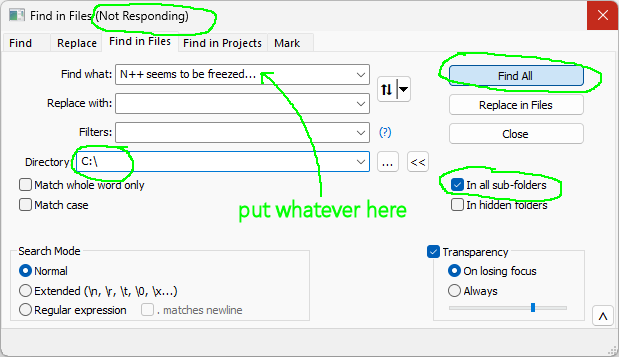
Details about the current sub-optimal “two-stage” FindInFiles design causing the above (there is also a possible WM_TIMER GUI-fix mentioned but I never had time to really try it) :
https://github.com/notepad-plus-plus/notepad-plus-plus/issues/13972#issuecomment-1767212918 -
@xomx said in 🐛 [ISSUE REPORT] Notepad++ Freezes When Using Find in Files with Network Drives:
I have a Synology NAS on net and will try to reproduce this issue later.
So I tested - and no big problem found.
I tried to simulate as closely as possible the reported issue conditions, my setup:
- a Synology NAS in fast domain network, mapped as disk (WebDAV … “\\MyNASName@SSL@PortNo\DavWWWRoot\login”)
- N++ v8.8.5 64-bit, with some plugins
- Win10 Enterprise LTSC 2021
- I created on NAS “Z:\NPP\test4FindInFiles\” folder and put there some source codes from projects (~60MB, 6822 files, 396 folders)
I fired up the FindInFiles, put there the same phrase “Do not save editing history” in FindWhat and hit the FindAll button - my N++ was approx. 12 secs unresponsive (this is the 1st stage from the two FindInFiles ones mentioned above) and then the FindInFiles progress bar appeared as usual.
-
@webforpcnet seen similar issues before, also with other tools. Thing is accessing network drives (and even external plugged drives) triggers security and caching tools such as anti-virus, status utilities such as TortoiseGit, etc.
A separate check needs to be done using another crawler, such as a simple script dumping the file contents. Paste something like the following in cmd.exe:
@echo off
rem Position in the target base directory
pushd  \\NAS\shared\code\
rem Iterate through all files in the subtree, assume all files, "*.*"
for /R %i in (*.*) do (
  echo Dumping '%i'
  rem Force reading file contents (but don't output them!), same as Notepad++ would
  type "%i" >nul
)
popd
(I’m assuming the \ special character sequence got escaped in the report.)
If the speed is substantially better than Notepad++ then it might mean there’s a problem (this quick/dirty check cannot assess for any whitelisting or heuristics in the environment).





Hello! It looks like you're interested in this conversation, but you don't have an account yet.
Getting fed up of having to scroll through the same posts each visit? When you register for an account, you'll always come back to exactly where you were before, and choose to be notified of new replies (either via email, or push notification). You'll also be able to save bookmarks and upvote posts to show your appreciation to other community members.
With your input, this post could be even better 💗
Register Login