Replacing text blocks with ToolBucket
-
Hello, I am new to this forum. I am working as an IT Administrator and use Notepad++ for a long time now. Now I need a solution for replaceing text blocks in a lot of measurement files. For this I added the ToolBucket Plugin. Here is my needed change (line 147 (in this file) always starts with QE QSSTAT, rest different):

should be replaced by
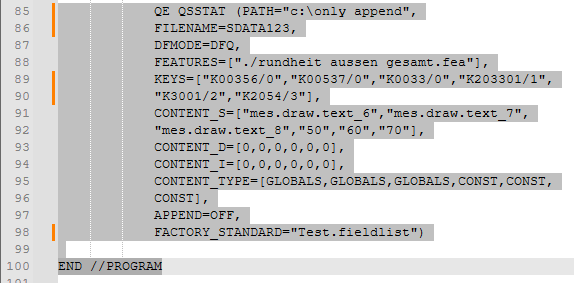
I tried now or 3 days, but no solution yet with regular expressions. 0 Matches or more that 200 (it is once in the file)
Please help, thank you very much. -
@JuergenBelle
If you need to replace only this line then default find and replace works fine.
Ctrl+h and check regular expression
Find: QE QSSTAT.*
Replace: your content if its same -
Further to what @h-jangra said, since N++ v8.8.6, you can just paste your multi-line text into the Replace, and use the Search @h-jangra suggested, and you don’t need the plugin at all…
If your replacement has parentheses
()or dollar signs$, it might not work as you expect, so you might have to escape them, as described in the user manual (https://npp-user-manual.org/docs/searching/#substitutions)


Hello! It looks like you're interested in this conversation, but you don't have an account yet.
Getting fed up of having to scroll through the same posts each visit? When you register for an account, you'll always come back to exactly where you were before, and choose to be notified of new replies (either via email, or push notification). You'll also be able to save bookmarks and upvote posts to show your appreciation to other community members.
With your input, this post could be even better 💗
Register Login