"Open containing folder in Explorer" always launches a new Explorer process instead of re-using!
-
Hi and many thanks for the wonderfully usable Notepad++,
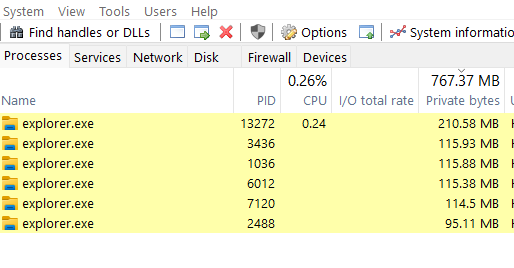
The native “Open containing folder in Explorer” command in Notepad++ (even in the latest version) launches Windows Explorer (Win11 latest release build) using this command line “C:\WINDOWS\explorer.exe /factory,{75dff2b7-6936-4c06-a8bb-676a7b00b24b} -Embedding” which starts a new Explorer.exe process that then lingers and keeps running in the background (and using memory) even when the relevant window is closed. This is the result from my task manager after using this function in Notepad++ for several times.
The same function in some other editor (like VS code) reuse the existing Explorer process and don’t seem to burden the system resource as much.
Thank you.
-
I believe your complaint is the same as in this official issue
Given that you say you are running the same
embeddingcommand that @xomx mentioned over there, I am assuming you didn’t fully understand what he was trying to say. I don’t know fully what’s going on, but the Issue lead me to believe that command is something the OS launches as a result of Notepad++ asking to open the explorer process, and wasn’t given as advice for what you should launch instead.Please note, as our FAQ says, that we are just the Community of users of Notepad++, so there’s nothing we can do here to fix it for you. The official issue I linked to is where anything that can be done will be done. Here, we can just talk about it, but not fix it.
-
This issue bothers me as well. I’ve already found a way around but unfortunately my half finished PR got lost together with my SSD which went w/o farewell into the Silicon Heaven and took some of my unbackuped freetime projects with it.
I’ll try next week.
-
Thanks for pointing me to that Github issue. I somewhat researched the topic (using VS code/Electron) repos and added a suggestion there.
The issue, I think, is that instead of using a dedicated shell API, Notepad++ tries to manually launch an Explorer process.



Hello! It looks like you're interested in this conversation, but you don't have an account yet.
Getting fed up of having to scroll through the same posts each visit? When you register for an account, you'll always come back to exactly where you were before, and choose to be notified of new replies (either via email, or push notification). You'll also be able to save bookmarks and upvote posts to show your appreciation to other community members.
With your input, this post could be even better 💗
Register Login