Perl keywords "class" and "method" not recognised by Function List
-
Hello @peterjones, @johnL22 and All,
Peter, adding the part :
class NewClassSyntax {
    method inBlock { return 1 }
    method inBlockProto($) { return $_[0] }
    method inBlockAttrib :prototype($) { return $_[0] }
}
At the end of the
uniTest.txtfileAnd updating the
perl.xmlfile, within theFunction Listfolder, does display the same function list view than your screenshot !
Sorry, I’ve just forgot to test your new
perl.xmlfile, so far, in order to simplify some regexes, if possible. I’ll have to find some time to get started on it !!Best Regards,
guy038
-
PeterJones et al
Thank you,
That looks to be what I would expect the Function List to contain.
I only use the most simple syntax of “class” and “method” currently.
I agree ADJUST is very like BEGIN & END (which I have NOT yet used), so I am undecided about including them in the Function List.
I will use your updated code, test it out, and confirm it does what I need soon.
Regards -
@PeterJones said in Perl keywords "class" and "method" not recognised by Function List:
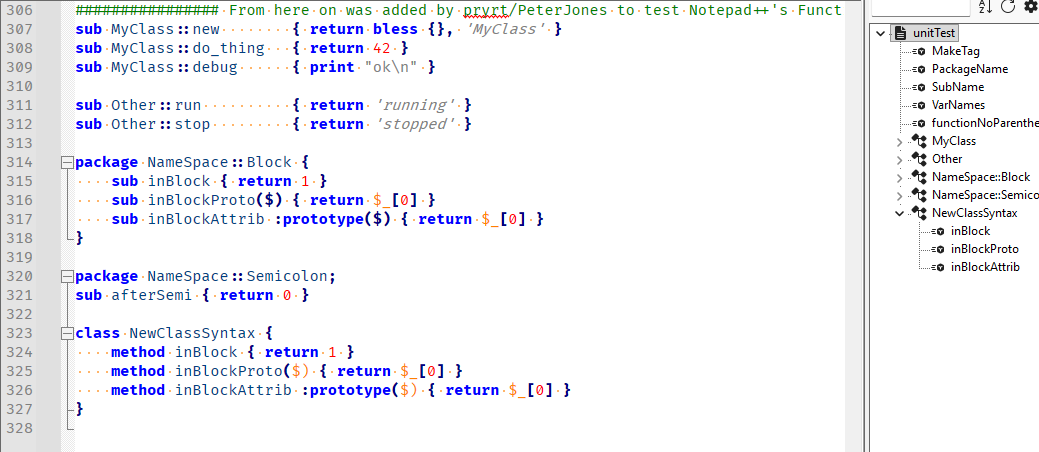
Please note: the bad highlighting on the
$)on lines 325 and 326 compared to 316-317 is caused by the underlying lexer from the Lexilla library project. I have already created an issue there to get that resolved; it cannot be fixed in Notepad++ until it’s fixed in Lexilla.(This is separate from the Function List behavior, but since I thought you might notice something like that if you used prototypes, I decided to point it out.)
-
Hello, @peterjones and All,
I finally succeeded to get a new
perl.xmlfile parser !
In short :
-
I do NOT use any
atomicconstruction ! -
In
mainExprof the class range, I do NOT use a named group but, simply, use the part^ (?: package | class ) \b, twice ! -
I changed your prototype / signature syntax
(?:\([^()]*+\)\s*+)?+to(?: \( [\x20-\x27\x2A-\x7E]* \) \s* )? -
I changed your attributes syntax
(?:\:[^{]+)?+to(?: : [\x20-\x7A\x7C-\x7E]+ \s* )?
So, for these two syntaxes, I just supposed that standard
ASCIIcharacters are used, from \x20 to \x7E, except for\x28and\x29in one part and\x7Bin second part ! May be, the\tshould be part of each class character, either !- I changed the regex class name
(?x)\s\K[^;{]+to(?x)\s+\K.+?(?=[;{])
BTW, my parser presently contains
13strings\s. May be, the\hor even[\t\x20]should be more appropriate, in some parts ?Also, how many optional parts
(?: \w+ :: )*may exist, before the mandatory\w+of the function name ?Anyway, this is a first draft. As I’m definitively not a Perl Expert, I probably missed a lot !
So, here is the first version of my
Perl.xmlparser :<?xml version="1.0" encoding="UTF-8" ?> <!-- ==========================================================================\ | | To learn how to make your own language parser, please check the following | link: | https://npp-user-manual.org/docs/function-list/ | \=========================================================================== --> <NotepadPlus> <functionList> <!-- ======================================================== [ PERL ] --> <!-- Perl - functions and packages, including fully-qualtified subroutine names --> <parser displayName="Perl" id="perl_syntax" commentExpr="(?x) # 'Free-spacing' mode (see `RegEx - Pattern Modifiers`) (?m-s: # 'Multi-lines' mode ( ^ and $ match at line-breaks ) / 'Dot' char does NOT match line-breaks \x23 .* # Single Line Comment ( #................ ) ) # | # OR (?s: # 'Single line' mode (letter s optional as mode set by DEFAULT) __ (?: END | DATA ) __ # String '__END__' or '__DATA__' .* # ANY character(s), including line-breaks, till... \Z # Last line-break, included ) " > <classRange mainExpr="(?x) # 'Free-spacing' mode (see `RegEx - Pattern Modifiers`) (?m-i) # 'Multi-lines' mode (^ and $ match at line-breaks) / 'Sensitive case' mode ^ # NO leading white-space at start of line (?: package | class ) \b # Header : word 'package' or 'clas', in LOWER case (?s: # 'Single line' mode (letter s optional as mode set by DEFAULT) .+? # ANY character(s), including line-breaks, till... ) # Section below, excluded (?= # Start of look-ahead \s* # Optional leading white-space of ^ # NO leading white-space at start of line (?: package | class ) \b # Next header : word 'package' or 'clas', in LOWER case | # OR \Z # last line-break ) # End of look-ahead " > <className> <nameExpr expr="(?x) # 'Free-spacing' mode (see `RegEx - Pattern Modifiers`) \s+ # Leading white-space(s) \K # Discard text matched so far .+? # ANY character(s) till... (?= [;{] ) # First semi-colon or left brace, excluded " /> </className> <function mainExpr="(?x) # 'Free-spacing' mode (see `RegEx - Pattern Modifiers`) (?m-i) # 'Mutli-lines' mode (^ and $ match at line-breaks) / 'Sensitive case' mode ^ \h* # Optional leading spaces or tabulations (?: sub | method ) \b # Word 'sub' or 'method', in LOWER case \s+ # White-space character(s) (?: \w+ :: )* # Optional list of words EACH followed with :: \w+ # Word character(s) \s* # Optional white-space character(s) (?: \( [\x20-\x27\x2A-\x7E]* \) \s* )? # Optional Prototype or Signature section (?: : [\x20-\x7A\x7C-\x7E]+ \s* )? # Optional Attributes section \{ # Start of function body " > <functionName> <funcNameExpr expr="(?x) # 'Free-spacing' mode (see `RegEx - Pattern Modifiers`) (?: sub | method ) # Word 'sub' or 'method', in LOWER case \s+ # White-space character(s) \K # Discard text matched, so far (move this line right before \w+ if 'prefix::' part NOT desired) (?: \w+ :: )* # Optional prefix:: part ( package:: / names:: ) \w+ # Word character(s) " /> </functionName> </function> </classRange> <function mainExpr="(?x) # 'Free-spacing' mode (see `RegEx - Pattern Modifiers`) (?m-i) # 'Mutli-lines' mode (^ and $ match at line-breaks) / 'Sensitive case' mode ^ \h* # Optional leading spaces or tabulations (?: sub | method ) # Word 'sub' or 'method', in LOWER case \s+ # White-space character(s) (?: \w+:: )* # Optional list of words, EACH followed with :: \w+ # Word character(s) \s* # Optional white-space character(s) (?: \( [\x20-\x27\x2A-\x7E]* \) \s* )? # Optional Prototype or Signature section (?: : [\x20-\x7A\x7C-\x7E]+ \s* )? # Optional Attributes section \{ # Start of function body " > <functionName> <nameExpr expr="(?x) # 'Free-spacing' mode (see `RegEx - Pattern Modifiers`) (?: sub | method ) # Word 'sub' or 'method', in LOWER case \s+ # White-space character(s) \K # Discard text matched, so far ( move this line right before \w+ if part 'prefix::' NOT desired (?: \w+ :: )* # Optional prefix:: part ( package:: / names:: ) \w+ # Word character(s) " /> </functionName> <className> <nameExpr expr="(?x) # 'Free-spacing' mode (see `RegEx - Pattern Modifiers`) (?: sub | method ) # Word 'sub' or 'method', in LOWER case \s+ # White-space character(s) \K # Discard text matched, so far \w+ # Word character(s) ( :: \w+ )* # Optional list of words, EACH preceded with :: (?= :: \w ) # Till a last string ':: + word char' excluded " /> </className> </function> </parser> </functionList> </NotepadPlus>
May be, it would be interesting to compare my version to yours, in terms of speed. To my mind, it’s seems similar !?
Best Regards,
guy038
-
-
@guy038 said in Perl keywords "class" and "method" not recognised by Function List:
for these two syntaxes, I just supposed that standard ASCII characters are used, from \x20 to \x7E, except for \x28 and \x29 in one part and \x7B in second part ! May be, the \t should be part of each class character, either
Perl allows Unicode alphanumeric/“word character” in any such identifier or token (just cannot start with a numeric), so restricting to ASCII is not going to work
-
I have used the changed perl.xml for more than 2 weeks.
It handles all formats of “class” definitions - test file attached…The only time it sometimes stumbles is when there is no class-ending statement after the “STATEMENT form of class” before the end-of-file. I can not yet reliably reproduce the situation
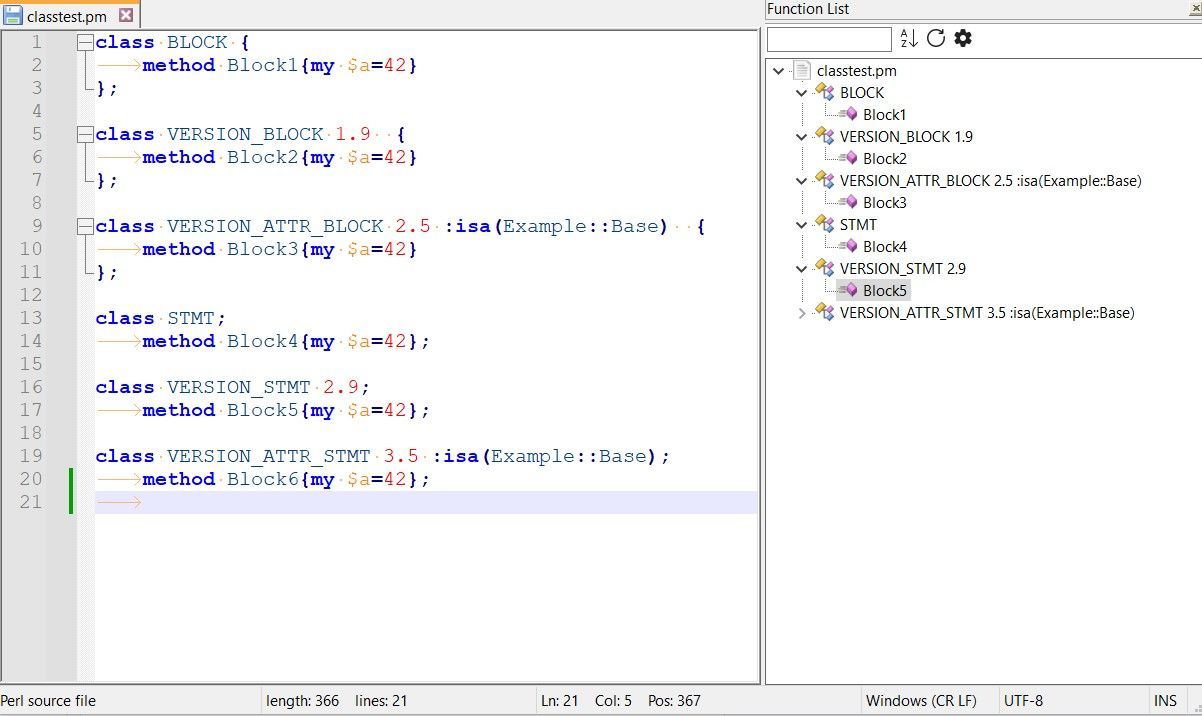
I will not comment on recognising identifiers in perl syntax.
-
@JohnL22 ,
The only time it sometimes stumbles is when there is no class-ending statement after the “STATEMENT form of class” before the end-of-file.
The image you showed has no stumble. Zooming in:
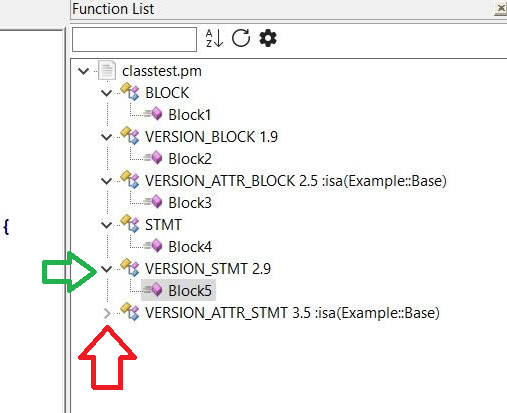
The green arrow points to the fact that most of the classes are set to show their contents, so have the
﹀down arrow next to them. The red arrow highlights the fact that the final class is set to be collapsed (hiding the functions/methods in that class), so has the>right arrow. If you want to see the methods in VERSION_ATTR_STMT 3.5, you need to click the>to make it a﹀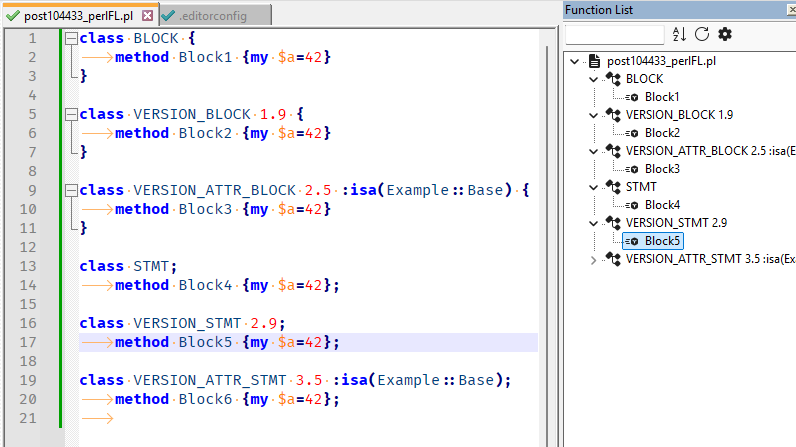
becomes
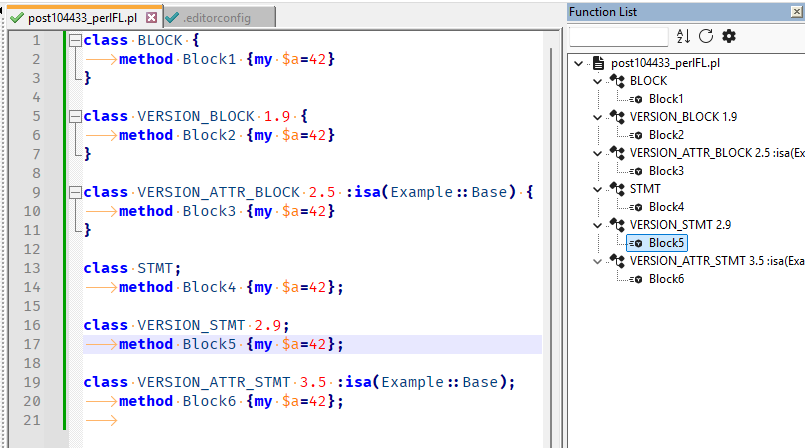
by toggling that arrow. -
@JohnL22 said in Perl keywords "class" and "method" not recognised by Function List:
The only time it sometimes stumbles is when there is no class-ending statement after the “STATEMENT form of class” before the end-of-file. I can not yet reliably reproduce the situation
The other possibility is that you didn’t have final newline/whitespace after the last line of code. That’s a long-standing issue buried deep in the FunctionList implementation that no one has been able to fix:
No newline:
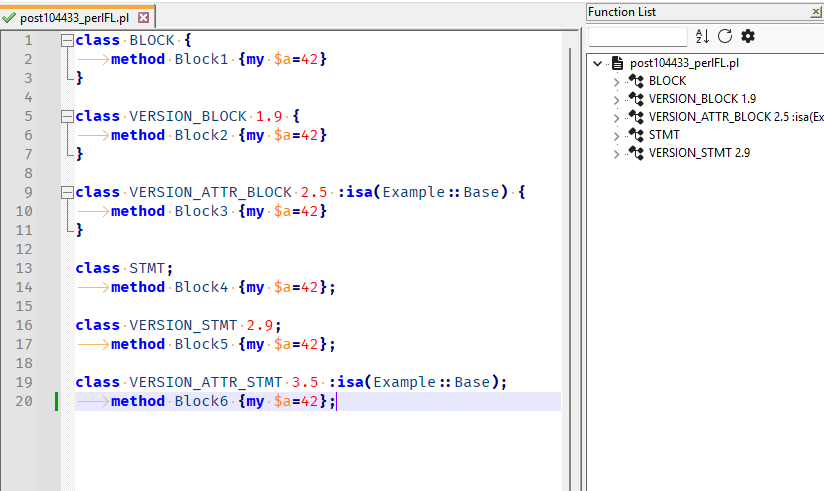
vs with newline:
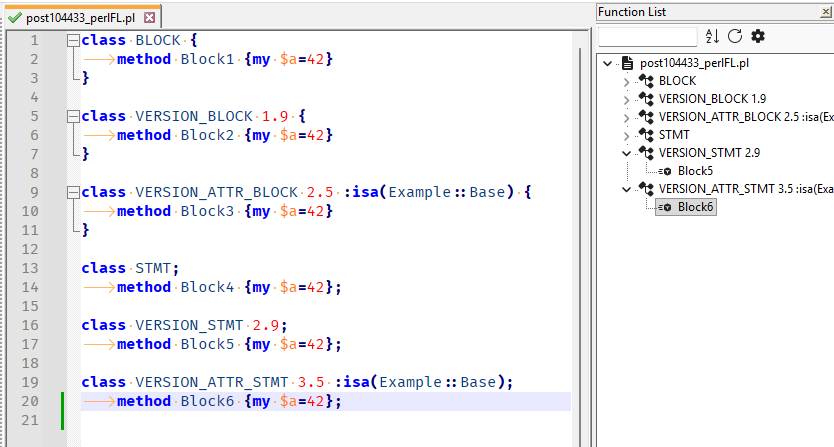
If you cannot force yourself to remember to always have the final newline in your file, you can use the EditorConfig plugin and set
insert_final_newline = truefor[*.p{l,m}]or for[*] -
@JohnL22 ,
… but since it’s essentially working for you, I have taken that as confirmation that the new perl.xml is an improvement, so it’s in a Pull Request now… hopefully, it will get merged for the v8.9.1 release candidate coming next week.
update: PR has been merged,so it will be in 8.9.1
-
@PeterJones I am happy :)
-
Hello, @peterjones,
First, read this post to @coises, where I discuss the Unicode concept of identifiers, particularly in
Perl!
Thus, as explained at the end of that post, I created a second version of my
perl.xmlfile parser which should work correctly without significant delay !In short :
-
I do NOT use any
atomicstructure ! -
In
mainExprof the class range, I do NOT use a named group but, simply, use the part^ (?: package | class ) \b, twice ! -
I changed your prototype / signature syntax
(?:\([^()]*+\)\s*+)?+to(?: \( [\x20-\x7E\w]* \) \s* )? -
I changed your attributes syntax
(?:\:[^{]+)?+to(?: : [\x20-\x7A\x7C-\x7E\w]+ \s* )?
In the two syntaxes above, I simply added
\wwithin each character classNote that, from this article https://www.effectiveperlprogramming.com/2015/04/use-v5-20-subroutine-signatures/, the following syntax seems possible :
sub animals ( $cat, $auto_id = get_id() ) {
    say "$auto_id: The cat is $cat";
    }
Thus, for prototype / signature syntax, I’ve allowed parentheses within the outer parentheses. If this example seems not pertinent, use the alternate syntax :
(?: \( [\x20-\x27\x2A\x7E\w]* \) \s* )?- Finally, I changed the regex class name
(?x)\s\K[^;{]+to(?x) \s+ \K .+? (?= \x20* [;{] )
BTW, my parser presently contains
13strings\s. May be, the\hor even the[\t\x20]syntax should be more appropriate, in some parts ?
<?xml version="1.0" encoding="UTF-8" ?>
<!-- ==========================================================================\
|
|   To learn how to make your own language parser, please check the following
|   link:
|       https://npp-user-manual.org/docs/function-list/
|
\=========================================================================== -->
<NotepadPlus>
	<functionList>
		<!-- ======================================================== [ PERL ] -->
		<!-- Perl - functions and packages, including fully-qualtified subroutine names -->

			<parser
				displayName="Perl"  id="perl_syntax"

				commentExpr="(?x)                                               # 'Free-spacing' mode (see `RegEx - Pattern Modifiers`)
							(?m-s:                                              # 'Multi-lines' mode ( ^ and $ match at line-breaks ) / 'Dot' char does NOT match line-breaks
								\x23 .*                                         #   Single Line Comment ( #................ )
							)                                                   #
							|                                                   # OR
							(?s:                                                # 'Single line' mode (letter s optional as mode set by DEFAULT)
								__ (?: END | DATA ) __                          #   String '__END__' or '__DATA__'
								.*                                              #   ANY character(s), including line-breaks, till...
								\Z                                              #   Last line-break, included
							)
						"
			>
				<classRange
					mainExpr="(?x)                                              # 'Free-spacing' mode (see `RegEx - Pattern Modifiers`)
							(?m-i)                                              # 'Multi-lines' mode (^ and $ match at line-breaks) / 'Sensitive case' mode
							^                                                   # NO leading white-space at start of line
							(?: package | class ) \b                            # Header : word 'package' or 'clas', in LOWER case
							(?s:                                                # 'Single line' mode (letter s optional as mode set by DEFAULT)
								.+?                                             #   ANY character(s), including line-breaks, till...
                            )                                                   # Section below, excluded
							(?=                                                 # Start of look-ahead
								\s*                                             #   Optional leading white-space of
								^                                               #   NO leading white-space at start of line
								(?: package | class ) \b                        #   Next header : word 'package' or 'clas', in LOWER case
							|                                                   # OR
								\Z                                              #   last line-break
							)                                                   # End of look-ahead
						"
				>
					<className>
						<nameExpr expr="(?x)                                    # 'Free-spacing' mode (see `RegEx - Pattern Modifiers`)
										\s+                                     # Leading white-space(s)
										\K                                      # Discard text matched so far
										.+?                                     # ANY character(s) till...
										(?= \x20* [;{] )                        # First semi-colon or left brace, excluded
									"
						/>
					</className>
					<function
						mainExpr="(?x)                                          # 'Free-spacing' mode (see `RegEx - Pattern Modifiers`)
								(?m-i)                                          # 'Mutli-lines' mode (^ and $ match at line-breaks) / 'Sensitive case' mode
								^ \h*                                           # Optional leading spaces or tabulations
								(?: sub | method ) \b                           # Word 'sub' or 'method', in LOWER case
								\s+                                             # White-space character(s)
								(?: \w+ :: )*                                   # Optional list of words EACH followed with ::
								\w+                                             # Word character(s)
								\s*                                             # Optional white-space character(s)
								(?: \( [\x20-\x7E\w]* \) \s* )?                 # Optional Prototype or Signature section
								(?: : [\x20-\x7A\x7C-\x7E\w]+ \s* )?            # Optional Attributes section
								\{                                              # Start of function body
							"
					>
						<functionName>
							<funcNameExpr expr="(?x)                            # 'Free-spacing' mode (see `RegEx - Pattern Modifiers`)
												(?: sub | method )              # Word 'sub' or 'method', in LOWER case
												\s+                             # White-space character(s)
												\K                              # Discard text matched, so far (move this line right before \w+ if 'prefix::' part NOT desired)
												(?: \w+ :: )*                   # Optional prefix:: part ( package:: / names:: )
												\w+                             # Word character(s)
											"
							/>
						</functionName>
					</function>
				</classRange>
				<function
					mainExpr="(?x)                                              # 'Free-spacing' mode (see `RegEx - Pattern Modifiers`)
							(?m-i)                                              # 'Mutli-lines' mode (^ and $ match at line-breaks) / 'Sensitive case' mode
							^ \h*                                               # Optional leading spaces or tabulations
							(?: sub | method )                                  # Word 'sub' or 'method', in LOWER case
							\s+                                                 # White-space character(s)
							(?: \w+ :: )*                                       # Optional list of words, EACH followed with ::
							\w+                                                 # Word character(s)
							\s*                                                 # Optional white-space character(s)
							(?: \( [\x20-\x7E\w]* \) \s* )?                     # Optional Prototype or Signature section
							(?: : [\x20-\x7A\x7C-\x7E\w]+ \s* )?                # Optional Attributes section
							\{                                                  # Start of function body
						"
				>
					<functionName>
						<nameExpr expr="(?x)                                    # 'Free-spacing' mode (see `RegEx - Pattern Modifiers`)
										(?: sub | method )                      # Word 'sub' or 'method', in LOWER case
										\s+                                     # White-space character(s)
										\K                                      # Discard text matched, so far ( move this line right before \w+ if part 'prefix::' NOT desired
										(?: \w+ :: )*                           # Optional prefix:: part ( package:: / names:: )
										\w+                                     # Word character(s)
									"
						/>
					</functionName>
					<className>
						<nameExpr expr="(?x)                                    # 'Free-spacing' mode (see `RegEx - Pattern Modifiers`)
										(?: sub | method )                      # Word 'sub' or 'method', in LOWER case
										\s+                                     # White-space character(s)
										\K                                      # Discard text matched, so far
										\w+                                     # Word character(s)
										( :: \w+ )*                             # Optional list of words, EACH preceded with ::
										(?= :: \w )                             # Till a last string ':: + word char' excluded
									"
						/>
					</className>
				</function>
			</parser>
	</functionList>
</NotepadPlus>
In the https://github.com/notepad-plus-plus/notepad-plus-plus/blob/a91b22bd8337465e04c1afa30cb71f7909340293/PowerEditor/Test/FunctionList/perl/unitTest file, I added text at various locations :
- Before the line
############### Start ###############
################ Added by guy038 to test Notepad++'s FunctionList sub animals ( $cat, $autoid = get_id() ) { say "$auto_id: the cat is $cat"; } sub _function_été { return 1 }- Before the line
package NameSpace::Block {
################ Added by guy038 to test Notepad++'s FunctionList sub grâce::Hôte { return 'running' } sub grâce::Son_ø { return 'stopped' } #################################################################- At the very end of file :
################ Added by guy038 to test Notepad++'s FunctionList

class NewClassSyntax {
    method inBlock { return 1 }
    method inBlockProto($) { return $_[0] }
    method inBlockAttrib :prototype($) { return $_[0] }
}

class Chaîne{
    method inBlock { return 1 }
    method Dûment($) { return $_[0] }
    method ƒ_Hameçon :prototype($) { return $_[0] }
}
#################################################################
In terms of speed, the
Function Listpanel seems quickly displayed. I also did a test copying UniTest.txt twice, and then adding, by regex,_1,_2and_3at end of the different names, theFunction Listpanel still appeared without delay !Best Regards,
guy038
-


Hello! It looks like you're interested in this conversation, but you don't have an account yet.
Getting fed up of having to scroll through the same posts each visit? When you register for an account, you'll always come back to exactly where you were before, and choose to be notified of new replies (either via email, or push notification). You'll also be able to save bookmarks and upvote posts to show your appreciation to other community members.
With your input, this post could be even better 💗
Register Login