autoupdater and connection temp.sh
-
FYI:
Security Update - Resolution of Notepad++ Update Server Compromise
https://notepad-plus-plus.org/news/hijacked-incident-info-update/ -
Seeing reactions all over the net to this attack, I’d like to try to clear some of the frequently asked questions: “Was my PC vulnerable/attacked/compromised too?” usually followed by “What should I do now?”. And also the common “Is this a Notepad++ fault or what?”. And remember, all the following is my personal view only. Also don’t ask me please for more attack details, the investigation is still ongoing and @donho will surely disclose more whenever/if it’ll be possible to do so.
Before I try to answer these questions, I have to explain 1st a little the N++ auto-update mechanism, as with every successful attack the attackers searched & found a weak-spot and this time it was the N++ automatic updates mechanism.
N++ auto-update simply works as:
- you installed a N++ version X.Y.Z, date of that installation is stored into a N++ config file
- when that installed N++ app is launched after a predefined period of time (I think, the default is 14 days), it issues a net-request to the N++ (compromised) server about a possible newer version than the current X.Y.Z and gets a response (yes/no, together with a link to the possible new updated binaries/installer)
- then the app is being updated (at exit or start of the N++ app, see the setting pics below)
More about that stuff e.g. here: https://github.com/notepad-plus-plus/notepad-plus-plus/issues/16759#issuecomment-3016024980
Now you can see the weakness, as the attackers were able to hack the N++ hosting provider server, they were also able to intercept/change the N++ updater answers from the PHP script running there and redirect these answers for specific IP addresses they were interested in.
Now to the questions:
-
Was my PC vulnerable too?
Only the users with this N++ setting ON could be affected:
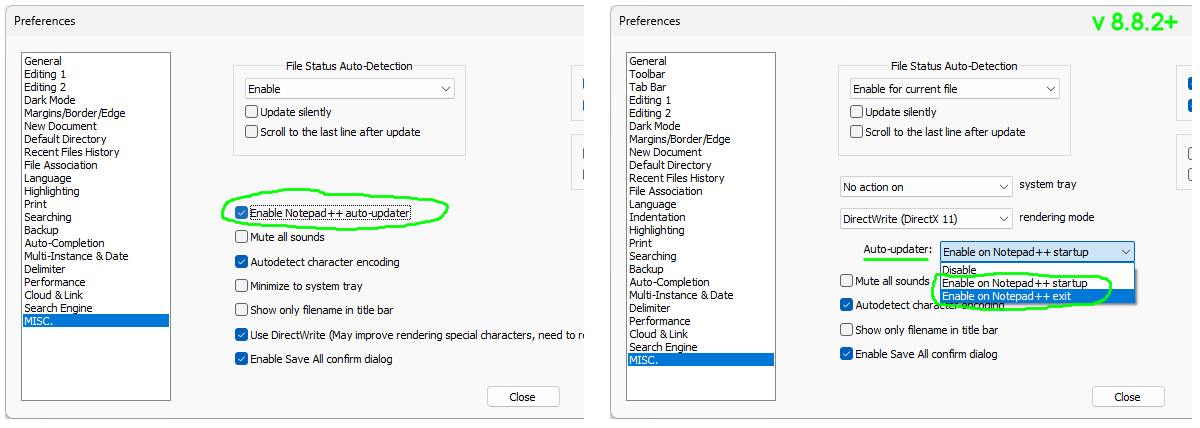
and only if there was at least one real N++ version auto-update in the attack-window (Jun 2025 - 2nd of Dec 2025, which means N++ updates to v8.8.2 - v8.8.8). Note that N++ binaries (installers and portable archives) have not been compromised at all, they reside at the GitHub https://github.com/notepad-plus-plus/notepad-plus-plus/releases/ -
Was my PC attacked too?
Most probably not. This was a highly targeted “supply chain” type of attack against some East Asia orgs. -
Was/is my PC compromised too? What should I do now?
The attackers attack was to collect/steal info one, so not a crypto-virus etc. (spreading and infecting your other files). But if you are in the theoretically affected group of users (see above), I’d highly recommend:
- full AV scan of your PC (if you don’t have any, you can e.g. use this offline MBAM: https://downloads.malwarebytes.com/file/mb5_offline )
- manual re-installation to the latest Notepad++ v8.9.1
- changing/rotating all your passwords used in that attack-window on/from your PC
- Is this a Notepad++ fault or what?
Yes, definitely. I’m saying this even if the attack target was not primarily the N++ app-code but an external hosting server. Once that server had been compromised (well, this itself was not a N++ fault), attackers could attack the N++'s distribution network/mechanism without further obstacles, which is just wrong (nowadays).
All I can say to defend N++ here is that it’s always easy to be wise after something…
Unfortunately, in the future, it’ll be necessary to devote the precious time of active contributors to the N++ project, instead to the app’s own functionality, also more to its security. So, at this point, I’d like to invite any of you using the N++ who are good at security, to also contribute a little of your experience and time for keeping this app up-to-date from a security POV. It’s opensource SW folks, not a magic box programming and maintaining itself.
-
Addendum to the points 2. & 3. above - even if you’re not to Reverse Engineering much, just follow the link and skip it to the ending “Indicators of compromise” part, where are some common markers that could help you decide whether or not your comp has been compromised:
https://www.rapid7.com/blog/post/tr-chrysalis-backdoor-dive-into-lotus-blossoms-toolkit/
-
@xomx said in autoupdater and connection temp.sh:
I’d like to invite any of you using the N++ who are good at security, to also contribute a little of your experience and time for keeping this app up-to-date from a security POV.
A great idea, if late in coming. But I also can’t deny the truth of this hot take from a reader of The Register’s article about this event:
[U]ltimately it’s Microsoft who caused this by deciding to have an ecosystem where securely distributing your software costs $300 per year
I would even suggest — if you want to do the most good with your contribution — give it to a project involved in bringing the Notepad++ experience to other platforms (via Qt 6, e.g.,NotepadNext) or even MacOS.
Windows was never a suitable environment for open source, and even its historically dominant user base will shrink as more and more people realize they cannot safely do personal computing on a device with AI surveillance permanently baked-in to the operating system.
-
@xomx Really appreciate you leaving this reply.
Could I just double check something to put my mind at ease:
I installed notepad++ on a new machine in mid november (listed build time nov 16, installed nov 25 from a github sourced exe), so version 8.8.8. Am I understanding things correctly that this should basically put me in the clear?
As the update feature from that version onwards, no longer pointed to the compromised domain. And as such if you have 8.8.8 installed, the only way for it to be compromised is if it was automatically updated from an older version, rather than installed directly?
Thanks again.
-
As the update feature from that version onwards, no longer pointed to the compromised domain. And as such if you have 8.8.8 installed, the only way for it to be compromised is if it was automatically updated from an older version, rather than installed directly?
If you have 8.8.8 installed and if you update to the new version manually, you’re not concerned by this incident.
The current state is, with the new hosting provider, the auto-update hijacked issue is fixed.
Furthermore, even though the v8.8.8 did not fully address the issue, it’s safe due to its “partial” fix according the hijacking schema, if you use auto-updater:
Security enhancement: prevent Notepad++ Updater from being hijacked.Of course, it’s better to update manually to v8.9.1 so you won’t worry about auto-updating in the future.
-
@xomx said in autoupdater and connection temp.sh:
the investigation is still ongoing and @donho will surely disclose more whenever/if it’ll be possible to do so.
Unfortunatly, the investigation actually concluded the day of the announcement (just after the announcement). As I mentioned at the bottom of my announce Edit (February 2, 2026), the IR team was unable to determine the hijacking method, :
Our IR team spent a week analyzing roughly 400 GB of server logs provided by the former hosting provider. While signs of an intrusion were identified, no concrete indicators of compromise - such as binary hashes, domains, or IP addresses - were found. -
@donho Thank you, I did just that (manual update). My older install turned out to be fine as well, thanks to the brilliant strategy of apparently having clicked no to the update prompt for the past 6 years… :)
-
@donho, so if I’ve already auto-updated from 8.8.8 to 8.9.1, would it be necessary or advised to run it again, manually?
-
so if I’ve already auto-updated from 8.8.8 to 8.9.1, would it be necessary or advised to run it again, manually?
Once you have v8.9.1 installed, it won’t be necessary to update your Notepad++ manually - you can just let auto-updater do its job.
-
P PeterJones referenced this topic on
-
-
-
-
-
Hi
If I understood the security issue correctly then it was the autoupdate functionallity that was compromised and that the advice is to download the latest version from the website and update.
What is not clear to me is if a user clicks the “?” menu and then select “Update Notepad++”, if the update then is updated through the potentially compromised autoupdater function or if that is the same thing as downloading the MSI and installing it?
I just want to be clear with the instructions to the users.
-
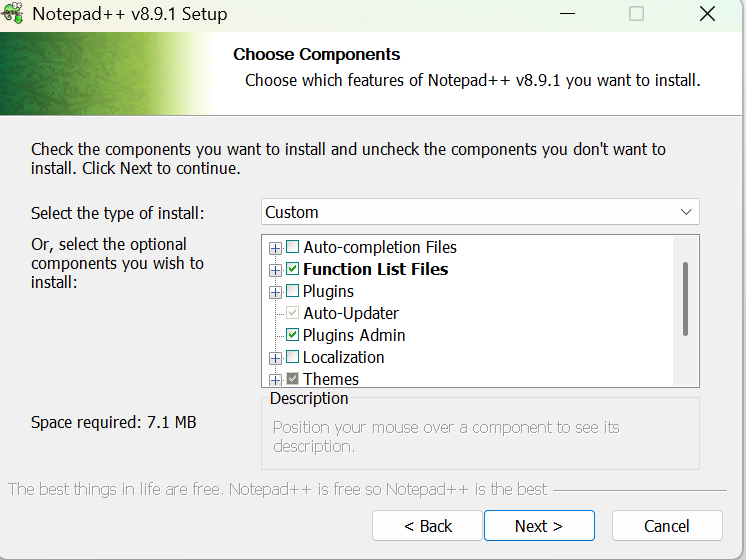
Thank you for the work and clarity. Just one weird question, when I try to install the latest npp (8.9.1 x64), the “Auto-Updater” tickbox is greyed out and I can’t untick it. Strangely, after playing around with this window a bit it allowed me to untick it, but in context of this attack it’s not a great look?
-
… and instant next post: after running the installer, because my previous install did have gup.exe, it should be noted gup was not removed, and npp in fact seems to happily use the old gup.exe now. I’ve verified it’s digital signature (all OK) but still… a bit messy?
-
Hi,
I created a new post not knowing this was already here. I do apologize.
I am totally not in the know on any of these things so my questions are simple and I really can’t find an answer that tells me these things.
As said, I understand very little about these sort of things. To start with:
- I have had Notepad++ installed on my system for years and always have the auto update turned on. Currently Notepad++ is at version 8.9. I am not sure when it updated to that version though.
- I run Windows 11 and there as well, the moment there is an update I get it installed.
- I use Kaspersky Premium to protect my system.
All I want to know are the following 3 things:
1 - How do I know if my system was affected by this?
2 - How do I clean the infection up if my system was affected by this?
3 - What might they have stolen from my PC?They seem simple questions, but the answers I found were not really understandable for me.
-
Your questions were answered in reply to your post. Your questions were answered in the FAQ you were directed to. Your questions were answered earlier in this Topic. Please stop asking the same questions that have already been answered multiple times
-
What is not clear to me is if a user clicks the “?” menu and then select “Update Notepad++”, if the update then is updated through the potentially compromised autoupdater function or if that is the same thing as downloading the MSI and installing it?
“Update Notepad++” command uses auto-updater (GUP.exe).
At the bottom I provide the “simplied” clarification link for the concerned users.@Marten-van-Wezel &
“how to disable the auto-updater” is included in the link of bottom.@Martin-1
Short answer: Normal users are unlikely affected by this incident. Please see the link at the bottom.FYI, the new IoCs (Indicators of Compromise) are published in the following link:
https://notepad-plus-plus.org/news/clarification-security-incident/ -
@Rickard-Ståhl said in autoupdater and connection temp.sh:
What is not clear to me is if a user clicks the “?” menu and then select “Update Notepad++”, if the update then is updated through the potentially compromised autoupdater function or if that is the same thing as downloading the MSI and installing it?
The ? > Update Notepad++ uses the builtin updater function.
In case it wasn’t clear: The function was not compromised. The website was, and for a tiny subset of users, when the website was hacked during the given date range, the website would return incorrect information. The website has been fixed already, so is no longer responding with incorrect information to anyone.
In the interim, the function has been improved to do better checks, so that if the hackers get better than the new website security again, they will not be able to use the same attack vector. That improved code would prevent downloading something based on incorrect information.
If you are running a version older than v8.8.8, the function hasn’t been improved: it’s not inherently “dangerous”, per se, since the website has been fixed; but out of an abundance of caution, the recommendation is to manually go to the official v8.9.1 download page https://notepad-plus-plus.org/downloads/v8.9.1/ which links to the download files stored on GitHub (or to go to the official GitHub releases page https://github.com/notepad-plus-plus/notepad-plus-plus/releases, download the installer yourself, and run the installer yourself, thus ensuring that you get the improved updater. After doing a manual download and installation of v8.9.1, the auto-updater will have the extra security features, and auto-update (or ? > Update Notepad++) will be more secure going forward.
-
@Marten-van-Wezel said in autoupdater and connection temp.sh:
after running the installer, because my previous install did have gup.exe, it should be noted gup was not removed, and npp in fact seems to happily use the old gup.exe now
That’s the worst of both worlds. One of the points of manually downloading and installing v8.9.1 is that you don’t use the old gup for this single installation, but that the newer gup installed with v8.9.1 will have the added security features, so that auto-update will be more secure going forward.
But by what you did, you are now running with the newest
notepad++.exe, which is fine and dandy, but there was nothing wrong or insecure with that; but you are also running with an oldgup.exe, so the updater/installer doesn’t currently have the additional security features, which is a bad thing.Either install the auto-updater when you manually install v8.9.1, so that you have the secure updater going foward, or manually delete the updater executables and dlls from
C:\Program Files\Notepad++\updater(or the whole folder, really) if you don’t ever want auto-updater again. But do not use the mix of new-Notepad++-and-old-gup.exe which you currently have. -
Might be helpful to clarify in the news article that direct website links weren’t compromised (possible since they apparently had server access) and that having auto-updater enabled but refusing the update would not have led to your device being compromised since these were two subtle points that took a bit of digging here to figure out.
-
@Marten-van-Wezel said in autoupdater and connection temp.sh:
the “Auto-Updater” tickbox is greyed out and I can’t untick it.
You couldn’t untick it because of you also had the “Plugins Admin” selected at the same time (which needs the “Auto-Updater” component item for its functionality and thus “Auto-Updater” item cannot be unchecked until you also uncheck the “Plugins Admin”).
@Marten-van-Wezel said in autoupdater and connection temp.sh:
because my previous install did have gup.exe, it should be noted gup was not removed,
Yes, that was a problem before, should be fixed in v8.9+ installers by
https://github.com/notepad-plus-plus/notepad-plus-plus/commit/e89b0be86193c41f8170315ce4f6aa2386e96cf0





Hello! It looks like you're interested in this conversation, but you don't have an account yet.
Getting fed up of having to scroll through the same posts each visit? When you register for an account, you'll always come back to exactly where you were before, and choose to be notified of new replies (either via email, or push notification). You'll also be able to save bookmarks and upvote posts to show your appreciation to other community members.
With your input, this post could be even better 💗
Register Login