Cant change cursor color, and latest version shortcut to start batch file claims it cant find it
-
Hello!
today I upgraded to the latest versions (since years I havent did this) and I have a c:\xxx.bat file starting from a shortcut, and now it claims it doesnt find it. when going back to older version (7.5, 8.0) this works.
also cant change cursor color, I am trying to change it in style configurator global styles -> caret color, doesnt work, theme is set to default, I have an own defined languge styler, but I dont find it in the language list in case it should be changed there. cursor is black.
thanks for any help!
-
@waskoma said in Cant change cursor color, and latest version shortcut to start batch file claims it cant find it:
today I upgraded to the latest versions
Which version do you think is the latest (see FAQ: Most Recent Version)? ie, did you just ? > Update Notepad++ to get v8.9.1? Or was it a few weeks ago, and pointing to v8.8.8 (IIRC)? Because the actual latest is v8.9.2. But if you’re not explicit, we don’t know what definition of “latest” you are using.
(since years I havent did this) and I have a c:\xxx.bat file starting from a shortcut, and now it claims it doesnt find it. when going back to older version (7.5, 8.0) this works.
can you show us the relevant portions of the
<UserDefinedCommands>section ofshortcuts.xml– specifically, the<Command>entry for thec:\xxx.bat… because the way you described your action, there shouldn’t be any change in how a run-menu-command is processed between v8.0 and now.also cant change cursor color, I am trying to change it in style configurator global styles -> caret color, doesnt work, theme is set to default, I have an own defined languge styler, but I dont find it in the language list in case it should be changed there. cursor is black.
It works for me, in both v8.9.1 and v8.9.2.
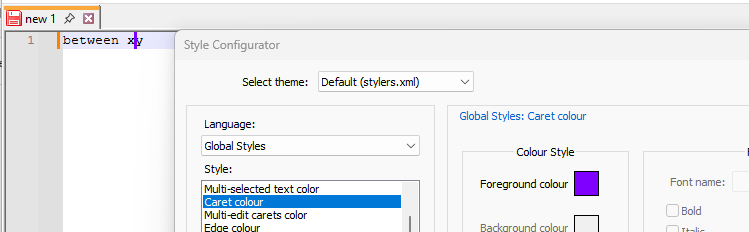
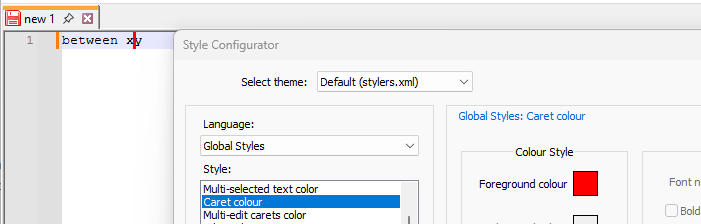
If you have done a multi-select (ctrl+click) to have multiple carets, then you also have to use Multi-Edits Colour, otherwise, they will be separate colors, as in:
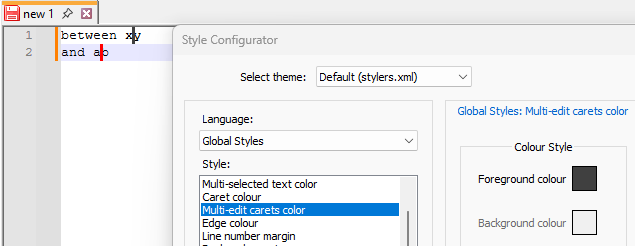
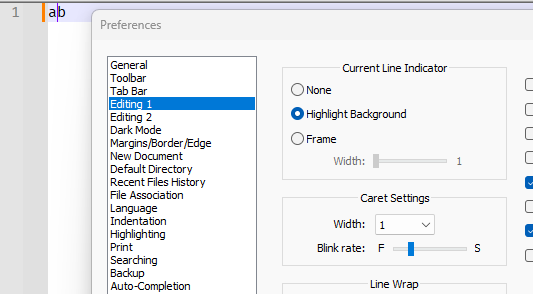
update: also, what are your Settings > Preferences > Editing 1 > Caret settings? Because with width=1, it’s really hard to see, and you just might not notice the change in color. For my screenshots above, I was using width=3 and super-slow blink rate, so that the screenshot would easily show the change in color. But by default, Caret settings look more like this :
-
here is the part from shortcuts.xml:
<Command name="Wikipedia Search" Ctrl="no" Alt="yes" Shift="no" Key="87"> c:\64start.bat $(FILE_NAME) $(NAME_PART).prg "$(CURRENT_DIRECTORY)"</Command>but it must be the version hence going back to older version immediately solves the problem. Currently I have 8.4.1 and it works.
I changed now to 8.9.2. and I immediately get the error again: “the system cannot find the file specified” “command:blabla” “error code2:”
I solved the caret colour problem by using style configurator and then global override, but it was in 8.4.1, I see it looks different now in 8.9.2.
while we’re at it, some years ago probably it was you helping me to get code folding working I want to use:
;blockbegin
;blockendbut that doesnt work again, looking at it at 8.9.2 it seems to recognize it only when there are like above right in the next row to eachother.
allow folding of comments is checked. comment line is set to “,”
line comment position is allow preceding white space
-
@waskoma said in Cant change cursor color, and latest version shortcut to start batch file claims it cant find it:
here is the part from shortcuts.xml:
<Command name="Wikipedia Search" Ctrl="no" Alt="yes" Shift="no" Key="87"> c:\64start.bat $(FILE_NAME) $(NAME_PART).prg "$(CURRENT_DIRECTORY)"</Command>Does your file name and/or directory name have spaces in it? Because their really should be quotes around each of those portions, because file names can have spaces.
but it must be the version hence going back to older version immediately solves the problem. Currently I have 8.4.1 and it works.
I will experiment in a few minutes to see if I can replicate the different behavior.
I changed now to 8.9.2. and I immediately get the error again: “the system cannot find the file specified” “command:blabla” “error code2:”
That sounds like it could be the quoting. But that wouldn’t explain the difference between 8.9.2 vs 8.4.1.
I solved the caret colour problem by using style configurator and then global override, but it was in 8.4.1, I see it looks different now in 8.9.2.
Forcing Global Override on colors is almost always a bad idea.
while we’re at it, some years ago probably it was you helping me to get code folding working I want to use:
…Could you go postI replied to that part in the original topic – it’s better to keep topics on one subject, rather than a random conglomeration. (It’s already hard enough in this discussion with two completely separate concepts in this Topic; let’s not tackle a third.) -
@waskoma said in Cant change cursor color, and latest version shortcut to start batch file claims it cant find it:
<Command name="Wikipedia Search" Ctrl="no" Alt="yes" Shift="no" Key="87"> c:\64start.bat $(FILE_NAME) $(NAME_PART).prg "$(CURRENT_DIRECTORY)"</Command>I cannot replicate the problem (so far)
content of
c:\64start.bat:@echo ran command `%0 %*` @pausecontent of
shortcuts.xmlentry:<Command name="Waskoma Command" Ctrl="no" Alt="yes" Shift="no" Key="87">c:\64start.bat $(FILE_NAME) $(NAME_PART).prg "$(CURRENT_DIRECTORY)"</Command>I tried with two files each, once with v8.4.1 and once with v8.9.2.
For
...\FileNameNoSpaces.txt:v8.4.1 results: ran command `"C:\64start.bat" FileNameNoSpaces.txt FileNameNoSpaces.prg "C:\usr\local\apps\npp\npp.8.4.1.waskoma"` Press any key to continue . . . v8.9.2 results: ran command `"C:\64start.bat" FileNameNoSpaces.txt FileNameNoSpaces.prg "C:\usr\local\apps\npp\npp.8.9.2.waskoma"` Press any key to continue . . .For
...\File Name With Spaces.txt:v8.4.1 results: ran command `"C:\64start.bat" File Name With Spaces.txt File Name With Spaces.prg "C:\usr\local\apps\npp\npp.8.4.1.waskoma"` Press any key to continue . . . v8.9.2 results: ran command `"C:\64start.bat" File Name With Spaces.txt File Name With Spaces.prg "C:\usr\local\apps\npp\npp.8.9.2.waskoma"` Press any key to continue . . .So both worked for me, and Notepad++ had no trouble running the
64start.bat, whether in v8.4.1 or v8.9.2However, this works on the assumption that there wasn’t really the newline before
c:\64start.batin your XML. It shouldn’t matter, but it also shouldn’t be there; so if there is the extra newline, delete it.Also, my test works on the assumption that your
64start.batwill do the “right thing” with spaces in the filename without quotes, which I am highly dubious of. My working theory is that the problem is actually either the missing quotes, or something that’s being called inside your batch file.Notepad++ has been undergoing changes in which XML reader library it is using for parsing the config files like
shortcuts.xml… so if you’ve actually got that newline, or if you have more entities than"which you haven’t told us about, it might be behaving differently between the two, and that might explain the difference in behavior.As an experiment, if removing the newline wasn’t enough to fix it, you might want to try renaming your
64start.batand putting in a new version that’s got my contents. If it properly runs and gives similar results to what I showed in my experiment, then the problem is likely the quoting. If it doesn’t properly run, even though you are using the same<Command...>entry, then I am betting you edited your command entry before posting it here, and whatever you edited out is the culprit.


Hello! It looks like you're interested in this conversation, but you don't have an account yet.
Getting fed up of having to scroll through the same posts each visit? When you register for an account, you'll always come back to exactly where you were before, and choose to be notified of new replies (either via email, or push notification). You'll also be able to save bookmarks and upvote posts to show your appreciation to other community members.
With your input, this post could be even better 💗
Register Login