Clipboard content is lost after using Ctrl+L (Delete Line)
-
I believe there is a bug related to the clipboard.
Steps to reproduce:
- Select some text in Notepad++.
- Press Ctrl+C to copy it to the clipboard.
- Move the cursor to any line.
- Press Ctrl+L (Delete Line).
Expected result:
The clipboard content should remain unchanged.Actual result:
The clipboard content becomes empty and the previously copied text is lost.Notes:
The issue happens even if Ctrl+L is used only once after copying.
It seems that deleting a line clears the clipboard content.Environment:
Notepad++ version: 8.9.1 (64bit)
OS: Windows 10 -
Hello, @mateusz-kowalski and All,
By default, the
Ctrl + Loperation is a Scintilla command which just CUT the current line contentsThus, obviously, a
Ctrl + Voperation just restores this cut line
If you need to preserve the previous status of the clipboard, use, first, the default
Ctrl + Shift + Lshortcut which deletes the current line contentsThen, the use of the
Ctrl + Voperation will correctly paste the clipboard contents !Best Regards,
guy038
-
@Mateusz-Kowalski said:
The clipboard content becomes empty
It’s probably not empty.
It probably contains a single line-ending.
You likely moved your caret to a line with no content, before issuing the Ctrl+L. -
Okay thx. I understand, sorry for the false alarm.
Best Regards, -
The User Manual’s section on those scintilla editing commands has been updated to include Notepad++'s default keystrokes for them, so we can more easily point users to the fact that
Ctrl+Lis LINECUT vsCtrl+Shift+Lis LINEDELETE.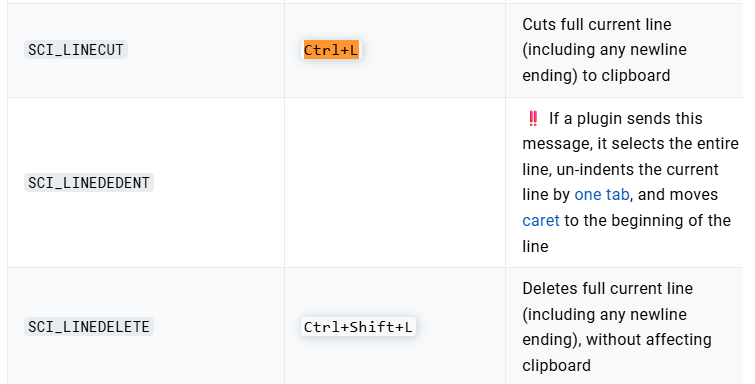
-
@Mateusz-Kowalski said in Clipboard content is lost after using Ctrl+L (Delete Line):
Mateusz Kowalski
Mar 8, 2026, 6:58 PMI believe there is a bug related to the clipboard.
Steps to reproduce:
Select some text in Notepad++.
Press Ctrl+C to copy it to the clipboard.
Move the cursor to any line.
Press Ctrl+L (Delete Line).
Expected result:
The clipboard content should remain unchanged.Actual result:
The clipboard content becomes empty and the previously copied text is lost.Notes:
The issue happens even if Ctrl+L is used only once after copying.
It seems that deleting a line clears the clipboard content.Environment:
Notepad++ version: 8.9.1 (64bit)
OS: Windows 10
Hi Mateusz,Thank you for the detailed report and the clear reproduction steps.
I tested the behavior you described. In Notepad++ the Ctrl+L (Delete Line) command internally performs a cut-like operation, which means the deleted line is temporarily placed into the clipboard. As a result, it replaces the content that was previously copied with Ctrl+C. This is why the clipboard appears empty or different after deleting a line.
So the clipboard is not actually being cleared by a bug. It is being overwritten by the delete-line operation.
Possible workarounds:
- Use Ctrl+Shift+L (if configured) or another plugin/command that deletes the line without copying it.
- Alternatively, copy the text again after performing line deletions if you still need it in the clipboard.
If preserving clipboard content during line deletion is important, it could be considered as a feature request rather than a bug.
Thanks again for reporting and providing the environment details.
-
I tested the behavior you described. In Notepad++ the Ctrl+L (Delete Line) command
That is wrong terminology, as already described above.
Ctrl+Lis Line Cut, not Line Delete. To use the wrong terms causes confusion for everyone. From the OP, it was acceptible, because they didn’t know better. But to post like you are an authority, but to use the incorrect terminology, is detrimental to yourself and anyone who reads the answers here.internally performs a cut-like operation,
Of course it does. It’s literally Line Cut, so it definitionally affects the clipboard
which means the deleted line is temporarily placed into the clipboard.
It’s no more “temporarily” on the clipboard than any
Ctrl+CorCtrl+Xis “temporarily” in the clipboard. It’s in the clipboard until something else replaces it, just like every other clipboard action.- Use Ctrl+Shift+L (if configured) or another plugin/command that deletes the line without copying it.
Did you come up with that alternative all on your own, or did you just reiterate what @guy038 and I had already said?
- Alternatively, copy the text again after performing line deletions if you still need it in the clipboard.
That’s horrible advice.
If preserving clipboard content during line deletion is important, it could be considered as a feature request rather than a bug.
No it couldn’t, because the feature already exists. Line Delete already exists as
Ctrl+Shift+L: use Line Delete if you don’t want to affect the clipboard, and Line Cut if you do want to affect the clipboard.@Evelyn-Walker , make sure you are not using LLM or GPT or any other AI to write your posts for you: that’s expressly forbidden in this forum.





Hello! It looks like you're interested in this conversation, but you don't have an account yet.
Getting fed up of having to scroll through the same posts each visit? When you register for an account, you'll always come back to exactly where you were before, and choose to be notified of new replies (either via email, or push notification). You'll also be able to save bookmarks and upvote posts to show your appreciation to other community members.
With your input, this post could be even better 💗
Register Login