Is there any way to disable the cursed "In selection" checkbox forever?
-
I rarely use the “In selection” checkbox and Notepad++ constantly checks it every time I select even a single character and it’s driving me insane. If I wanted to use it I would manually check it. Is there any way to stop this annoying behavior?
-
Settings > Preferences > Searching > Minimum Size for Auto-Checking “in selection”:
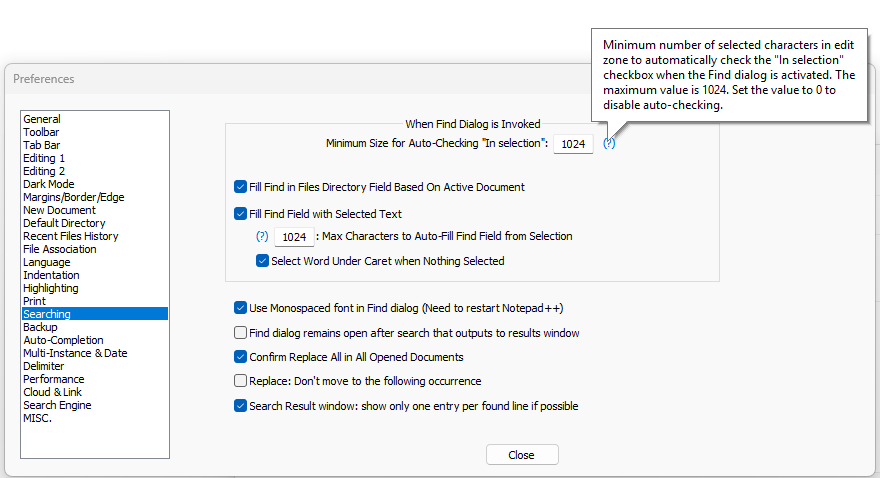
It defaults to 1024, meaning you need to select at least 1024 characters in order to get it to checkmark the “in selection” box with the default setting. If you changed it to a lower number (like “1”), that would explain why it always auto-checks that box.
And if you really want never, instead of >=1024, then set that to
0, as it says when you hover your mouse cursor over the(?)and in the user manual’s section on the “Searching” preferences. -
@PeterJones I didn’t even know this setting exists. It seems that when I select all the text (which should exceed that default number), the box stays checked even after I stop selecting. Making it 0 seems to do the trick.
-
@Võ-Văn-Hiếu said:
It seems that when I select all the text (which should exceed that default number), the box stays checked even after I stop selecting.
I’m not quite sure what your meaning is here, but…
…and I presume that when you say “default number”, you mean 1024…
The In selection checkbox isn’t truly dynamic; it isn’t going to change while you are selecting text. It only changes when you invoke search, and here are some examples of that:
- input focus in the editing area and you press Ctrl+f
- input focus in the editing area with Find window also visible, and you use the mouse to activate the Find window



Hello! It looks like you're interested in this conversation, but you don't have an account yet.
Getting fed up of having to scroll through the same posts each visit? When you register for an account, you'll always come back to exactly where you were before, and choose to be notified of new replies (either via email, or push notification). You'll also be able to save bookmarks and upvote posts to show your appreciation to other community members.
With your input, this post could be even better 💗
Register Login