Is there a way to recover a file after clicking YES in "this file had been modified by another program" error message?
-
I’m facing a problem similar to the one described in this unanswered thread (link). I had a .txt file in Notepad++ where I stored summaries from a course, and I received the error message: “This file has been modified by another program.” I usually click “No,” but this time I accidentally clicked “Yes” without realizing it. As a result, my file was almost completely wiped, it originally had 2,000 lines and now only has 490. I know this was entirely my fault, but is there any way to recover the original file from somewhere? I tried checking the backup folder but didn’t find anything.
-
As I said there: “If you did not have a separate backup plan, then the data is likely gone.” That doesn’t seem “unanswered” to me.
The backup FAQ, which I linked to in that conversation, explains all the possible backup systems that Notepad++ has, and how to check if those were enabled, and where to look for the backups if they exist. If they don’t exist , but previously did, the recovery software might help, but not likely.
Other than that, there’s nothing we or Notepad++ can do to recover the data. Sorry to be the bearer of bad news.
-
Unfortunately it doesn’t help you with your current data loss, but there is now at least a partial safety measure taken for this situation in the upcoming v8.9.3 - for the case of a modified file, that Reload-dialog offered default answer has been changed from YES to NO:
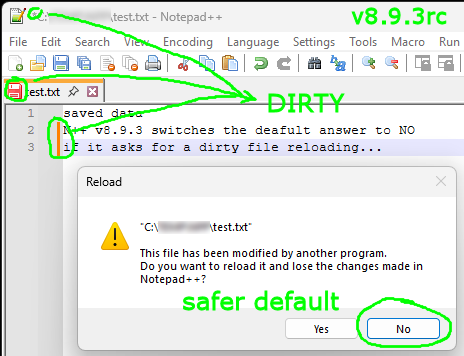
For unmodified files, the default remains YES.
-
@Dervars14 Just checked and unfortunately the undo, ^Z, does not work. This used to be a more common occurance in the old days, Prior to Windows 7 and back in the DOS days, there was no checking to see if wanted to keep a file, it just got overwritten even if a totally different file, but just had the same name. The way we used to get around this is with a recovery program. The good thing is for a long time, whenever you save a file, it actually saves it to a different area of the dirve, precisely for this kind of incedent.
First important thing is don’t do any work on that drive, if the data is still there, it is not protected, the more you use the computer, the more likelihood those clusters of the drive will get overwritten.
I don’t think Windows has any internal programs, other than the Recycle bin, which is no use here, as overwritten files aren’t placed there. There is a free program called Recuva, from Piriform, the same people that do CCleaner. If possible, try and download this on another computer to a USB drive, as I said, the more work you do on the drive, the chance of losing the data.
The other good thing with using another machine, is you quickly play around with recuva, it is very basic program, the results are in table form, so easy to rearrange. You can save any detected files to the USB drive as well. If you get the file back, then just replace the current one. And this is the way to all learn to do backups more regularly, which reminds me.




Hello! It looks like you're interested in this conversation, but you don't have an account yet.
Getting fed up of having to scroll through the same posts each visit? When you register for an account, you'll always come back to exactly where you were before, and choose to be notified of new replies (either via email, or push notification). You'll also be able to save bookmarks and upvote posts to show your appreciation to other community members.
With your input, this post could be even better 💗
Register Login