Daily Reliability Monitor events
-
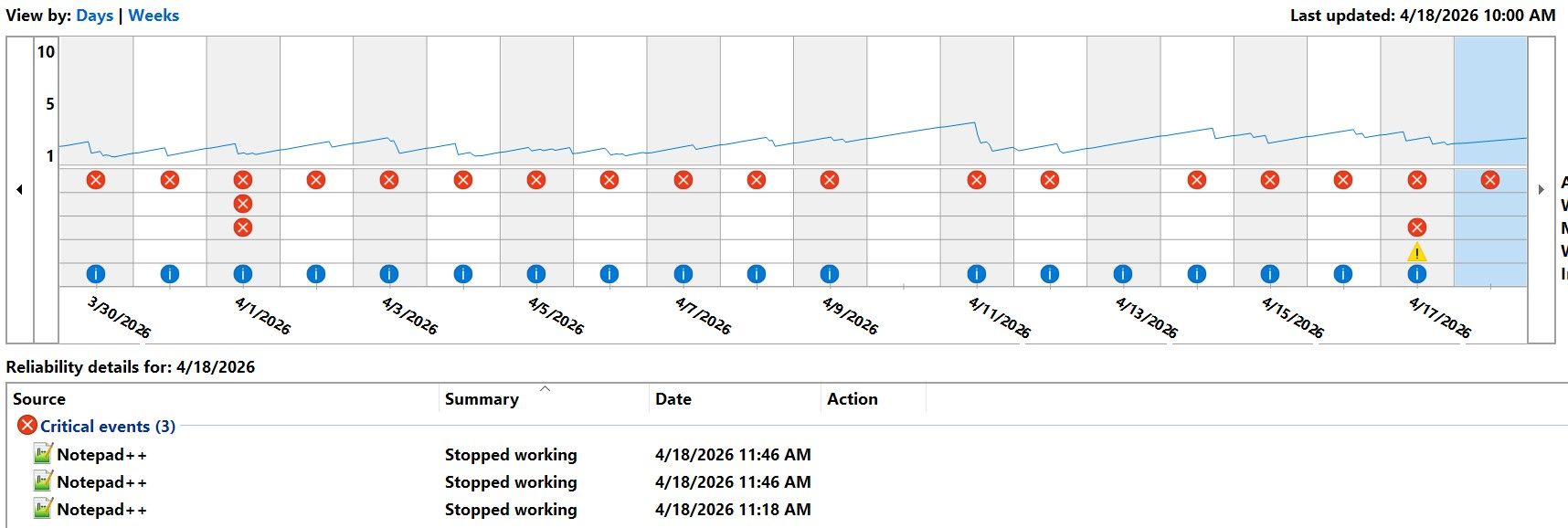
Is this normal? The vast majority of the red flags are Notepad++
-
@mapsonx ,
I don’t know that tool, so I don’t know what it considers a “critical event”, or what “stopped working” means.
You also don’t say what version of Notepad++ you are using (especially whether or not you are still using the portableapps modification or the official), nor what plugins you may have installed (which can highly affect stability).
But in my experience, Notepad++ doesn’t just “stop working”, except in cases of rare critical bugs, or plugin misbehavior, or user error.
update: Wow, I’d never heard of the Windows Reliability Monitor before. On mine, I see no Notepad++ events. On the events that I do have, some show a “View technical details” link, which brings a crash report which has meaningful information: it’s too bad that yours don’t appear to have that link. The format of that window appears similar to the details obtainable from the Event Viewer – so maybe you can find details for one or more of those evens from that MS tool, and see if that gives you any hints, or share the details so that someone here might be able to give you insight (I know that @xomx has been able to help interpret Event Viewer details before, and that has even led quickly to a PR to fix the bug).
-
That “Stopped working” is a common overall expression there for the app crashes, hungs etc.
So @mapsonx should open that “details” you mentioned or simply launch the Windows EventViewer, i.e.:- press WinKey+R to invoke the Windows Run-dialog
- copy & paste there:
eventvwr.msc /c:"Application"and click OK - wait for the Event Viewer launching and attaching to OS logs
- search/filter there for “Error”
Levelrecords (or simply follow the ReliabilityMonitor published date/time of the N++ problem), with “notepad++.exe” within - app crashes usually have as log
Source“Application Error”, frozen apps “Application Hang”
Then publish here what the content of such a record tell us, e.g.:
Faulting application name: notepad++.exe, version: 8.9.3.0, time stamp: 0x69bc8a94
Faulting module name: USER32.dll, version: 10.0.19041.6926, time stamp: 0xcd1afcbd
Exception code: 0xc0000005
Fault offset: 0x00000000000467cd
Faulting process id: 0x296c
Faulting application start time: 0x01dcce3ba0a16cb7
Faulting application path: ...\npp.8.9.3.portable.x64\notepad++.exe
Faulting module path: C:\Windows\System32\USER32.dll



Hello! It looks like you're interested in this conversation, but you don't have an account yet.
Getting fed up of having to scroll through the same posts each visit? When you register for an account, you'll always come back to exactly where you were before, and choose to be notified of new replies (either via email, or push notification). You'll also be able to save bookmarks and upvote posts to show your appreciation to other community members.
With your input, this post could be even better 💗
Register Login