Issues with the Preview HTML plugin
-
Hi @robk-blue,
I have also had some issues with this plugin before. From the project history, it looks like Preview HTML has been around for quite a long time, and the original project was later deprecated, so some problems are maybe not so surprising.
The current fork still tries to keep it usable, but the embedded preview can depend a lot on the Notepad++ version, the Windows browser component being used, and the local system setup. Because of this, modern HTML, CSS, and JavaScript do not always behave exactly like in a real browser.
One thing I noticed is that the project still seems to carry some compatibility logic from older browser assumptions, so the result can differ from one machine to another.
If the live preview is not reliable, the more stable way is often
View -> View Current File In -> Browser, and then using a normal browser for testing.So for me, the main issue is not really that the plugin is bad, but more that it is operating in an area where browser behavior, Windows web components, and Notepad++ compatibility have all changed quite a lot over time.
Hope that helped!
-
In fact, internal anchors are navigable if the preview is being rendered by the WebView2 embedded browser — the default in current plugin versions, provided that Edge is installed on the PC and the
NoEdgeuser option is not enabled.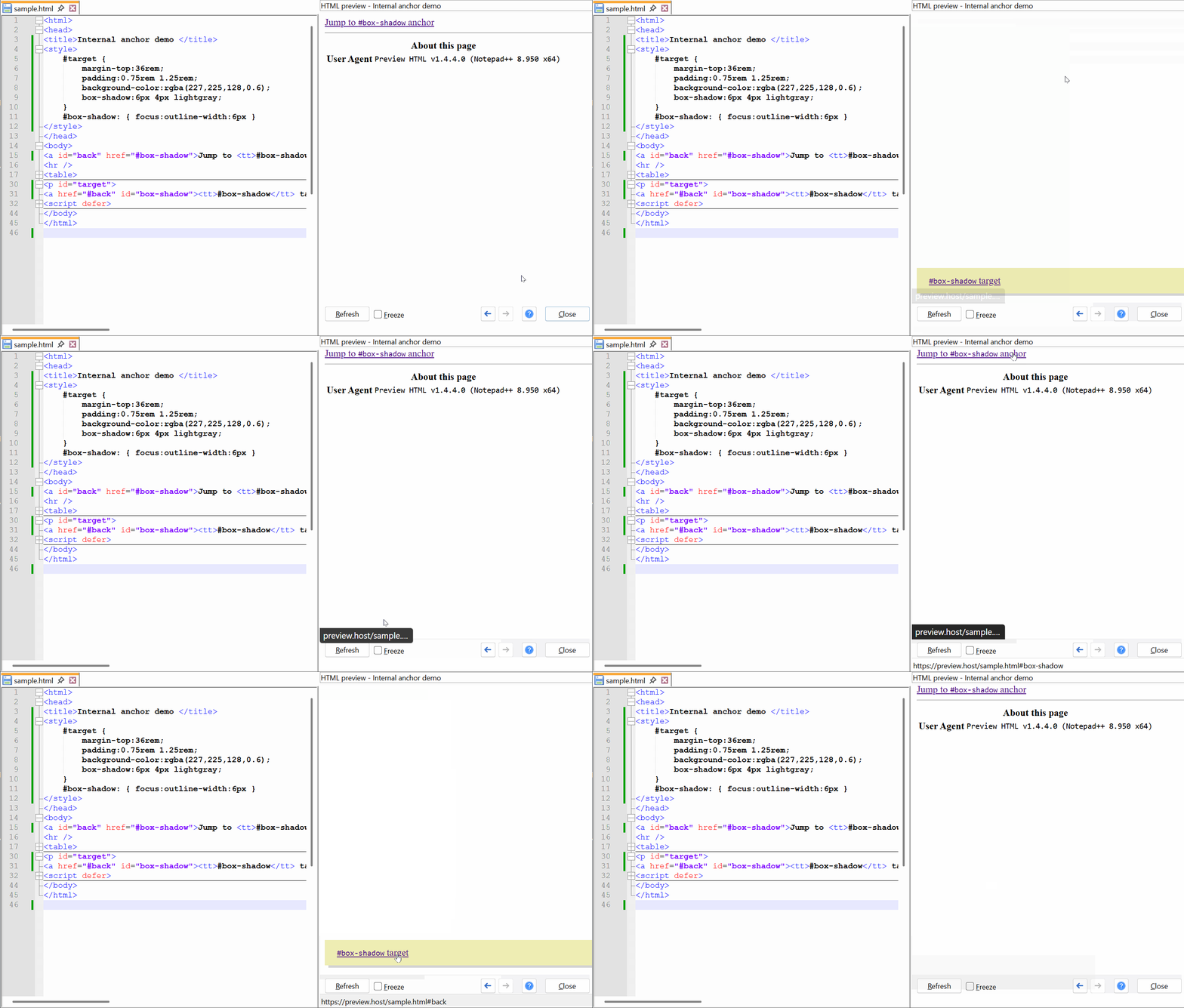
Additional questions/concerns can be posted here.
-
Hi,
Thanks for your quick responses. After reading @rdipardo response and then trying to download and install the latest version of Preview HTML from Github, I simply went into Plugins Admin and updated there.
Now it works lol.
-
And this morning I woke up to my html previewer not working at all! Just a blank screen. I updated Notepad++, reinstalled the plugin, no dice.
Are there any logs or debugging for plugins?
-
[T]his morning I woke up to my html previewer not working at all! Just a blank screen.
Sounds like an earlier reported issue.
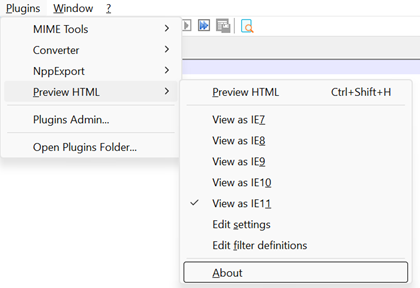
In addition to my suggestions in that thread, make sure the plugin version is 1.4.4, then open the About dialog to see what browser version is detected:
Are there any logs or debugging for plugins?
Logging is only active when the plugin is built in debug mode. I don’t distribute debug DLLs because the additional instrumentation code usually gets flagged by virus scanners.
-
In fact, internal anchors are navigable if the preview is being rendered by the WebView2 embedded browser — the default in current plugin versions, provided that Edge is installed on the PC and the
NoEdgeuser option is not enabled.Additional questions/concerns can be posted here.
I’m having trouble installing the 1.44 version you linked. It has no .dll file that Windows would use. What am I missing?
-
I’m having trouble installing the 1.44 version you linked.
If your version of Notepad++ is at least 8.9.4, you can use the built-in Plugins Admin installer:
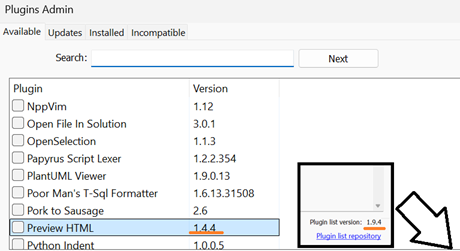
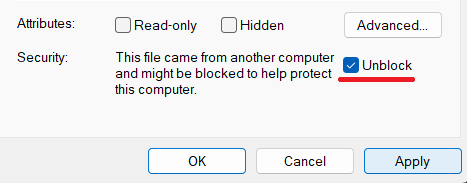
It has no .dll file that Windows would use.
If you’re talking about a ZIP archive you got from the plugin’s GitHub page, my guess is that some anti-virus program is putting the DLL in quarantine as soon as you extract it, or else the extracted DLL needs to be cleared of a Web origin designator:
-
@rdipardo
My Notepad++ says it’s up to date at 8.9.3 and the Preview HTML plugin shows 1.4.3 as its version in Plugins Admin!And there’s part of the problem, your earlier link to ‘current plugin versions’ is different to the one just above (GitHub page) which has the DLL file. Sweet !
Screenshot - 17_05_2026 , 12_41_07 PM.png
OK, I downloaded it and manually installed 1.4.4. It’s working for the moment.
Thanks a bunch.
-
My Notepad++ says it’s up to date at 8.9.3
Notepad++ has actually released two versions since v8.9.3, they just haven’t been triggered for auto-update, so the Check For Updates won’t show them.
-
@PeterJones OK, I didn’t know that.
.8.9.4 and .5 both broke my PreviewHTML plugin, installing back to 8,9,3 fixed it. So, there you go.
-
Hi All,
I’m not sure what’s happening, but every morning when I open NP++ for the first time, PreviewHTML isn’t working. I tried reinstalling the plugin again, no fix.
Any suggestions?
-
Any suggestions?
Usually the Notepad++ Debug Info dialog is the best place to start:
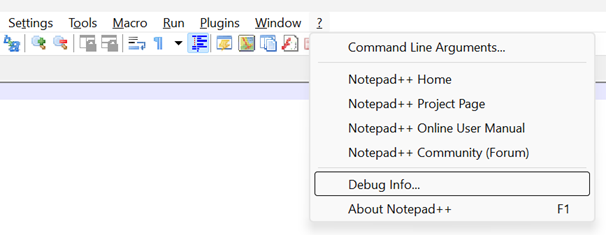
Click Copy debug info to clipboard and share the details in a new post.
Some plugin-specific things include:
- Is Microsoft Edge installed?
Launch PowerShell or the Command Prompt and enter:
reg query "HKEY_LOCAL_MACHINE\SOFTWARE\WOW6432Node\Microsoft\EdgeUpdate\Clients\{F3017226-FE2A-4295-8BDF-00C3A9A7E4C5}" /v LocationOr simply launch File Explorer and try to locate this folder:
C:\Program Files (x86)\Microsoft\EdgeWebView\Application- Is your
config.xmlfile trying to relaunch the preview panel automatically when Notepad++ starts up?
Go here for instructions on how to find out.
If you have a GitHub account, please consider posting your findings to the issue tracker I mentioned before.
-
C:\Program Files (x86)\Microsoft\EdgeWebView\Application
Yes, Edge is installed and tested via your suggested queries.
What config.xml file are referring to?
-
What config.xml file are referring to?
At the link I provided in my last message you will find the following:
-
[To l]ocate your
config.xmlfile:-
%AppData%\Notepad++\config.xml, if you installed Notepad++ for all users; or -
$(PORTABLE_NPP_DIR)\config.xml, if it’s a portable installation
-
-
Find and remove the
PluginDlgelement with the attributepluginName="PreviewHTML.dll", for example:
<!-- config.xml -->

    <GUIConfig name="DockingManager" leftWidth="200" rightWidth="168" topHeight="200" bottomHeight="124">
        <FloatingWindow cont="4" x="257" y="440" width="916" height="686" />
        <FloatingWindow cont="5" x="161" y="206" width="761" height="606" />
    <!--
      Remove:
        <PluginDlg pluginName="PreviewHTML.dll" id="0" curr="1" prev="-1" isVisible="yes" />
    -->
        <PluginDlg pluginName="Notepad++::InternalFunction" id="44085" curr="1" prev="-1" isVisible="no" />
    </GUIConfig>
Yes, Edge is installed
O.K. What about the Notepad++ debug info?
-
-
I found that entry in the config.xml file so I removed it. However, the entry is rewritten every time you open and close the app. The only difference is that ‘isvisble’ changes between yes and no.
The upshot is, if I close the PreviewHTML pane before closing NP, it will work when I open the app next time.
Debug
Notepad++ v8.9.3 (64-bit)
Build time: Mar 20 2026 - 00:44:25
Scintilla/Lexilla included: 5.6.0/5.4.7
Boost Regex included: 1_90
pugixml included: 1.15
nlohmann JSON included: 3.12.0
Path: C:\Program Files\Notepad++\notepad++.exe
Command Line: “C:\Users\Akm\AppData\Roaming\Notepad++\config.xml”
Admin mode: OFF
Local Conf mode: OFF
Cloud Config: OFF
WinGUp: present
disableNppAutoUpdate.xml: absent
Periodic Backup: ON
Placeholders: OFF
Scintilla Rendering Mode: SC_TECHNOLOGY_DIRECTWRITE (1)
Multi-instance Mode: monoInst
asNotepad: OFF
File Status Auto-Detection: cdEnabledNew (for current file/tab only)
Dark Mode: OFF
Display Info:
primary monitor: 1920x1080, scaling 100%
visible monitors count: 2
installed Display Class adapters:
0000: Description - Intel® UHD Graphics
0000: DriverVersion - 31.0.101.2135
0001: Description - DisplayLink USB Device
0001: DriverVersion - 9.3.2992.0
0002: Description - DisplayLink USB Device
0002: DriverVersion - 9.3.2992.0
OS Name: Windows 10 Pro (64-bit)
OS Version: 22H2
OS Build: 19045.6466
Current ANSI codepage: 1252
Plugins:
AutoSave (2)
DSpellCheck (1.5)
mimeTools (3.1)
NavigateTo (2.7.1)
NppConverter (4.7)
NppExport (0.4)
NppTextFX (0.2.4)
PreviewHTML (1.4.4)
_CustomizeToolbar (5.3) -
If I close the PreviewHTML pane before closing NP, it will work when I open the app next time.
Yes, closing it before quitting will stop the Docking Manager from trying to relaunch it. I’m guessing you also have an active session of unsaved files? I’m not sure, but it could be that reloading files from a session doesn’t trigger a preview refresh the way that manually opening the file does. If it happens again, just save the file and reload it with
Ctrl+R.Another thing is that your version of TextFX is really old. For reference, version 0.2.6 has been incompatible with Notepad++ for several years: https://sourceforge.net/p/npp-plugins/bugs/354
You should remove or rename the
NppTextFXplugin folder, open the Plugins Admin installer, and download it again from the current source: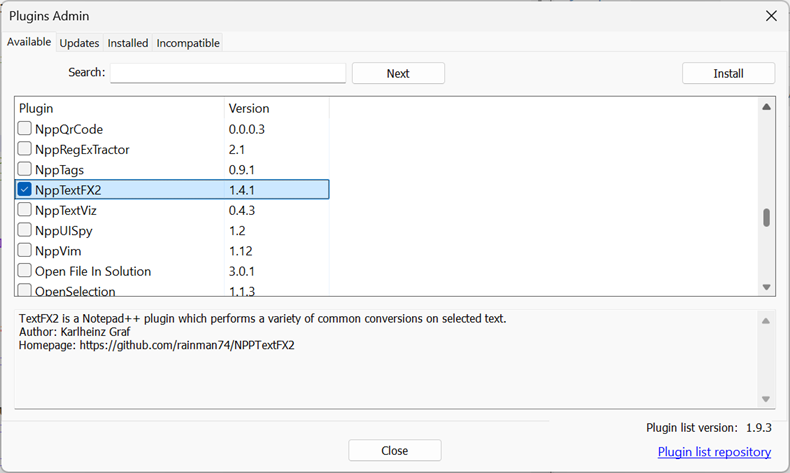




Hello! It looks like you're interested in this conversation, but you don't have an account yet.
Getting fed up of having to scroll through the same posts each visit? When you register for an account, you'll always come back to exactly where you were before, and choose to be notified of new replies (either via email, or push notification). You'll also be able to save bookmarks and upvote posts to show your appreciation to other community members.
With your input, this post could be even better 💗
Register Login