On selection - open file does not working
-
Hello,
we have just found that function - “on selection - open file” does not working.Notepad++ v8.9.6.4 (64-bit)
Build time: Jun 3 2026 - 23:47:49
Scintilla/Lexilla included: 5.6.2/5.4.9
Boost Regex included: 1_90
pugixml included: 1.15
nlohmann JSON included: 3.12.0
Path: C:\Program Files\Notepad++\notepad++.exe
Command Line: “Z:\TEAM\oem\stellantis\26_med_RTB\cae\fem\job\K2\M01\cae02\Accidental_common_cases\A-2R1L.inp”
Admin mode: OFF
Local Conf mode: OFF
Cloud Config: OFF
WinGUp: absent
disableNppAutoUpdate.xml: absent
Periodic Backup: OFF
Placeholders: OFF
Scintilla Rendering Mode: SC_TECHNOLOGY_DIRECTWRITE (1)
Multi-instance Mode: multiInst
asNotepad: OFF
File Status Auto-Detection: cdEnabledNew (for current file/tab only)
Dark Mode: OFF
Display Info:
primary monitor: 2560x1440, scaling 100%
visible monitors count: 2
installed Display Class adapters:
0000: Description - Intel® UHD Graphics
0000: DriverVersion - 32.0.101.7077
0001: Description - NVIDIA RTX A1000 Laptop GPU
0001: DriverVersion - 32.0.15.9608
OS Name: Windows 11 Enterprise (64-bit)
OS Version: 25H2
OS Build: 26200.8390
Current ANSI codepage: 1252
Plugins:
AnalysePlugin (1.14.54)
ComparePlugin (2.0.2)
JSMinNpp (1.2503)
mimeTools (3.1)
NppConverter (4.7)
NppExport (0.4)
XMLTools (3.1.1.13) -
we have just found that function - “on selection - open file” does not working
It works for me. I have a file called
C:\usr\local\apps\npp\npp.8.9.6.4.portable.x64\license.txtIf I have that text selected in Notepad++ v8.9.6.4, and do Edit > On Selection > Open File, it opens the license file.
Can you show an example that doesn’t work, including a screenshot showing the exact selection, along with a directory listing proving you have that file? Like I provide below:

C:\usr\local\apps\npp\npp.8.9.6.4.portable.x64>dir *.txt Volume in drive C is OS Volume Serial Number is AA11-1111 Directory of C:\usr\local\apps\npp\npp.8.9.6.4.portable.x64 01/29/2026 07:34 PM 35,500 license.txt 01/29/2026 07:34 PM 1,526 readme.txt 2 File(s) 37,026 bytes 0 Dir(s) 445,432,713,216 bytes free -
 X xomx referenced this topic on
-
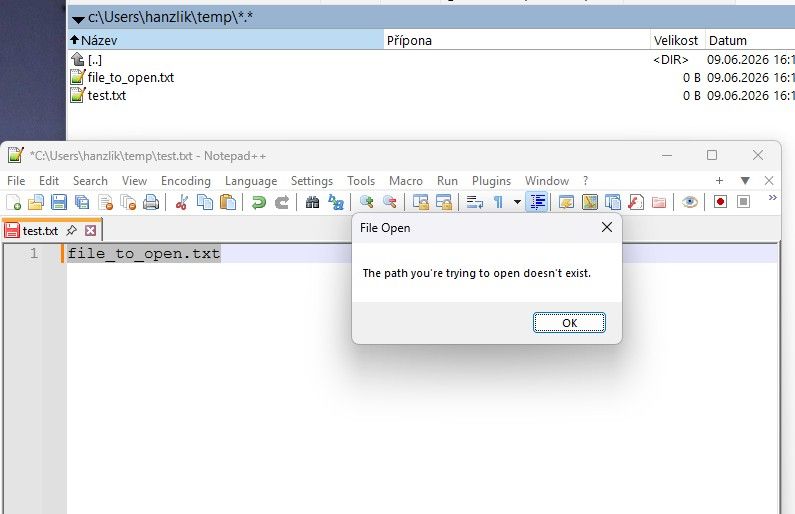
@PeterJones yes, here is the screen shot!
-
Okay, @xomx was right (in this other topic) – you are having a problem with relative file opening, which other people are as well. They are working on fixing the bug, so it should work again in the next version.
-
@PeterJones Thank you very much.


Hello! It looks like you're interested in this conversation, but you don't have an account yet.
Getting fed up of having to scroll through the same posts each visit? When you register for an account, you'll always come back to exactly where you were before, and choose to be notified of new replies (either via email, or push notification). You'll also be able to save bookmarks and upvote posts to show your appreciation to other community members.
With your input, this post could be even better 💗
Register Login