unsaved change star symbol
-
Some of my opened files are prefixed with a star “*”. As far as I understood it should indicate an unsaved change.
But there’s no unsaved change. Both the “Save” button and the “Save” menu item are greyed out.
Additionally I found out, that depending on the position of the file window the star appears or disappears. This also happens to the non active file windows.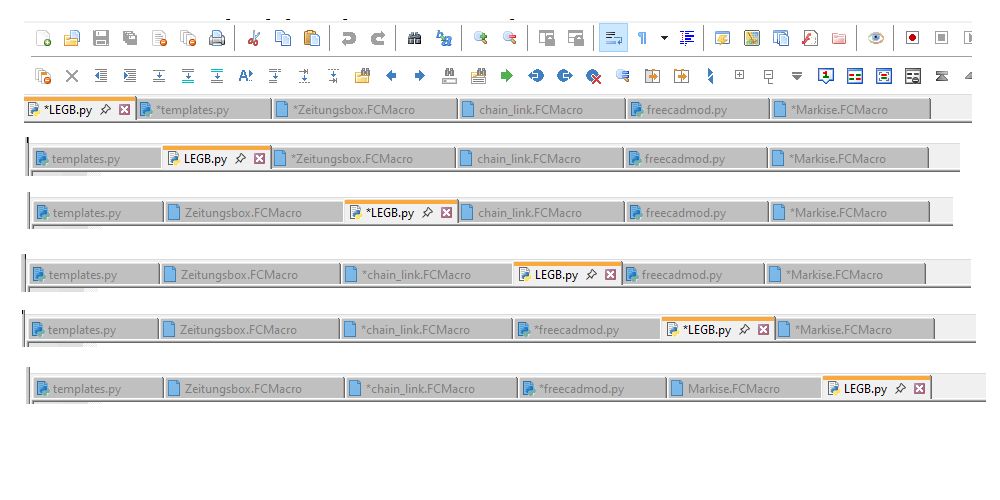
Notepad++ v8.9.3 (64-bit)
Build time: Mar 20 2026 - 00:44:25
Scintilla/Lexilla included: 5.6.0/5.4.7
Boost Regex included: 1_90
pugixml included: 1.15
nlohmann JSON included: 3.12.0
Path: C:\Program Files\Notepad++\notepad++.exe
Command Line: “C:\Users\peter\Documents\CAD\macro001.FCMacro”
Admin mode: OFF
Local Conf mode: OFF
Cloud Config: OFF
WinGUp: present
disableNppAutoUpdate.xml: absent
Periodic Backup: ON
Placeholders: OFF
Scintilla Rendering Mode: SC_TECHNOLOGY_DEFAULT (0)
Multi-instance Mode: monoInst
asNotepad: OFF
File Status Auto-Detection: cdEnabledNew (for current file/tab only)
Dark Mode: OFF
Display Info:
primary monitor: 1920x1080, scaling 100%
visible monitors count: 2
installed Display Class adapters:
0001: Description - Intel® HD Graphics 4000
0001: DriverVersion - 10.18.10.4358
0002: Description - NVIDIA GeForce GT 640M
0002: DriverVersion - 22.21.13.8205
OS Name: Windows 10 Pro (64-bit)
OS Version: 22H2
OS Build: 19045.6466
Current ANSI codepage: 1252
Plugins:
ComparePlus (2.2)
MenuIcons (2.0.7)
mimeTools (3.1)
NppConverter (4.7)
NppExport (0.4)
NppSnippets (1.7.1)
_CustomizeToolbar (5.3) -
MenuIcons (2.0.7)
This is most likely not a N++ issue but that plugin one:
https://github.com/notepad-plus-plus/notepad-plus-plus/issues/16798
https://github.com/notepad-plus-plus/notepad-plus-plus/issues/16867files are prefixed with a star “*”
This is not a N++ feature but that plugin one. Seems it causes more problems than benefits:
https://github.com/francostellari/NppPlugins/issues/71#issuecomment-4321741836

Hello! It looks like you're interested in this conversation, but you don't have an account yet.
Getting fed up of having to scroll through the same posts each visit? When you register for an account, you'll always come back to exactly where you were before, and choose to be notified of new replies (either via email, or push notification). You'll also be able to save bookmarks and upvote posts to show your appreciation to other community members.
With your input, this post could be even better 💗
Register Login