Need help with find and replace using wildcards and in multiple files
-
Fellow Notepad++ Users,
Could you please help me the following search-and-replace problem I am having?
I am trying to replace data under the following format in multiple files, and in multiple occurrences in single files;
split = 30 40 30
The “split” in each instance is not always the same.I want to replace every occurrence with the following
split = 33 34 33.
Please help, thank you.
-
@Paul-Klaes Are there only 3 digits to be replaced every time? Does the line beginning with the term, “split” end with numbers? Please give a before and after (expected solution) example. If there are only 3 digits, you can hit ctrl+h on your keyboard, click on the, “Find in Files” tab, put
(split =) \d+ \d+ \d+in the Find field and$1 33 34 33in the Replace field, tick (check) the Regular expression mode and hit the Replace all button. You have to ensure that you select which folder you want to do this in correctly!
Explanation:$1represents the capturing group 1 which is what is in parentheses that is used in the “Find field”, in this case, “split =” -
Yes, it is always 3 numbers, it represents a population split among the 3 defined classes for each province in a computer game; and I’m trying for a uniformity among provinces in the mod I’ve created.
-
@Paul-Klaes So, does the solution I provided solve your problem?
-
I can’t tell, it runs like it is making the changes, but it isn’t saving the changes. How do you get it to save the changes?
-
@dr-ramaanand I can’t tell if it is working. It runs like it is doing something, but it doesn’t save the changes in the files. How do I tell it to save changes? I’ve tried it both under the “Folder as workspace” and by simply opening notepad++ regularly.
-
@dr-ramaanand I made a mistake; the data I want to change isn’t in “split = 30 40 30” format; it is in “split = 30.40.30” format. No spaces between the numbers, just a period. What would be the syntax for the find and replace then?
-
You don’t need to post the same reply twice. When you made your post, you had to X away the notification that there is a post queue – you have to wait until there’s a moderator available to read and approve your post.
I can’t tell if it is working. It runs like it is doing something, but it doesn’t save the changes in the files. How do I tell it to save changes?
a normal find/replace Replace All will replace all the occurrences in the currently open file, and then you have to save it manually. But in the Find in Files tab, the Replace All in Files will automatically make the changes, whether or not the file is open – and since Notepad++ isn’t opening the files, you won’t really see that it’s made the changes, unless you notice the
Replace in Files: ## occurrences were replacedin the status bar of the dialog.But if it finds none, it will say
0 occurrences were replaced, and none of the files would change. It probably told you this, and you may or may not have noticed: see the bottom of this screenshot:
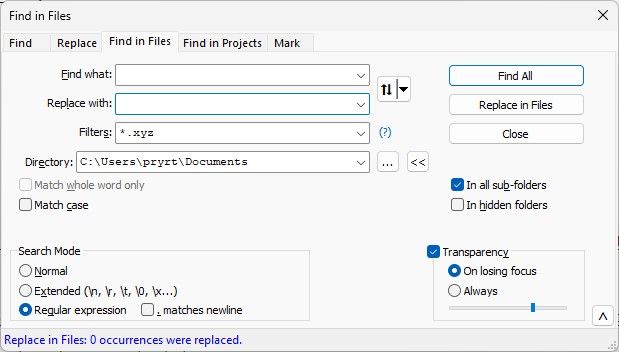
the data I want to change isn’t in “split = 30 40 30” format; it is in “split = 30.40.30” format
What would be the syntax for the find and replace then?The
.is the “wildcard” character in regular expressions, so don’t just use.to match it. Instead, you “escape” it by putting a\before it, so\.matches one dot character. Any place in @dr-ramaanand’s response where you want to match a.instead of a space, change the space from that FIND WHAT into a\.– so(split =) \d+ \d+ \d+becomes(split =) \d+\.\d+\.\d+ -
@PeterJones Would I need to use the
\.for the “.” in the “replace with” box also? -
Nope. Replacement syntax needs fewer escapes
At this point, I recommend you start reading Notepad++ Online User Manual: Searching/Regex at https://npp-user-manual.org/docs/searching/#regular-expressions for the full story, or https://npp-user-manual.org/docs/searching/#substitutions to focus on the substitution syntax.
-
@PeterJones Worked perfectly, thank you.


Hello! It looks like you're interested in this conversation, but you don't have an account yet.
Getting fed up of having to scroll through the same posts each visit? When you register for an account, you'll always come back to exactly where you were before, and choose to be notified of new replies (either via email, or push notification). You'll also be able to save bookmarks and upvote posts to show your appreciation to other community members.
With your input, this post could be even better 💗
Register Login