[New Plugin] EncTags — inline text encryption via ^^...^^ tags
-
Hi everyone,
I built a small plugin called EncTags. It lets you encrypt a fragment
of text right inside any file, using a simple ^^…^^ tag format,
without touching the rest of the file.Repo: https://github.com/saintleningrad-prog/enctags-npp
How it works:
- Select text, or place the cursor inside a ^^…^^ tag, press
Ctrl+Shift+E - Raw ^^some text^^ gets encrypted into ^^L1:base64…^^
- Cursor on an encrypted tag decrypts it back, with a password prompt
- Nothing happens automatically on open, save, or close, every
action is explicit
Crypto: AES-256-GCM + PBKDF2-HMAC-SHA256 (100k iterations), via
Windows CNG (bcrypt.dll), no third-party crypto library.The tag format is intentionally simple and documented in the README,
so a tag can be decrypted outside the plugin too (Python, a browser
script, anything that implements the same AES-GCM parameters).This is an early release (v0.2.0), built with help from an AI
assistant for both the design and the C++ implementation. I would
appreciate any feedback, especially on the Notepad++/Scintilla
integration, whether the notification handling and buffer position
tracking is done correctly, and whether the approach makes sense
from a plugin-architecture standpoint.Thanks for reading.
- Select text, or place the cursor inside a ^^…^^ tag, press
-
I had not really thought about embedding encrypted text inside another otherwise unencrypted file. Do you have a specific use case, or example use-cases, in mind?
In my opinion, all-or-nothing with encryption generally seems sufficient.
-
- Select text, or place the cursor inside a ^^…^^ tag, press
Ctrl+Shift+E
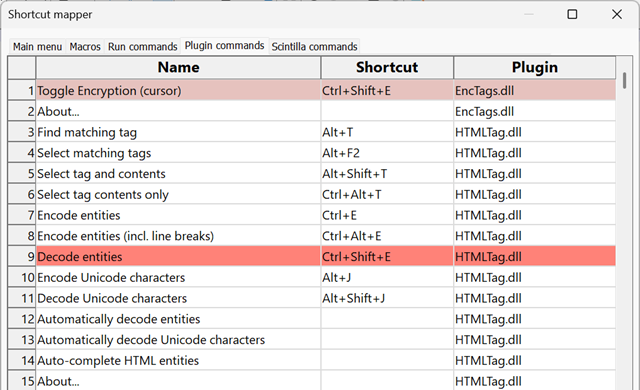
Just a head’s up: that’s the same default key combination that decodes HTML entities when HTML Tag is installed.
Since plugin commands are mapped in alphabetical order, and the most recent mapping prevails, having both installed will silently block the EncTag’s plugin shortcut from functioning:
One more thing: the text you are passing to the About message box (here) contains the literal Unicode character
U+2013: EN DASH. Since the Unicode literal is inside a character string, the compiler interprets everything between"..."as if it were encoded in the operating system’s default, single-byte code page (usually Windows-1252 on English- or European-language PCs). When shown, the emdash becomes the string of nonsensical bytes\xe2\x80\x94: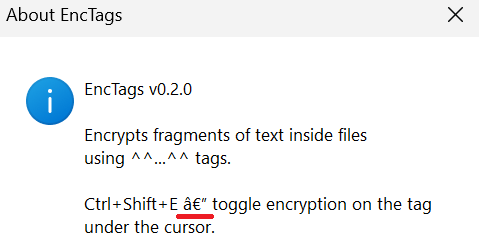
You just need to escape the Unicode literal, i.e.,
"Ctrl+Shift+E \u2013 ..." - Select text, or place the cursor inside a ^^…^^ tag, press


Hello! It looks like you're interested in this conversation, but you don't have an account yet.
Getting fed up of having to scroll through the same posts each visit? When you register for an account, you'll always come back to exactly where you were before, and choose to be notified of new replies (either via email, or push notification). You'll also be able to save bookmarks and upvote posts to show your appreciation to other community members.
With your input, this post could be even better 💗
Register Login