[New plugin] Smart Math
-
Hi, I’m new to the Notepad++ community.
I’d like to share a plugin with you that I made not long ago.Smart Math
Real-time mathematical evaluation plugin for Notepad++ using EOL annotations. Supports variables, percentages, and persistent tab settings. Written in FreeBASIC.I think it’s pretty simple but also quite useful :)
It would be great if the plugin showed up in the plugins manager list, but I’m a bit lazy and haven’t got a clue, so I’m just going to share it here.
GitHub repository: https://github.com/c-sanchez/npp-smart-math/
Thread on the FreeBASIC forum: https://www.freebasic.net/forum/viewtopic.php?t=33519 -
@Carlos-Sánchez said in [New plugin] Smart Math:
I’m a bit lazy and haven’t got a clue
I can’t solve the first part, but for the clue:
- it’s just a PR to the nppPluginList project. Since you’re working in GitHub already, I assume you know how to do the PR
- fork the nppPluginList repo, create your own branch
- in that branch, edit pl.x64.json to link to the 64-bit version, and pl.x86.json to link to the 32-bit version
- the
idrequired in the JSON is just the SHA256 hash, which GitHub provides for you:

- once you have edited both files in your branch, submit the PR from that branch
-
Believe or not, I’m starting to work on a tiny update to SmartMath to eventually have all these features:
https://github.com/c-sanchez/AkelPad-Smart-Math/blob/main/USAGE_AND_SYNTAX.md
The “MathParser.bas” has already been imported, as well as “MathParserRawResult.bas” that allows exact integers and arrays in the calculation results.
The latest changes are here:
https://github.com/d0vgan/npp-smart-math/tree/feature/powerful-calcIt’s a work-in-progress since AkelPad-Smart-Math is so far ahead.
But the updated “MathParser.bas” is already here, so npp-smart-math is already expected to support all the math expressions and calculations as AkelPad-Smart-Math does.I don’t think I’ll include all the unit tests from AkelPad-Smart-Math. To be honest, it would make perfect sense to have the “MathParser.bas”, “MathParserRawResult.bas” and maybe the Results Formatter as a separate project in git, and then both npp-smart-math and AkelPad-Smart-Math will reuse that as e.g. a git submodule.
But it’s not an intermediate question - it’s rather a question for the future, and I hope I will not become “liberated” in that future (referring to the “liberation” of e.g. Bakhmut, Maryinka, Popasna, Volnovakha, Soledar, Vovchansk, Chasiv Yar and other cities).Another interesting topic is syntax highlighting. It was easy to do in AkelPad by means of its Coder plugin that allows to enable syntax highlighting programmatically for a given file:
https://github.com/c-sanchez/AkelPad-Smart-Math/blob/main/AkelFiles/Plugs/Coder/smartmath.coder
I am not sure if something similar can be achieved in Notepad++. -
A small example of what is already working:
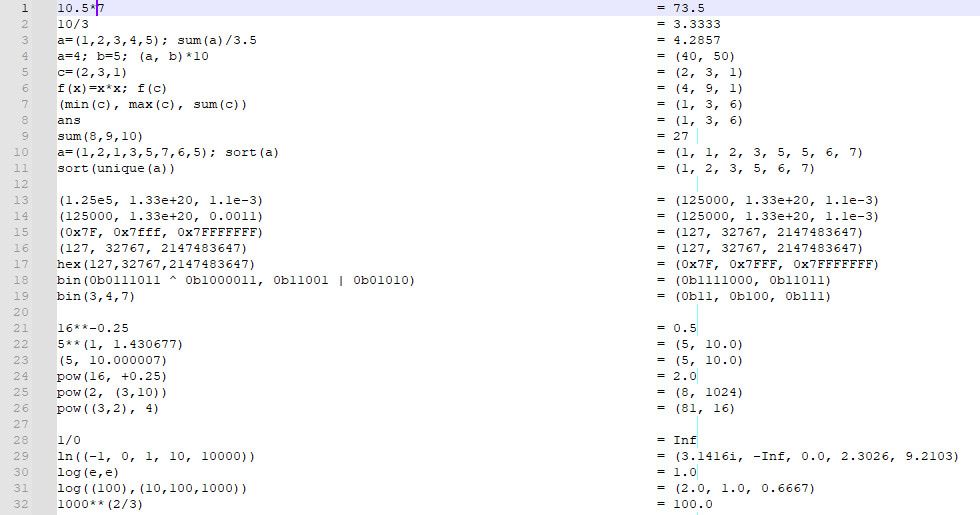
This demonstrates just several functions; the other functions from USAGE_AND_SYNTAX work as well.
The next step is to:- Create a syntax file to apply “function color” to built-in functions;
- Apply this syntax file automatically when Smart Math is enabled for the current file/document.
The syntax file can be created by means of user-defined language.
But how to apply this user-defined language automatically when Smart Math is enabled for the current file/document? -
The syntax file can be created by means of user-defined language.
But how to apply this user-defined language automatically when Smart Math is enabled for the current file/document?OK, sorted it out:
- call NPPM_GETNBUSERLANG first to get the number of UDLs;
- then iterate through all the UDLs and call GetMenuStringW;
- once the menu item string matches my UDL name, I’ve identified my UDL menu id;
- after that, call NPPM_MENUCOMMAND with the obtained UDL menu id.
Here is an example withUDL applied:
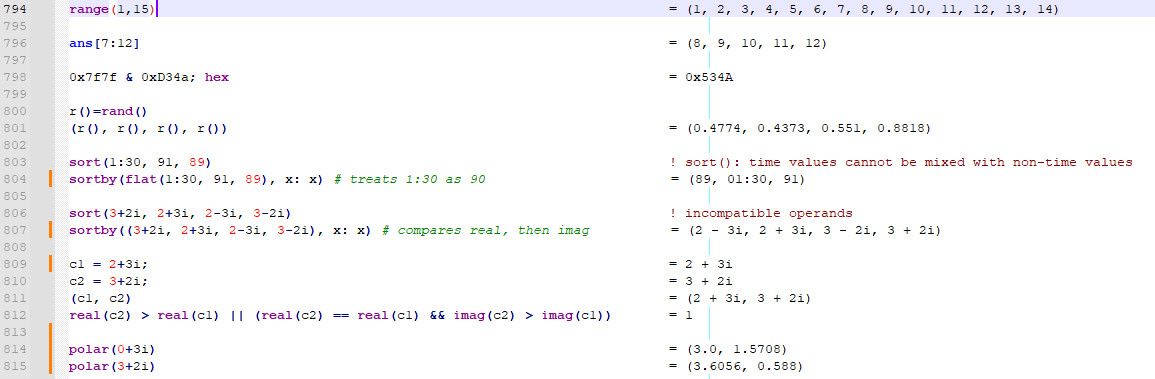
It’s a pity that I can’t make the keyword colors (such as function colors) to be dependent on the active color theme/style.
I mean, for dark color themes these keywords in blue look too dark, so the color must be changed for dark themes. -
Now the plugin supports the Dark Mode by means of “SmartMath_Dark.udl.xml” (in addition to “SmartMath.udl.xml” which is the light one) and automatically applies either light or dark one.
This is achieved by listening to NPPN_DARKMODECHANGED and requesting NPPM_ISDARKMODEENABLED to understand whether the dark UDL or the bright UDL to apply.A screenshot:
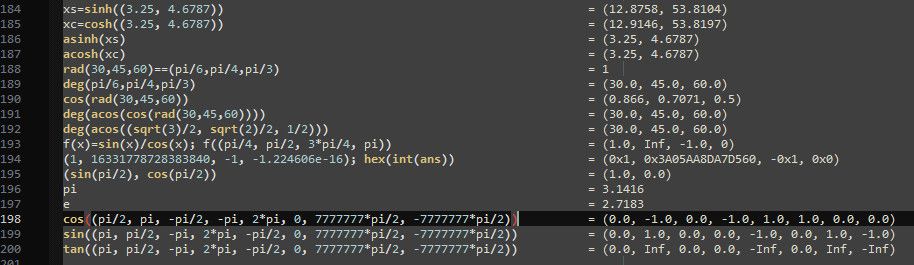
Feel free to propose better colors if you are good in that :)
The UDLs are here:
https://github.com/d0vgan/npp-smart-math/tree/feature/powerful-calc/Notepad%2B%2B/userDefineLangs -
Here are the latest binaries if you are interested:
32-bit:
https://drive.google.com/file/d/1jmKaSU5YF2Hd2mHKAWDZyG4NDfx99Xnc/view?usp=drive_link64-bit (x86_64):
https://drive.google.com/file/d/1mrqNicsfjfJITmrfeHlG2WEzgHZdokI-/view?usp=drive_link -
Regarding the nppPluginList, how does the Plugins Admin understand where to unpack the files from the archive?
For example, the SmartMath plugin has more tight integration with Notepad++ than most of plugins.
Here is the structure of the archive at the current moment:autoCompletion\ SmartMath.xml plugins\ doc\ SmartMath.md SmartMath\ SmartMath.dll userDefineLangs\ SmartMath.udl.xml SmartMath_Dark.udl.xmlHow will the Plugins Admin understand that all these files (under the respective folders) must be unpacked into the root of Notepad++'s directory?
-
I don’t think the Plugins Admin will be able to do all of that on its own. The DLL needs to be at the top level of the zipfile.
What you could do is to have your plugin intialization look for the autoCompletion and userDefineLangs files in the appropriate locations (use NPPM_GETNPPSETTINGSDIRPATH to make sure you put the UDL in the right per-user place, regardless of doLocalConf, -settingsDir, CloudDirectory, or normal AppData; autoCompletion always goes relative to NPPM_GETNPPDIRECTORY – and for any that are missing, copy from
...\plugins\SmartMath\subfolder(s) into the right destinations.A possible zipfile structure could be:
SmartMath.dll
doc\
    SmartMath.md
autoCompletion\
    SmartMath.xml
userDefineLangs\
    SmartMath.udl.xml
    SmartMath_Dark.udl.xml
That would all get placed in
...\plugins\SmartMath\Because autoCompletion definitions are in the program directory hierarchy, there may be a permission issue, so you’d have to request elevated permission to do that copy; examples of how I did that can be found in my ConfigUpdater plugin. (The plugin itself is not so useful, since I moved that feature to N++ itself, but some of the code is still useful reference.)
-
Here are the latest binaries of SmartMath.
This is a fully-working unofficial build that is going to be added to the official git repository… unless more improvements are suggested :)
What’s new:- the archive structure corresponds to the expectations of the Plugins Admin;
- the plugin searches for its documentation file near the SmartMath.dll, as well as in the “plugins\doc” folder;
- the plugin shows a warning when it does not find its syntax files in the expected locations under the “userDefineLangs” and “autoCompletion” folders of Notepad++.
64-bit version:
https://drive.google.com/file/d/1pTS_cBdU_Q0vkG03cubqWZ9TDdYiSsXW/view?usp=drive_link32-bit version:
https://drive.google.com/file/d/1qsI5Hsx4XmyRlhVeGsplAoTX391WEnOv/view?usp=drive_link



Hello! It looks like you're interested in this conversation, but you don't have an account yet.
Getting fed up of having to scroll through the same posts each visit? When you register for an account, you'll always come back to exactly where you were before, and choose to be notified of new replies (either via email, or push notification). You'll also be able to save bookmarks and upvote posts to show your appreciation to other community members.
With your input, this post could be even better 💗
Register Login