Code is not working
-
I am using Notepad++ 32-bit 8.6.7 on Windows 10.
I am trying to mark duplicate lines (not delete) in text documents. I am using Search Mode and Regular Expression, and have checked Bookmark Line and Mark All buttons.
First, I entered the expression:
^(.*?)$\s+(?=[\s\S]*?^\1$)under the Mark tab. It said, “Find invalid regular expression”.Then, I tried:
^(.+?)\r?\n(?=\1)which found zero matches in entire file. I KNOW there is is at least one identical duplicate line.Anyone knows the correct way of doing this?
-–
moderator added code markdown around text; please don’t forget to use the
</>button to mark example text as “code” or ` characters around inline text (like `this` ⇒this) so that characters don’t get changed by the forum -
First, I entered the expression:
^(.*?)$\s+(?=[\s\S]*?^\1$)under the Mark tab. It said, “Find invalid regular expression”.Hover over the
...button in the speach bubble on the error message. It will tell you that, essentially, the regex got too “complex”, because it has to keep backing up to try the next option. Basically, your file is too big.See more in the User Manual on regex complexity
With a small file, your regex works just fine:
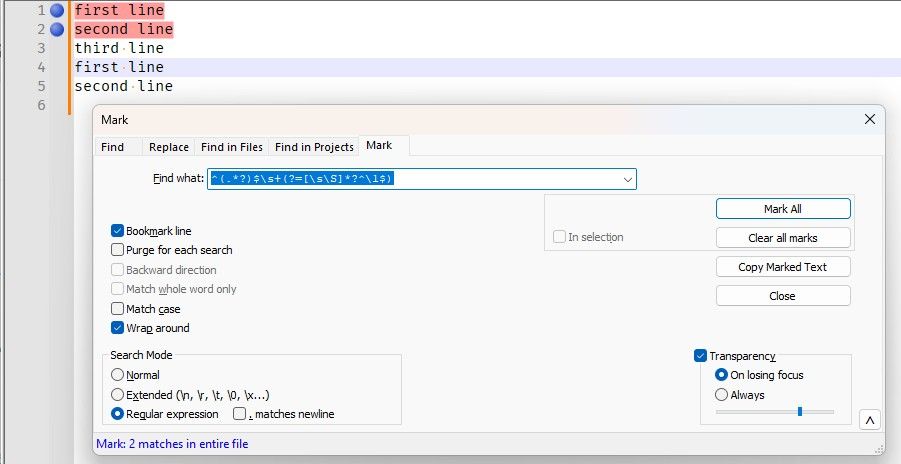
Then, I tried:
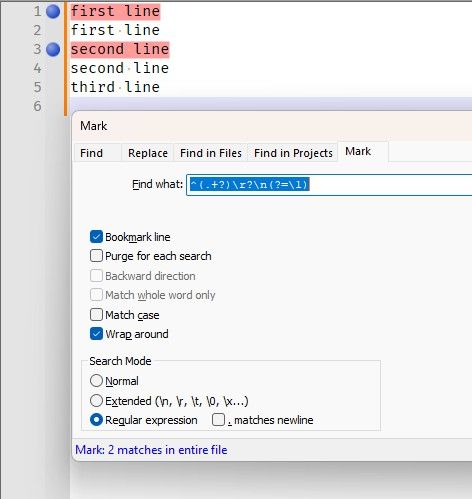
^(.+?)\r?\n(?=\1)which found zero matches in entire file. I KNOW there is is at least one identical duplicate line.That one only finds duplicate lines if they are immediately next to each other:
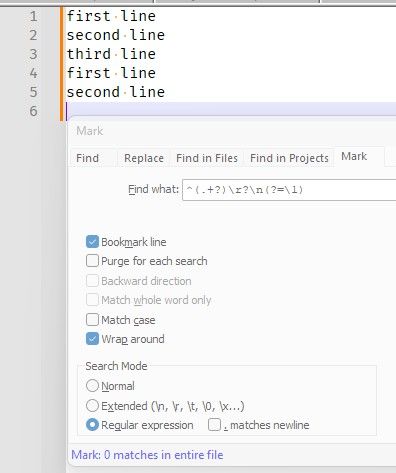
vs
Anyone knows the correct way of doing this?
With very big files, it is non-trivial
- If the line order doesn’t matter, you could sort the file, then use your second regex.
- If you just want to delete the duplicates, then you can use Edit > Line Operations > Remove Duplicate Lines
- If you just want to mark them for later investigation, without changing line order, it’s going to be more difficult. I would probably recommend making two copies of the file, in addition to the original, as copy1 and copy2.
- In copy1, I would just sort and run your second regex;
- In copy2, I would
- use Edit > Column editor to create initial line numbering (prefix with 0).
- do a regex to move the number from the beginning to end of each line (
^(?-s)(\d+)(?=\D)(.*)$⇒$2\t$1 - do the sort
- do a regex to move the number to the end of each line (
^(?-s)(.*?)\t(\d+)$⇒$1\t$2
- then you can do your second simpler duplicate search in copy1, and use copy2 to determine which line number each line was from originally
It’s not ideal, but without some magical regex manipulation to make it less backtracky (hints in the complexity section), you’re not likely to find a regex that doesn’t become invalid for you.
-
It’s not ideal, but without some magical regex manipulation to make it less backtracky (hints in the complexity section), you’re not likely to find a regex that doesn’t become invalid for you.
@blake-g.-barrington , @PeterJones:
I can’t say for certain — much of Boost.regex (the regular expression engine Notepad++ uses) is still a black box to me — but I think it’s unlikely that any regex can do what is requested without getting the complexity error on large files. As best I can tell, Boost.regex is a bit “trigger happy” with that warning. It doesn’t really know whether the expression is trapped in a loop that isn’t progressing, it just knows that it seems to be scanning the same text over and over again. For any regex to solve this problem, it has to scan the same text over and over: for every line, it needs to check every following line up to the end of the file, unless it finds a match sooner. Given that and what I have observed about Boost.regex, I would not recommend spending a lot of time trying to improve the regular expression.
As @PeterJones noted, if you don’t need to preserve the order of lines in the files, the solution is simple: sort the file first.
If you do need to preserve order, the next question is whether this is a one-time thing you need to do to solve a specific problem, or a recurring task you’ll need to perform against various files in the future.
If it’s a recurring task, ditch the regular expressions and write a script. Python is probably the best language for scripting in Notepad++, but I’m not very familiar with Python, so I’ll leave it to someone else to explain that approach if that is what you need.
If this is a one time thing, then I would suggest:
- Insert line numbers at the beginning of each line.
- Make a zero-width rectangular selection following the line numbers and sort.
- Adapt your regular expression to find adjacent lines that contain duplicate text following the line number and make a replace expression that adds a marker character following the line number: a character that isn’t used otherwise in the file.
- Sort on the line numbers to put things back in order.
- Mark lines that contain the marker character.
- Use Replace All to delete the marker character.
-
Hello, @blake-g.-barrington, @peterjones, @coises and All,
Here is my version to get duplicate lines, separated by any number of lines ( whatever they are : true empty lines, blank lines or lines with text ), even zero line :
MARK
(?-si)^(.+)(?=(.*\R)+\1$)As said by @Peterjones, and after some tests, this kind of regex get into trouble when the bunch of lines, between two duplicate lines, exceeds
15,000empty lines about !
Now, Let’s suppose you create this text file :
first
0002
0003
0004
0005
....
....
....
9997
9998
9999
10000
first
Then the
(?-si)^(.+)(?=(.*\R)+\1$)regex returns :-
Correct result until the number of the in-between lines does not exceed
1,600, with the message1 match in entire file -
Correct result until the number of the in-between lines does not exceed
12,000, although the error messageFind Invalid Regular Expression( So F.I.R.E. !! ) occurs ! -
NO result at all if the number of lines is over
12,000lines, with, of course, the error messageFind Invalid Regular Expression
Best Regards,
guy038
P.S. :
I should add that my
Windows11laptop has32 Gbof memory ! -



Hello! It looks like you're interested in this conversation, but you don't have an account yet.
Getting fed up of having to scroll through the same posts each visit? When you register for an account, you'll always come back to exactly where you were before, and choose to be notified of new replies (either via email, or push notification). You'll also be able to save bookmarks and upvote posts to show your appreciation to other community members.
With your input, this post could be even better 💗
Register Login