Why headings are not displayed in the function list menu ?
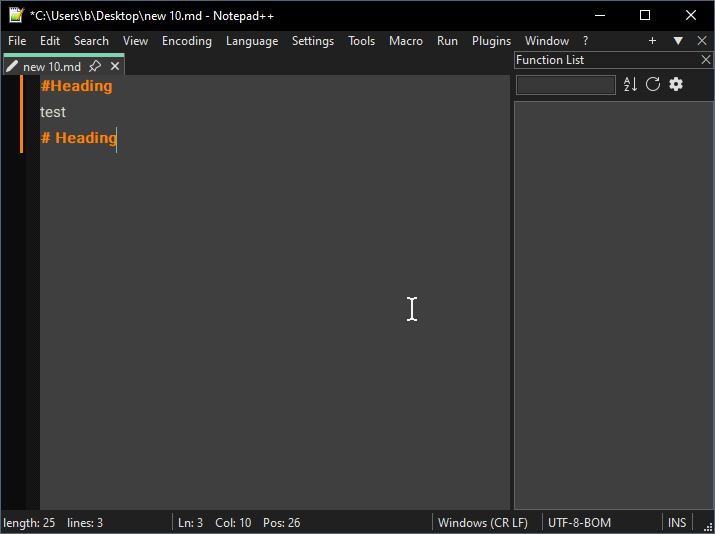
-
I will be assuming you have a normal installation (using AppData for configuration files). If that’s not the case, or you are having difficulty finding the files and directories mentioned, share your ?-menu’s Debug Info
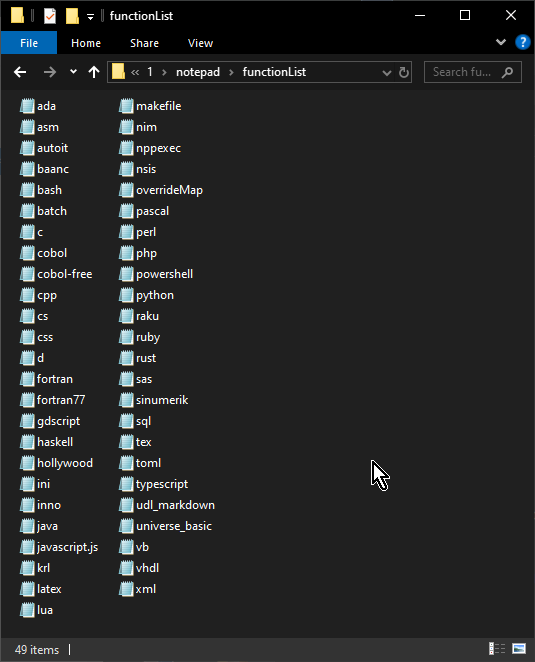
- share a directory listing of
%AppData%\Notepad++\functionList- you are looking for it to contain something like
udl_markdown.xmlor something similarly named. And a file calledoverrideMap.xml
- you are looking for it to contain something like
- open
%AppData%\Notepad++\functionList\overrideMap.xml, and scroll down near the bottom; there should be a section<!-- ==================== User Defined Languages ============================ -->, and there should be some<association .../>tags there, including one like<association id="udl_markdown.xml" userDefinedLangName="Markdown (preinstalled)"/>.- If it’s not there, share the entire section from the “User Defined Languages” section down to the bottom. (Use
</>button then paste the XML directly into your post in the region provided by the button)
- If it’s not there, share the entire section from the “User Defined Languages” section down to the bottom. (Use
Even in a normal installation, if you did things differently (maybe your AI doesn’t know N++ as well as you think), those files may have been put into the installation directory, so in
c:\program files\notepad++\functionList\or wherever relative to your installed Notepad++.Basically, what you must have is that your
overrideMap.xmlmust have an association where the filename is in theidattribute, and the exact name of the active UDL (in my case, I am usingMarkdown (preinstalled)) is in theuserDefinedLangNameattribute. Then that file must contain the definition for the function list to show the headers (if you can’t find those files anywhere, even after we reply to your Debug Info, then you might need to download a new definition file, like from my publically-shared one, here on my GitHub) - share a directory listing of
-
’s Debug
Tanks for your help. I use portable version.I save all the useful texts I collect from the internet in .md files because they have headings. For example, after I find a solution to this problem, I save it in an .md file.
Debug InfoNotepad++ v8.9.6.4 (64-bit) Build time: Jun 3 2026 - 23:47:49 Scintilla/Lexilla included: 5.6.2/5.4.9 Boost Regex included: 1_90 pugixml included: 1.15 nlohmann JSON included: 3.12.0 Path: C:\1\notepad\notepad++.exe Command Line: Admin mode: OFF Local Conf mode: ON Cloud Config: OFF WinGUp: present disableNppAutoUpdate.xml: present Periodic Backup: OFF Placeholders: OFF Scintilla Rendering Mode: SC_TECHNOLOGY_DEFAULT (0) Multi-instance Mode: monoInst asNotepad: OFF File Status Auto-Detection: cdEnabledNew (for current file/tab only) Dark Mode: ON Display Info: primary monitor: 1600x900, scaling 100% visible monitors count: 1 installed Display Class adapters: 0000: Description - NVIDIA GeForce GT 710 0000: DriverVersion - 30.0.14.7212 OS Name: Windows 10 Enterprise LTSC 2021 (64-bit) OS Version: 21H2 OS Build: 19044.7291 Current ANSI codepage: 65001 Plugins: ComparePlugin (2.0.2) DSpellCheck (1.5) EnhanceAnyLexer (1.4.1) PythonScript (2.1)udl_markdown:
<?xml version="1.0" encoding="UTF-8"?>
<NotepadPlus>
    <functionList>
        <parser id="markdown_headers" displayName="Markdown Headers" commentExpr="">
            <function mainExpr="^[\t ]*#+[\t ]+(.*)$">
                <functionName>
                    <nameExpr expr="(?:^[\t ]*#+[\t ]+)(.*)$"/>
                </functionName>
            </function>
        </parser>
    </functionList>
</NotepadPlus>
overrideMap.xml:
<association id="udl_markdown.xml" userDefinedLangName="Markdown (preinstalled)"/>directory listing of unctionList
userDefineLangs
1-markdown._preinstalled.udl:<?xml version="1.0" encoding="UTF-8" ?> <!--// Markdown-plus-plus is a project to support Markdown syntax in Notepad++. All UDLs are carefully designed by human, rather than generated by machine. Want an UDL for different theme? Want to change its preference? Want to create your own? Go get it: https://github.com/Edditoria/markdown-plus-plus Please read the README file for details. Welcome issues and pull requests via the above link. Copyright (c) Edditoria. Open source under the MIT license: https://github.com/Edditoria/markdown-plus-plus/blob/master/LICENSE.txt //--> <NotepadPlus> <UserLang name="Markdown (preinstalled)" ext="md markdown" udlVersion="2.1"> <Settings> <Global caseIgnored="yes" allowFoldOfComments="no" foldCompact="no" forcePureLC="2" decimalSeparator="0" /> <Prefix Keywords1="yes" Keywords2="yes" Keywords3="yes" Keywords4="yes" Keywords5="yes" Keywords6="yes" Keywords7="yes" Keywords8="no" /> </Settings> <KeywordLists> <Keywords name="Comments">00# 01 02((EOL)) 03<!-- 04--></Keywords> <Keywords name="Numbers, prefix1"></Keywords> <Keywords name="Numbers, prefix2"></Keywords> <Keywords name="Numbers, extras1"></Keywords> <Keywords name="Numbers, extras2"></Keywords> <Keywords name="Numbers, suffix1">.</Keywords> <Keywords name="Numbers, suffix2">.</Keywords> <Keywords name="Numbers, range"></Keywords> <Keywords name="Operators1">@ < > \< \> \\ \` \* \_ \{ \} \[ \] \( \) \# \+ \- \. \! \~ \| |:-: |:--: |:---: | :-: :--: :---: :|: |: :|</Keywords> <Keywords name="Operators2">- + :- :-- :--- :</Keywords> <Keywords name="Folders in code1, open"></Keywords> <Keywords name="Folders in code1, middle"></Keywords> <Keywords name="Folders in code1, close"></Keywords> <Keywords name="Folders in code2, open"></Keywords> <Keywords name="Folders in code2, middle"></Keywords> <Keywords name="Folders in code2, close"></Keywords> <Keywords name="Folders in comment, open"></Keywords> <Keywords name="Folders in comment, middle"></Keywords> <Keywords name="Folders in comment, close"></Keywords> <Keywords name="Keywords1">../ (../ http:// (http:// https:// (https:// mailto: (mailto: ftp:// (ftp:// ftps:// (ftps:// (/ /</Keywords> <Keywords name="Keywords2">==== ----</Keywords> <Keywords name="Keywords3">*** ___</Keywords> <Keywords name="Keywords4">** __</Keywords> <Keywords name="Keywords5">* _</Keywords> <Keywords name="Keywords6">** __</Keywords> <Keywords name="Keywords7">* _</Keywords> <Keywords name="Keywords8"></Keywords> <Keywords name="Delimiters">00![ 00[ 01\ 02] 02] 03``` 03` 03~~~ 04\ 05``` 05((EOL `)) 05~~~ 06*** 07\ 08((EOL ***)) 09** 10\ 11((EOL **)) 12* 13\ 14((EOL *)) 15** 16\ 17((EOL **)) 18* 19\ 20((EOL *)) 21 22 23</Keywords> </KeywordLists> <Styles> <WordsStyle name="DEFAULT" fgColor="333333" bgColor="FFFFFF" colorStyle="0" fontName="" fontStyle="0" nesting="0" /> <WordsStyle name="COMMENTS" fgColor="808080" bgColor="FFFFFF" colorStyle="1" fontName="" fontStyle="2" nesting="0" /> <WordsStyle name="LINE COMMENTS" fgColor="FF8000" bgColor="FFFFFF" colorStyle="1" fontName="" fontStyle="1" nesting="0" /> <WordsStyle name="NUMBERS" fgColor="0080FF" bgColor="FFFFFF" colorStyle="1" fontName="" fontStyle="0" nesting="0" /> <WordsStyle name="KEYWORDS1" fgColor="8000FF" bgColor="FFFFFF" colorStyle="1" fontName="" fontStyle="0" nesting="0" /> <WordsStyle name="KEYWORDS2" fgColor="FF8000" bgColor="FFFFFF" colorStyle="1" fontName="" fontStyle="1" nesting="0" /> <WordsStyle name="KEYWORDS3" fgColor="000080" bgColor="FFFFFF" colorStyle="1" fontName="" fontStyle="3" nesting="0" /> <WordsStyle name="KEYWORDS4" fgColor="000080" bgColor="FFFFFF" colorStyle="1" fontName="" fontStyle="1" nesting="0" /> <WordsStyle name="KEYWORDS5" fgColor="000080" bgColor="FFFFFF" colorStyle="1" fontName="" fontStyle="2" nesting="0" /> <WordsStyle name="KEYWORDS6" fgColor="000080" bgColor="FFFFFF" colorStyle="1" fontName="" fontStyle="3" nesting="0" /> <WordsStyle name="KEYWORDS7" fgColor="000080" bgColor="FFFFFF" colorStyle="1" fontName="" fontStyle="3" nesting="0" /> <WordsStyle name="KEYWORDS8" fgColor="333333" bgColor="FFFFFF" colorStyle="0" fontName="" fontStyle="0" nesting="0" /> <WordsStyle name="OPERATORS" fgColor="8080FF" bgColor="FFFFFF" colorStyle="1" fontName="" fontStyle="1" nesting="0" /> <WordsStyle name="FOLDER IN CODE1" fgColor="333333" bgColor="FFFFFF" colorStyle="0" fontName="" fontStyle="0" nesting="0" /> <WordsStyle name="FOLDER IN CODE2" fgColor="333333" bgColor="FFFFFF" colorStyle="0" fontName="" fontStyle="0" nesting="0" /> <WordsStyle name="FOLDER IN COMMENT" fgColor="333333" bgColor="FFFFFF" colorStyle="0" fontName="" fontStyle="0" nesting="0" /> <WordsStyle name="DELIMITERS1" fgColor="8000FF" bgColor="FFFFFF" colorStyle="1" fontName="" fontStyle="2" nesting="0" /> <WordsStyle name="DELIMITERS2" fgColor="008000" bgColor="FFFFFF" colorStyle="1" fontName="" fontStyle="0" nesting="0" /> <WordsStyle name="DELIMITERS3" fgColor="000080" bgColor="FFFFFF" colorStyle="1" fontName="" fontStyle="3" nesting="0" /> <WordsStyle name="DELIMITERS4" fgColor="000080" bgColor="FFFFFF" colorStyle="1" fontName="" fontStyle="1" nesting="65600" /> <WordsStyle name="DELIMITERS5" fgColor="000080" bgColor="FFFFFF" colorStyle="1" fontName="" fontStyle="2" nesting="32800" /> <WordsStyle name="DELIMITERS6" fgColor="000080" bgColor="FFFFFF" colorStyle="1" fontName="" fontStyle="3" nesting="0" /> <WordsStyle name="DELIMITERS7" fgColor="000080" bgColor="FFFFFF" colorStyle="1" fontName="" fontStyle="3" nesting="0" /> <WordsStyle name="DELIMITERS8" fgColor="333333" bgColor="FFFFFF" colorStyle="0" fontName="" fontStyle="0" nesting="0" /> </Styles> </UserLang> </NotepadPlus>2-markdown._preinstalled_DM.udl:
<?xml version="1.0" encoding="UTF-8" ?> <!--// Markdown-plus-plus is a project to support Markdown syntax in Notepad++. All UDLs are carefully designed by human, rather than generated by machine. Want an UDL for different theme? Want to change its preference? Want to create your own? Go get it: https://github.com/Edditoria/markdown-plus-plus Please read the README file for details. Welcome issues and pull requests via the above link. Copyright (c) Edditoria. Open source under the MIT license: https://github.com/Edditoria/markdown-plus-plus/blob/master/LICENSE.txt //--> <NotepadPlus> <UserLang name="Markdown (preinstalled dark mode)" ext="md markdown" darkModeTheme="yes" udlVersion="2.1"> <Settings> <Global caseIgnored="yes" allowFoldOfComments="no" foldCompact="no" forcePureLC="2" decimalSeparator="0" /> <Prefix Keywords1="yes" Keywords2="yes" Keywords3="yes" Keywords4="yes" Keywords5="yes" Keywords6="yes" Keywords7="yes" Keywords8="no" /> </Settings> <KeywordLists> <Keywords name="Comments">00# 01 02((EOL)) 03<!-- 04--></Keywords> <Keywords name="Numbers, prefix1"></Keywords> <Keywords name="Numbers, prefix2"></Keywords> <Keywords name="Numbers, extras1"></Keywords> <Keywords name="Numbers, extras2"></Keywords> <Keywords name="Numbers, suffix1">.</Keywords> <Keywords name="Numbers, suffix2">.</Keywords> <Keywords name="Numbers, range"></Keywords> <Keywords name="Operators1">@ < > \< \> \\ \` \* \_ \{ \} \[ \] \( \) \# \+ \- \. \! \~ \| |:-: |:--: |:---: | :-: :--: :---: :|: |: :|</Keywords> <Keywords name="Operators2">- + :- :-- :--- :</Keywords> <Keywords name="Folders in code1, open"></Keywords> <Keywords name="Folders in code1, middle"></Keywords> <Keywords name="Folders in code1, close"></Keywords> <Keywords name="Folders in code2, open"></Keywords> <Keywords name="Folders in code2, middle"></Keywords> <Keywords name="Folders in code2, close"></Keywords> <Keywords name="Folders in comment, open"></Keywords> <Keywords name="Folders in comment, middle"></Keywords> <Keywords name="Folders in comment, close"></Keywords> <Keywords name="Keywords1">../ (../ http:// (http:// https:// (https:// mailto: (mailto: ftp:// (ftp:// ftps:// (ftps:// (/ /</Keywords> <Keywords name="Keywords2">==== ----</Keywords> <Keywords name="Keywords3">*** ___</Keywords> <Keywords name="Keywords4">** __</Keywords> <Keywords name="Keywords5">* _</Keywords> <Keywords name="Keywords6">** __</Keywords> <Keywords name="Keywords7">* _</Keywords> <Keywords name="Keywords8"></Keywords> <Keywords name="Delimiters">00![ 00[ 01\ 02] 02] 03``` 03` 03~~~ 04\ 05``` 05((EOL `)) 05~~~ 06*** 07\ 08((EOL ***)) 09** 10\ 11((EOL **)) 12* 13\ 14((EOL *)) 15** 16\ 17((EOL **)) 18* 19\ 20((EOL *)) 21 22 23</Keywords> </KeywordLists> <Styles> <WordsStyle name="DEFAULT" fgColor="DCDCCC" bgColor="3F3F3F" colorStyle="0" fontName="" fontStyle="0" nesting="0" /> <WordsStyle name="COMMENTS" fgColor="7F9F7F" bgColor="3F3F3F" colorStyle="1" fontName="" fontStyle="2" nesting="0" /> <WordsStyle name="LINE COMMENTS" fgColor="FF8040" bgColor="3F3F3F" colorStyle="1" fontName="" fontStyle="1" nesting="0" /> <WordsStyle name="NUMBERS" fgColor="8CD0D3" bgColor="3F3F3F" colorStyle="1" fontName="" fontStyle="0" nesting="0" /> <WordsStyle name="KEYWORDS1" fgColor="EDD6ED" bgColor="3F3F3F" colorStyle="1" fontName="" fontStyle="0" nesting="0" /> <WordsStyle name="KEYWORDS2" fgColor="FF8040" bgColor="3F3F3F" colorStyle="1" fontName="" fontStyle="1" nesting="0" /> <WordsStyle name="KEYWORDS3" fgColor="E3CEAB" bgColor="3F3F3F" colorStyle="1" fontName="" fontStyle="3" nesting="0" /> <WordsStyle name="KEYWORDS4" fgColor="E3CEAB" bgColor="3F3F3F" colorStyle="1" fontName="" fontStyle="1" nesting="0" /> <WordsStyle name="KEYWORDS5" fgColor="E3CEAB" bgColor="3F3F3F" colorStyle="1" fontName="" fontStyle="2" nesting="0" /> <WordsStyle name="KEYWORDS6" fgColor="E3CEAB" bgColor="3F3F3F" colorStyle="1" fontName="" fontStyle="3" nesting="0" /> <WordsStyle name="KEYWORDS7" fgColor="E3CEAB" bgColor="3F3F3F" colorStyle="1" fontName="" fontStyle="3" nesting="0" /> <WordsStyle name="KEYWORDS8" fgColor="DCDCCC" bgColor="3F3F3F" colorStyle="0" fontName="" fontStyle="0" nesting="0" /> <WordsStyle name="OPERATORS" fgColor="DFC47D" bgColor="3F3F3F" colorStyle="1" fontName="" fontStyle="1" nesting="0" /> <WordsStyle name="FOLDER IN CODE1" fgColor="DCDCCC" bgColor="3F3F3F" colorStyle="0" fontName="" fontStyle="0" nesting="0" /> <WordsStyle name="FOLDER IN CODE2" fgColor="DCDCCC" bgColor="3F3F3F" colorStyle="0" fontName="" fontStyle="0" nesting="0" /> <WordsStyle name="FOLDER IN COMMENT" fgColor="DCDCCC" bgColor="3F3F3F" colorStyle="0" fontName="" fontStyle="0" nesting="0" /> <WordsStyle name="DELIMITERS1" fgColor="EDD6ED" bgColor="3F3F3F" colorStyle="1" fontName="" fontStyle="2" nesting="0" /> <WordsStyle name="DELIMITERS2" fgColor="CEDF99" bgColor="3F3F3F" colorStyle="1" fontName="" fontStyle="0" nesting="0" /> <WordsStyle name="DELIMITERS3" fgColor="E3CEAB" bgColor="3F3F3F" colorStyle="1" fontName="" fontStyle="3" nesting="0" /> <WordsStyle name="DELIMITERS4" fgColor="E3CEAB" bgColor="3F3F3F" colorStyle="1" fontName="" fontStyle="1" nesting="65600" /> <WordsStyle name="DELIMITERS5" fgColor="E3CEAB" bgColor="3F3F3F" colorStyle="1" fontName="" fontStyle="2" nesting="32800" /> <WordsStyle name="DELIMITERS6" fgColor="E3CEAB" bgColor="3F3F3F" colorStyle="1" fontName="" fontStyle="3" nesting="0" /> <WordsStyle name="DELIMITERS7" fgColor="E3CEAB" bgColor="3F3F3F" colorStyle="1" fontName="" fontStyle="3" nesting="0" /> <WordsStyle name="DELIMITERS8" fgColor="DCDCCC" bgColor="3F3F3F" colorStyle="0" fontName="" fontStyle="0" nesting="0" /> </Styles> </UserLang> </NotepadPlus>Tanks againg
-
All your setup – directories, file names, and the overrideMap association – look right.
It looks like your function list regex can be slightly modified to make it work.
The
.*from^[\t ]*#+[\t ]+(.*)$is matching across multiple lines, because the default for the.-matches-newlineswitch in the regex engine is “on”. Using(?-s)or equivalent is highly recommended for the function name matching.So with that slight tweak, I was able to make yours work:
<?xml version="1.0" encoding="UTF-8"?>
<NotepadPlus>
    <functionList>
        <parser id="markdown_headers" displayName="Markdown Headers" commentExpr="">
            <function mainExpr="(?-s)^[\t ]*#+[\t ]+(.*)$">
                <functionName>
                    <nameExpr expr="(?-s:^[\t ]*#+[\t ]+)(.*)$"/>
                </functionName>
            </function>
        </parser>
    </functionList>
</NotepadPlus>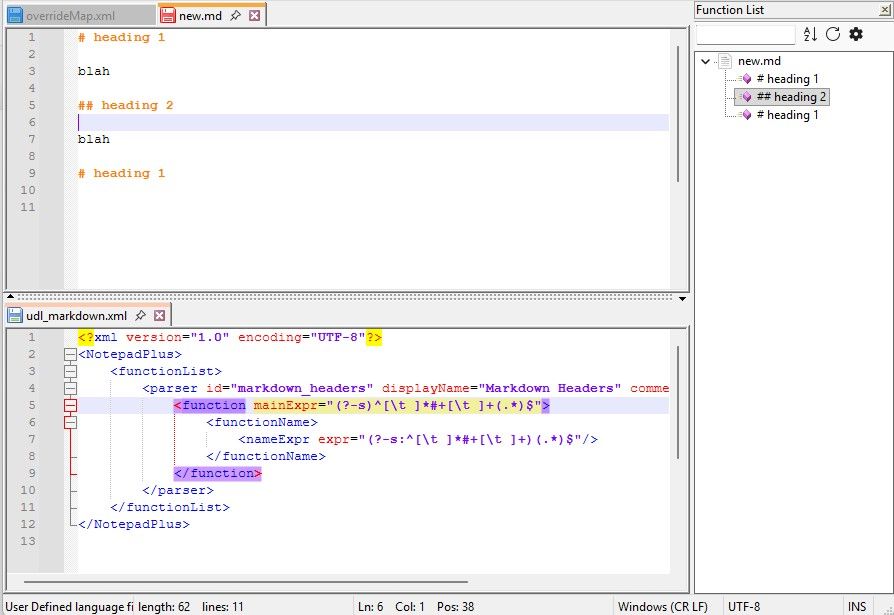
You also might want to try mine (linked above), because it also handles “underlined header” syntax, like:
This is a header
----

blah

So is this
====
And those “underlined header” syntaxes are recognized by many markdown parsers (including the one for this forum).
-
@PeterJones
I put your code in the udl markdown file but the problem did not resolve and don’t show any thing in function list.
I’m not good in English and Codes so I’m sorry maby I’m mistake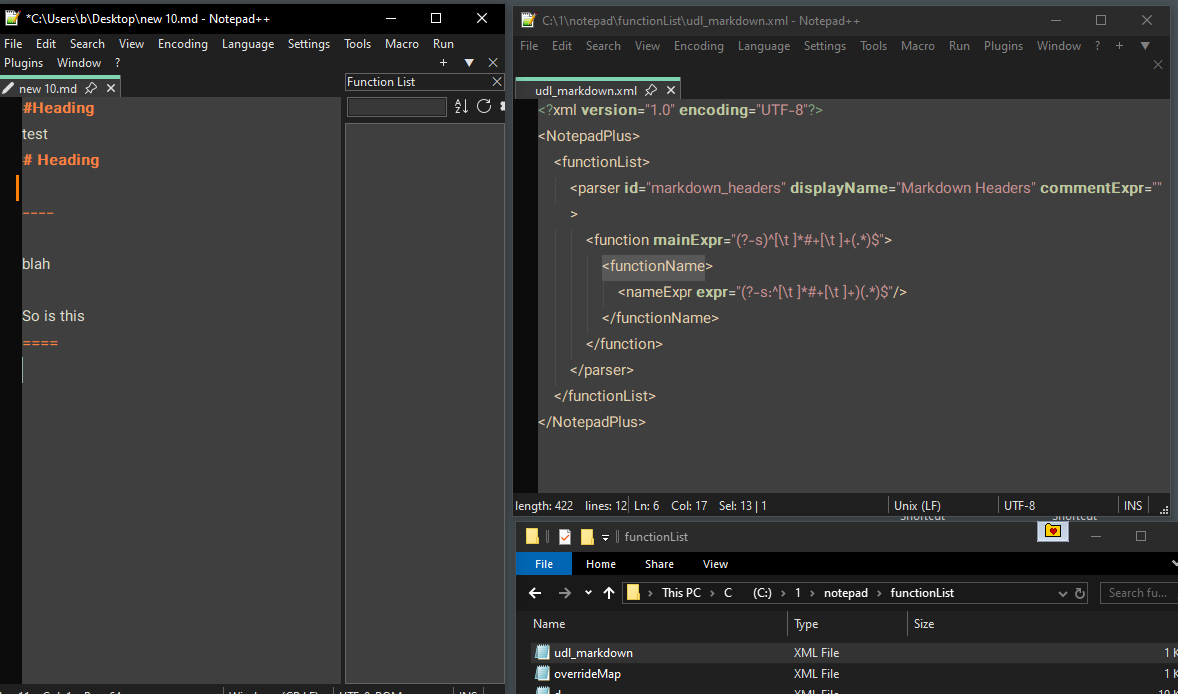
-
Any time you make a change to the function list definition, you must save it, then close all instances of Notepad++, then reopen Notepad++ to force it to re-read the definition, before it will take effect. Did you do that?
(And, the
(?-s)change isn’t sufficient to get underline headers. You have to use the version from the link I provided earlier to get those.) -
@peterjones PeterJones
yes I Do that.
I get code from link right now and put to udl_markdown.xml but but the problem did not resolve -
I didn’t notice: you are using dark mode.
overrideMap.xml needs to point to
Markdown (preinstalled dark mode)as the UDL name. -
@PeterJones
Yes. I"m using dark mode.I edit udl_markdown.xml but the problem did not resolve. udl_markdown.xml now:<association id="udl_markdown.xml" userDefinedLangName="Markdown (preinstalled dark mode)"/> -
I cannot see what’s going wrong. It all works perfectly when I set things up for myself, as decribed in the conversation above. My guess is there’s been a miscommunication or misunderstanding at some point.
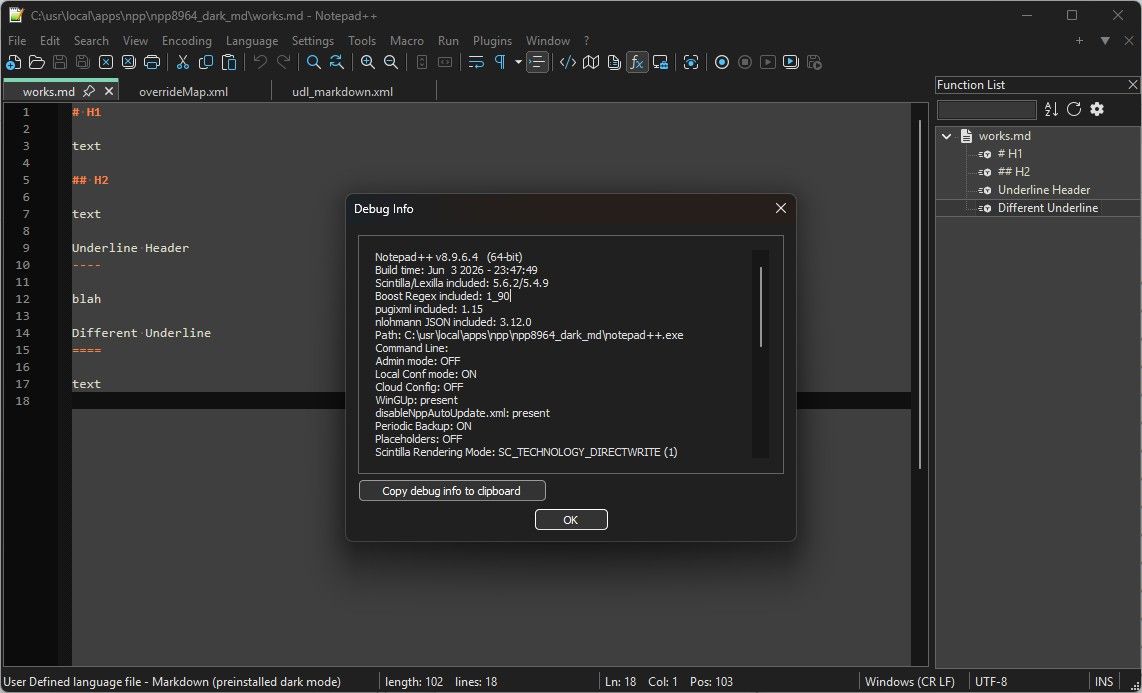
Here is a zip archive of a portable 8.9.6.4 set in Dark Mode:
(link deleted). The zipfile will only be there for a few days, then I will delete this link.
Download it. Look at the mentioned files and filestructure. Compare what’s wrong in yours compared to this working example.
-
Thank YOU so much
I copy Your overrideMap & udl_markdown in my folder and problem is solved.
I wish program by default have this option.
Thank you again dear Peter

Hello! It looks like you're interested in this conversation, but you don't have an account yet.
Getting fed up of having to scroll through the same posts each visit? When you register for an account, you'll always come back to exactly where you were before, and choose to be notified of new replies (either via email, or push notification). You'll also be able to save bookmarks and upvote posts to show your appreciation to other community members.
With your input, this post could be even better 💗
Register Login