Problem with inactive/unavailable Plugins Admin on v8.9.8
-
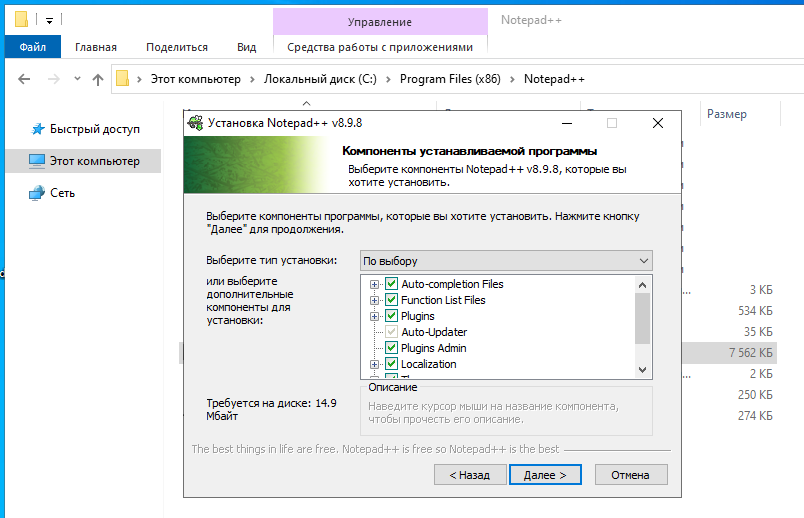
When you ran the installer, did you turn off the following checkmark?
How do I change this setting in the portable version?
-
How do I change this setting in the portable version?
There is no such setting for portable. The normal portable (not the minimalist) comes with the
nppPluginList.dllin the right place, so Plugins Admin should just work.If it does not, you probably left the Mark of the Web on either that DLL or on
GUP.exe. I explained how to check (and clear) that in my post above.If that’s not it, but you’ve been using the same portable directory for a long time, and have just been extracting the new exe with each update, it may be that your GUP is old enough to not have the right security handoff with notepad++.exe any more: make sure you’ve extracted the most recent GUP and nppPluginList from the newest portable zip (and removed the Mark of the Web).
(To do either of those last two paragraphs, Notepad++ must not be running.)
If you need more help, create a new Topic, as the problem you are having does not appear to be a regression, and shouldn’t be part of this Announcement.
-
If you need more help, create a new Topic, as the problem you are having does not appear to be a regression, and shouldn’t be part of this Announcement.
I can’t ask questions on the site github.com and I don’t understand what to do about it:
https://i.imgur.com/EnMge5h.mp4
This question of mine is not related to this topic, but I already don’t know what to do. -
I wasn’t saying to use GitHub. I was saying to create a new Topic here, in the Community Forum. I just moved your post and the replies to a new Topic, so you don’t have to create a new Topic any more. Just answer in reply here, not in the Announcement topic.
-
So I have no clue why GitHub isn’t letting you type, as shown in your video. It might have something to do with you using the onscreen keyboard instead of a physical keyboard. There’s nothing I can do about that.
But let’s get back to your Plugins Admin issue. (At least, I am assuming you have an issue with Plugins Admin, since you were asking how to change that installer option when using Notepad++. The only reason I can imagine that’s what you are asking for is because you were seeing Plugins Admin not being there in the menu.)
You claim you have a portable version. So that means it’s at some path like
c:\myportable\notepad++\(that’s the path I will use for my examples)- Exit all copies of Notepad++
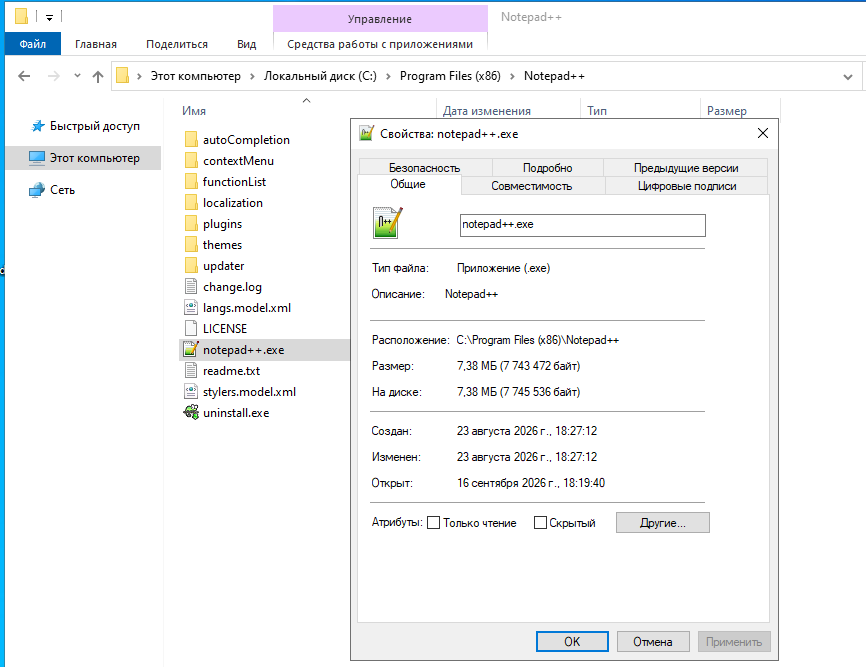
- use Windows Explorer to go to
c:\myportable\notepad++\ - right click on
notepad++.exe,- select Properties,
- be on the General tab (which is the first tab you should see).
- Look at the bottom.
- Does it have the “Unblock” checkbox at the bottom, like in the following screenshot?
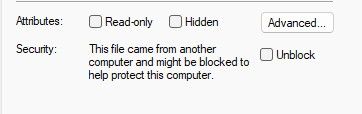
- If so, click the checkbox and choose Apply then OK
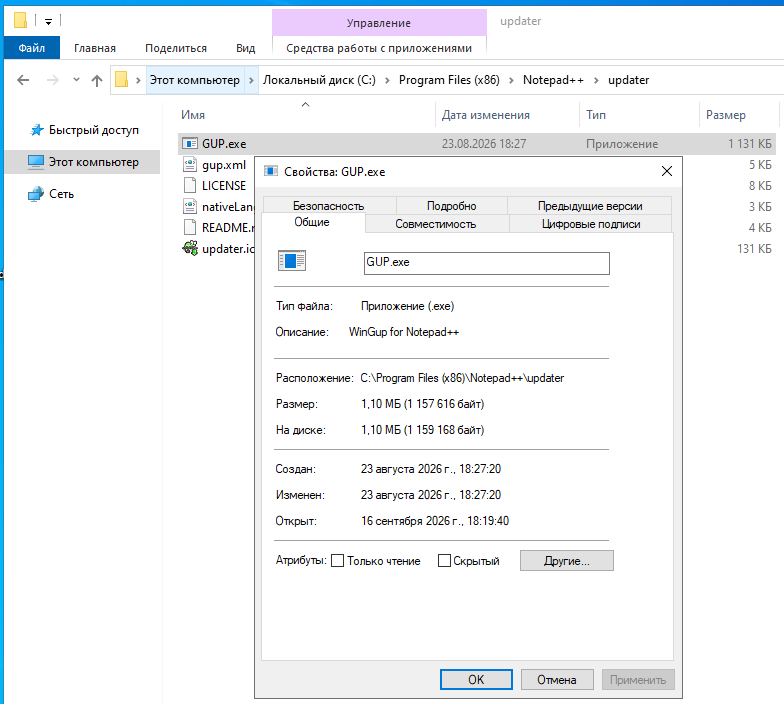
- use Windows Explorer to go to
c:\myportable\notepad++\updater\ - right click on
GUP.exe,- select Properties,
- be on the General tab (which is the first tab you should see).
- Look at the bottom.
- Does it have the “Unblock” checkbox at the bottom?
- If so, click the checkbox and choose Apply then OK
- use Windows Explorer to go to
c:\myportable\notepad++\plugins\Config\ - right click on
nppPluginList.dll,- select Properties,
- be on the General tab (which is the first tab you should see).
- Look at the bottom.
- Does it have the “Unblock” checkbox at the bottom?
- If so, click the checkbox and choose Apply then OK
Now, run Notepad++ again. Plugins Admin should show up in the Plugins menu
If it does not, you need to do the following:
- Share your ?-menu’s Debug Info
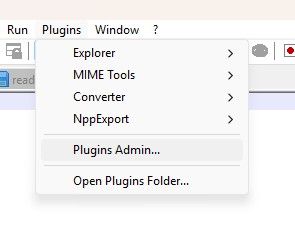
- Share a screenshot of your Plugins menu
- not a movie
- please do a normal screenshot, so you can paste it right in your post, so we can see it withouth going to an external website who exists solely to show us ads we don’t want.
- it should be something like this:
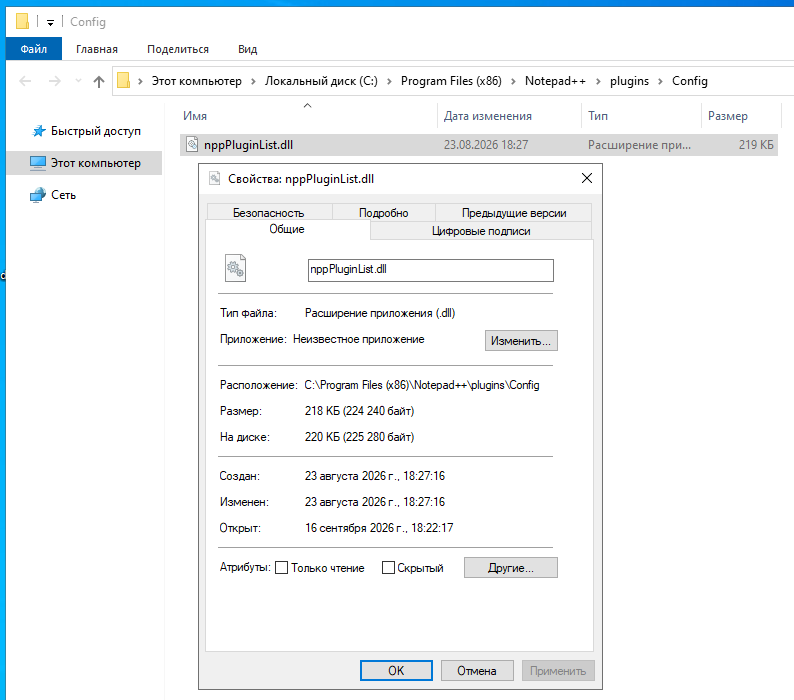
- Share your directory listing (either a screenshot or the output of the
dircommand) for each of the three directories mentioned in my initial steps 1, 3, 5
-
@PeterJones
Did a clean install on a virtual machine with Windows 10
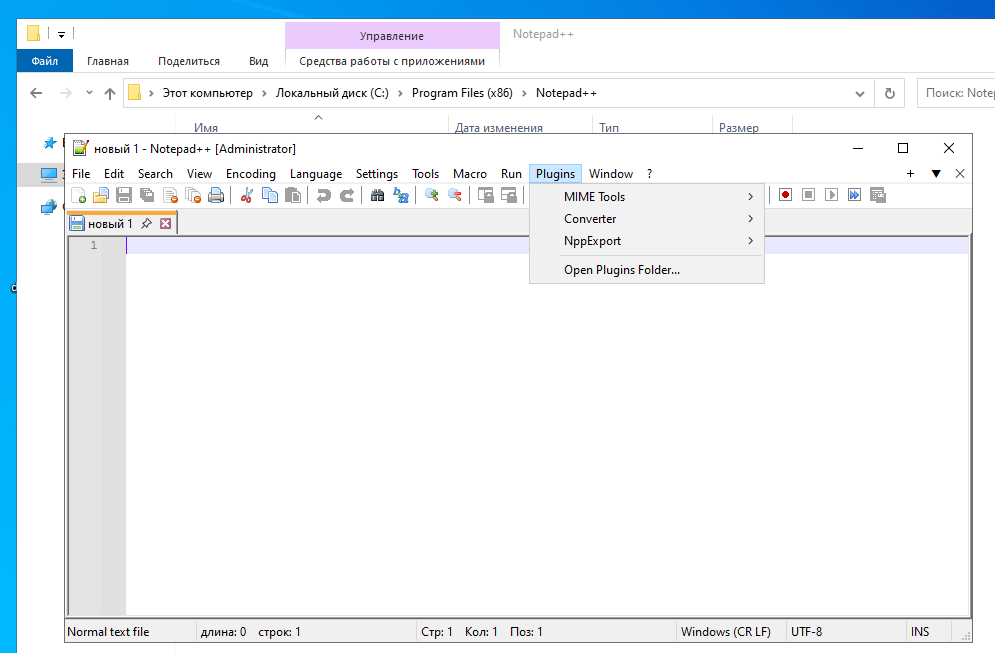
Notepad++ v8.9.8 (32-bit)
Build time: Aug 23 2026 - 17:20:01
Scintilla/Lexilla included: 5.6.6/5.5.3
Boost Regex included: 1_90
pugixml included: 1.16
nlohmann JSON included: 3.12.0
Path: C:\Program Files (x86)\Notepad++\notepad++.exe
Command Line:
Admin mode: ON
Local Conf mode: OFF
Cloud Config: OFF
WinGUp: present
disableNppAutoUpdate.xml: absent
Periodic Backup: ON
Placeholders: OFF
Scintilla Rendering Mode: SC_TECHNOLOGY_DIRECTWRITE (1)
Multi-instance Mode: monoInst
asNotepad: OFF
File Status Auto-Detection: cdEnabledNew (for current file/tab only)
Dark Mode: OFF
Display Info:
primary monitor: 1920x1007, scaling 100%
visible monitors count: 1
installed Display Class adapters:
0000: Description - VirtualBox Graphics Adapter for Windows 8+
0000: DriverVersion - 5.2.44.0
OS Name: Windows 10 Enterprise LTSC 2021 (64-bit)
OS Version: 21H2
OS Build: 19044.1288
Current ANSI codepage: 1251
Plugins:
mimeTools (3.1)
NppConverter (4.7)
NppExport (0.4) -
All the mark of the web looks okay, and all the files are in the right place.
I am not sure why it’s not working for you. With a similar installation, but 64-bit, I have no problems with Plugins AdminAdmin mode: ON
Can you try
- running not as administrator. That can sometimes mess up permissions, so maybe for some strange reason, your Admin has been denied privilege on one or more of the DLL or EXE files mentioned?
- installing the 64-bit 8.9.8 on that machine, instead of 32-bit, and see if it behaves the same?
- confirm that you don’t have this problem with v8.9.7 on the same setup
First few experiments on my end:
- 8.9.8-64bit, non-Admin: my daily driver, and I use Plugins Admin frequently:
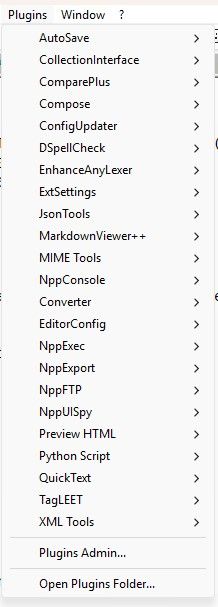
- 8.9.8-64bit, Admin:
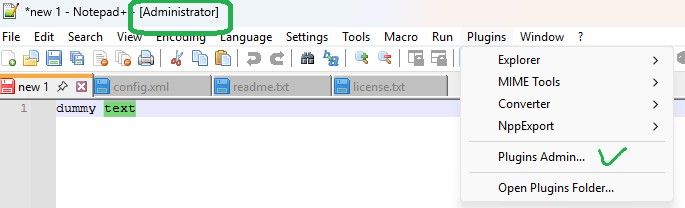
- 8.9.8-32bit, Not Admin:
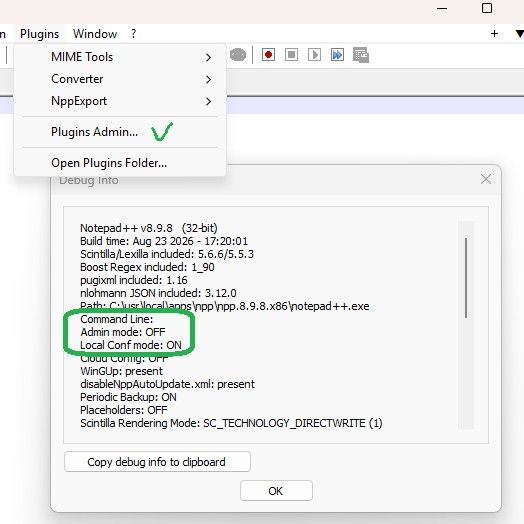
- 8.9.8-32bit, Admin:
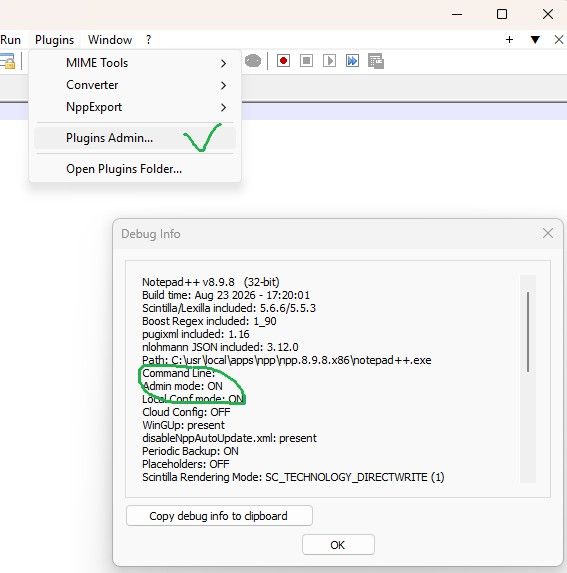
So, so far, on my Win 11 machine, I cannot replicate with 64-bit or 32-bit, admin or no, with the portable (or the installed, for 8.9.8-64)
Update
Virtual Win 10 machine:
- Portable 32-bit: Plugins Admin is there, whether normal run or Admin
- Portable 64-bit: Plugins Admin is there, whether normal run or Admin
- Installed 64-bit: Plugins Admin is there, whether normal run or Admin
- Installed 32-bit: Plugins Admin is there, whether normal run or Admin
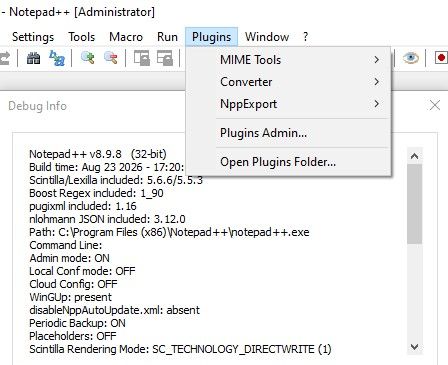
Notepad++ v8.9.8   (32-bit)
Build time: Aug 23 2026 - 17:20:01
Scintilla/Lexilla included: 5.6.6/5.5.3
Boost Regex included: 1_90
pugixml included: 1.16
nlohmann JSON included: 3.12.0
Path: C:\Program Files (x86)\Notepad++\notepad++.exe
Command Line:
Admin mode: ON
Local Conf mode: OFF
Cloud Config: OFF
WinGUp: present
disableNppAutoUpdate.xml: absent
Periodic Backup: ON
Placeholders: OFF
Scintilla Rendering Mode: SC_TECHNOLOGY_DIRECTWRITE (1)
Multi-instance Mode: monoInst
asNotepad: OFF
File Status Auto-Detection: cdEnabledNew (for current file/tab only)
Dark Mode: OFF
Display Info:
    primary monitor: 1024x666, scaling 100%
    visible monitors count: 1
    installed Display Class adapters:
        0000: Description - VirtualBox Graphics Adapter (WDDM)
        0000: DriverVersion - 7.1.8.18469
OS Name: Windows 10 Home (64-bit)
OS Version: 22H2
OS Build: 19045.5854
Current ANSI codepage: 1252
Plugins:
    mimeTools (3.1)
    NppConverter (4.7)
    NppExport (0.4)
I tried to get as close to your setup as I possibly can, and I still cannot replicate your problem.
If what I have suggested to you to try doesn’t help, then you’ll have to wait for someone else to have some ideas. Good luck, -
This post is deleted! -
@peterjones
Installed Notepad++ v8.9.8.1, and this problem went away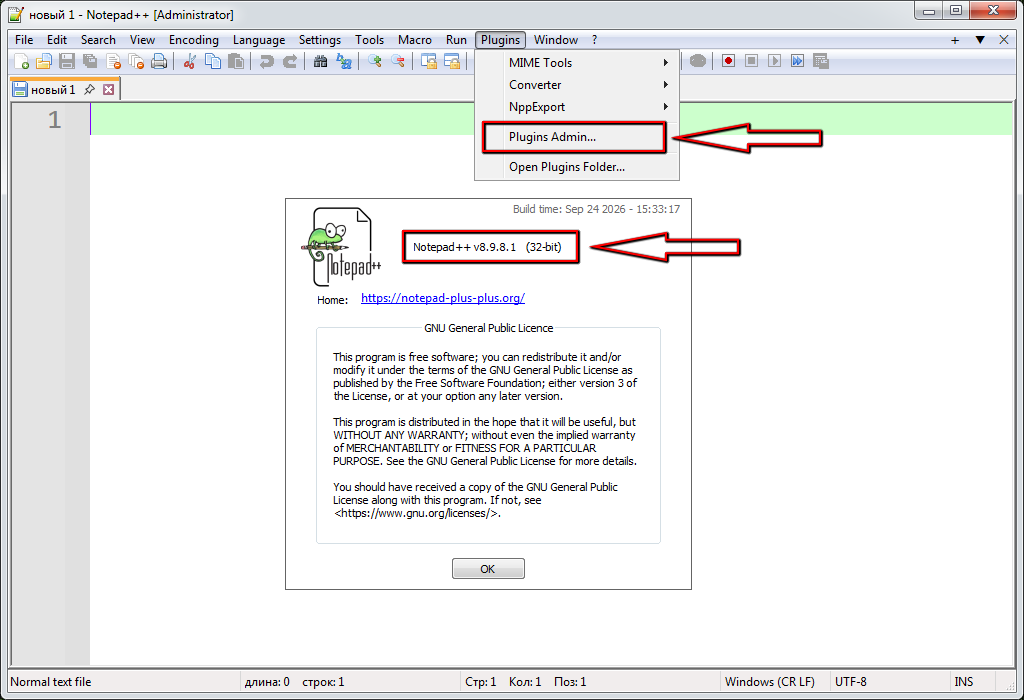
p.s.
And I don’t need to unblock files received from the Internet, because after a clean install of any Windows, I will block this option through the registry. -
This post is deleted!


Hello! It looks like you're interested in this conversation, but you don't have an account yet.
Getting fed up of having to scroll through the same posts each visit? When you register for an account, you'll always come back to exactly where you were before, and choose to be notified of new replies (either via email, or push notification). You'll also be able to save bookmarks and upvote posts to show your appreciation to other community members.
With your input, this post could be even better 💗
Register Login