Last Opened Files are not There when Reopening after Windows 11 Update
-
Hello,
My work laptop was just update for Windows 11 a week ago. Since then, NotePad++ will not backup my files so that they open the next time I open NotePad++. I have tried:- Going into %AppData%\Notepad++ and removing the old session.xml, and starting over.
- Going into Settings and in Preferences
a. Backup - turning off and on “Remember current session for next launch” and “Enable session snaptshot and periodic backup”. It is set to “Simple backup”.
b. MISC - Turning off and on “Enable for all opened files”. - Turning off and on Plugins.
I don’t know what else to do or try.
I cannot uninstall and reinstall the program as only IT has permissions to do that.
This did not happen on my personal computer.Here is my Debug List (with Plugins turned back on after blocking them for a test).
Notepad++ v8.9.8 (64-bit)
Build time: Aug 23 2026 - 17:22:44
Scintilla/Lexilla included: 5.6.6/5.5.3
Boost Regex included: 1_90
pugixml included: 1.16
nlohmann JSON included: 3.12.0
Path: C:\Program Files\Notepad++\notepad++.exe
Command Line:
Admin mode: OFF
Local Conf mode: OFF
Cloud Config: OFF
WinGUp: absent
disableNppAutoUpdate.xml: absent
Periodic Backup: ON
Placeholders: ON
Scintilla Rendering Mode: SC_TECHNOLOGY_DIRECTWRITE (1)
Multi-instance Mode: monoInst
asNotepad: OFF
File Status Auto-Detection: cdEnabledOld (for all opened files/tabs)
Dark Mode: OFF
Display Info:
primary monitor: 1920x1080, scaling 125%
visible monitors count: 2
installed Display Class adapters:
0000: Description - Intel® UHD Graphics
0000: DriverVersion - 31.0.101.2130
0001: Description - DisplayLink USB Device
0001: DriverVersion - 11.3.5139.0
0002: Description - DisplayLink USB Device
0002: DriverVersion - 11.3.5139.0
0003: Description - DisplayLink USB Device
0003: DriverVersion - 11.3.5139.0
- warning, search has been limited to maximum number of adapter records: 4
OS Name: Windows 11 Enterprise (64-bit)
OS Version: 23H2
OS Build: 22631.7584
Current ANSI codepage: 1252
Plugins:
mimeTools (3.1)
NppConverter (4.7)
NppExport (0.4)Thank you for any help you can offer me,
-
@Karen3D ,
That sounds like a permissions issue… but you aren’t running in Admin mode, so usually there isn’t such a thing.
What are the results of the following experiment?
- Exit Notepad++
- delete
%AppData%\Notepad++\session.xml - Run Notepad++
- Open 3 files
- Exit Notepad++
- Look at
%AppData%\Notepad++- Is there
session.xml? - If you open it (with
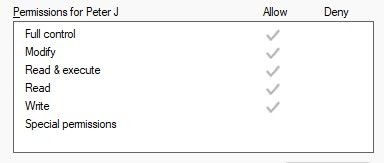
notepad.exeor some other editor), what are its contents - What permissions does it have? Windows Right-Click properties, Security tab, click on your username, it should have all the normal permissions checkmarked, like:
- Is there
If it’s there, and your three files are listed, then when you next run Notepad++, it should load those files. If it does, great, problem solved. If it doesn’t, then as long as it’s not a security issue (ie, unimportant filenames/paths without secrets in the path), it would be great if you could share the contents of the session.xml, as well as confirming that your Debug Info is identical to what you shared above, and paste screenshot of your Settings > Preferences > Backup
-
Hi @Karen3D — one more angle worth checking, specific to the Windows 11 update scenario: session.xml is only written when Notepad++ exits cleanly. Windows updates are notorious for restarting the machine and killing running apps before they can save, so the session file can end up out of date or empty even with “Remember current session for next launch” ticked.
A couple of quick checks that fit an IT-managed work laptop:
- Close Notepad++ yourself before restarting or shutting down, and confirm in Task Manager that no notepad++.exe process is left hanging around. A leftover process can hold on to the old session.
- Open a couple of files, close Notepad++ normally, then check the timestamp on session.xml in %AppData%\Notepad++. If it has not been updated, the write itself is being blocked — roaming profiles or redirected folders on corporate machines are a classic cause.
- If your files live on network drives, make sure the drive mappings are unchanged after the update. Notepad++ quietly skips files it cannot find at start-up.
Worth ruling these out before going any deeper.

Hello! It looks like you're interested in this conversation, but you don't have an account yet.
Getting fed up of having to scroll through the same posts each visit? When you register for an account, you'll always come back to exactly where you were before, and choose to be notified of new replies (either via email, or push notification). You'll also be able to save bookmarks and upvote posts to show your appreciation to other community members.
With your input, this post could be even better 💗
Register Login