Uninstall keeps user config: what survives a 'clean reinstall', and why it matters
-
Where this comes from: same independent audit as the plugin-trust note. This one is about what the uninstaller leaves behind, and why “uninstall then reinstall” is not the clean slate people assume.
What survives an uninstall
The uninstaller keeps user data by default (
uninstall.nsh,$keepUserData). In a normal profile that means these stay on disk after uninstall:%APPDATA%\Notepad++\config.xml- includessuppress2GBWarning,largeFileRestriction%APPDATA%\Notepad++\shortcuts.xml- shortcut and command bindings%APPDATA%\Notepad++\session.xml- the last-open file list
All three are in a user-writable directory, and they are read again after reinstall.
Why that matters
“Uninstall and reinstall” is the first thing people do when they suspect something is wrong with the program. But:
- session.xml is a known input surface. A crafted entry with an unreachable UNC path hangs startup for 40+ seconds and triggers an outbound SMB authentication attempt (reported separately: #18548, #18553). A “clean reinstall” does not remove it.
- shortcuts.xml binds commands to keys. A malicious entry is not removed either - it just stops working while the app is uninstalled, and starts working again after reinstall.
- config.xml holds user-tunable safety switches (e.g.
suppress2GBWarning). Those survive too.
So for anyone who got a bad config written (by malware, or by a family member clicking something), the standard “reinstall” advice does not clean it. The user believes they wiped it; they did not.
What would help
- An explicit “remove user config” option in the uninstaller (keep-by-default is fine, but make the choice visible)
- Documenting the config directory so users can delete it manually
- Optionally: a “reset settings” entry in the app itself
Disclosure
Limited public note, not a CVE request. This is a “by design” behavior with a real consequence: the reinstall people rely on does not remove the config that can hurt them. Not asking anyone to change the default - asking for the choice to be visible.
-
An explicit “remove user config” option in the uninstaller (keep-by-default is fine, but make the choice visible)
You mean this already-existing promt during the uninstall process?
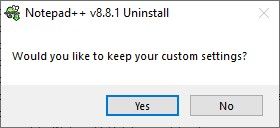
If you click no on that dialog, it deletes all the files you were mentioning.
Documenting the config directory so users can delete it manually
https://npp-user-manual.org/docs/config-files/#configuration-files-location
Optionally: a “reset settings” entry in the app itself
Pointless, given that a user can just delete the
%AppData%\Notepad++directory manually if they want to reset.In other words, your suggestions were already-implemented, already-implemented, and redudant/pointless.
-
same user posted similar in this issue #10923 comment

Hello! It looks like you're interested in this conversation, but you don't have an account yet.
Getting fed up of having to scroll through the same posts each visit? When you register for an account, you'll always come back to exactly where you were before, and choose to be notified of new replies (either via email, or push notification). You'll also be able to save bookmarks and upvote posts to show your appreciation to other community members.
With your input, this post could be even better 💗
Register Login