Notepad++ v8.9.9 Release Candidate
-
- Add an option to display the Incremental Search bar at the top. (Fix #18486)
I installed the RC (x86 on Windows 7), but I don’t see a new option under Preferences>Searching or anywhere else. I see it in the source code. Is it dependent on something else to be shown?
On Windows 10 (presumably no different on Windows 7) it’s in the incremental search bar itself. There is a button that has an upward pointing arrow when the bar is at the bottom; clicking it moves the bar to the top and changes the button to a downward pointing arrow. The button is in a fixed position; on my screen, its left edge is 1055 pixels to the right of the left edge of the Notepad++ window. If the window is not that wide, you can’t see it.
-
- Add an option to display the Incremental Search bar at the top. (Fix #18486)
I installed the RC (x86 on Windows 7), but I don’t see a new option under Preferences>Searching or anywhere else. I see it in the source code. Is it dependent on something else to be shown?
On Windows 10 (presumably no different on Windows 7) it’s in the incremental search bar itself. There is a button that has an upward pointing arrow when the bar is at the bottom; clicking it moves the bar to the top and changes the button to a downward pointing arrow. The button is in a fixed position; on my screen, its left edge is 1055 pixels to the right of the left edge of the Notepad++ window. If the window is not that wide, you can’t see it.
Thank you. Mine was around 1240 pixels over - way beyond the Count checkbox and about an inch off my usual window size. It’s lonely out there, no label, no tooltip.
When I clicked it, the search bar disappeared and it required a restart to see it again. Clicking back to the bottom did not.
Do the options need to be spaced so far apart?
-
astewart77 said:
- Add an option to display the Incremental Search bar at the top. (Fix #18486)
I installed the RC (x86 on Windows 7), but I don’t see a new option under Preferences>Searching or anywhere else. I see it in the source code. Is it dependent on something else to be shown?
On Windows 10 (presumably no different on Windows 7) it’s in the incremental search bar itself. There is a button that has an upward pointing arrow when the bar is at the bottom; clicking it moves the bar to the top and changes the button to a downward pointing arrow. The button is in a fixed position; on my screen, its left edge is 1055 pixels to the right of the left edge of the Notepad++ window. If the window is not that wide, you can’t see it.
Thank you. Mine was around 1240 pixels over
I forgot that I had also tried the new dialog font option. I had changed the font size from 8 to 9 and that enlarges the Increment search bar, among others. Back to 8 and the top/bottom button appears at 1055 pixels.
Still disappears after moving to the top, until restart.
-
The up/down button heavily overlaps the text.
Is there a way to move this button to a free space (for example, near the closing of the search panel)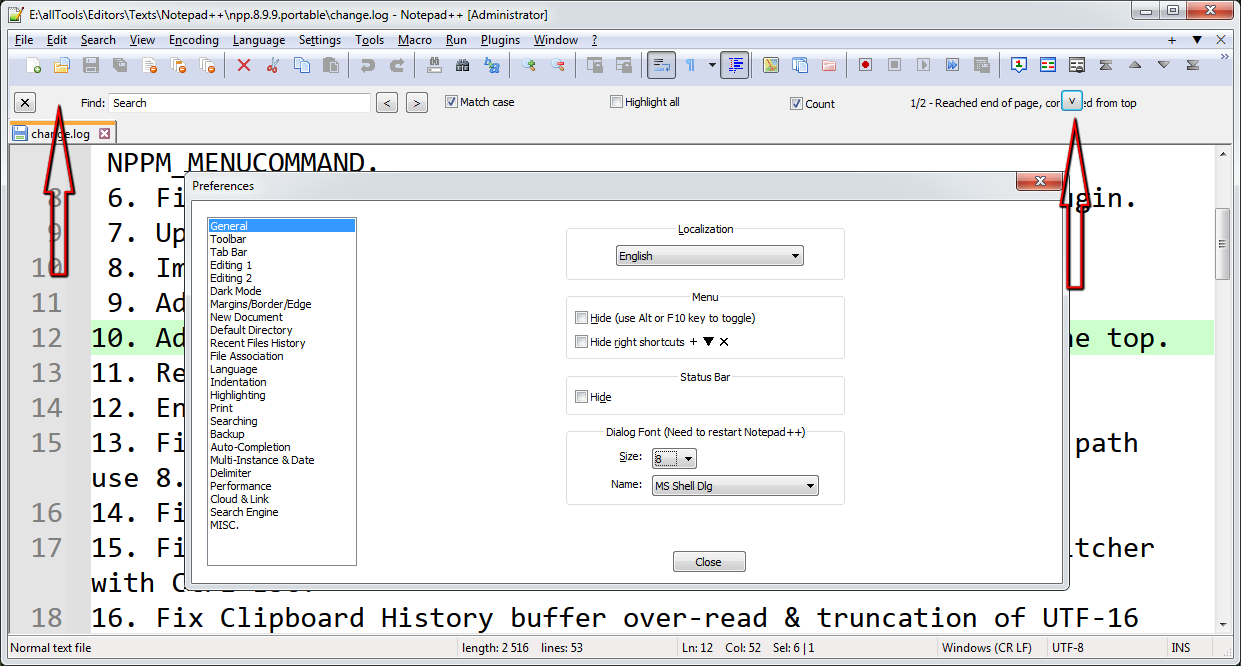
Notepad++ v8.9.9 (32-bit) Build time: Oct 31 2026 - 18:01:18 Scintilla/Lexilla included: 5.6.7/5.5.4 Boost Regex included: 1_90 pugixml included: 1.16 nlohmann JSON included: 3.12.0 Path: E:\allTools\Editors\Texts\Notepad++\npp.8.9.9.portable\VBS\..\notepad++.exe Command Line: "C:\Users\Uzzer\Desktop\Intel_UPE_ComparisonChart_2026_10_27.csv" Admin mode: ON Local Conf mode: ON Cloud Config: OFF WinGUp: present disableNppAutoUpdate.xml: present Periodic Backup: ON Placeholders: OFF Scintilla Rendering Mode: SC_TECHNOLOGY_DIRECTWRITE (1) Multi-instance Mode: monoInst asNotepad: OFF File Status Auto-Detection: cdEnabled4CurrentFile Dark Mode: OFF Display Info: primary monitor: 1920x1080, scaling 100% visible monitors count: 2 installed Display Class adapters: 0000: Description - Intel(R) HD Graphics 4000 0000: DriverVersion - 10.18.10.3345 0001: Description - NVIDIA Quadro K620 0001: DriverVersion - 26.21.14.4166 0002: Description - NVIDIA Quadro FX 580 (Microsoft Corporation - WDDM v1.1) 0002: DriverVersion - 8.15.11.8593 0003: Description - Стандартный VGA графический адаптер 0003: DriverVersion - 6.1.7600.16385 - warning, search has been limited to maximum number of adapter records: 4 OS Name: Windows 7 Home Premium (64-bit) OS Build: 7601.0 Current ANSI codepage: 1251 Plugins: ColorPicker (2.3) ComparePlugin (2.0.2) DSpellCheck (1.5) Explorer (1.9.9) HexEditor (0.9.14) HTMLTag_unicode (1.6.1) ImgTag (2.0.1) JSMinNPP (25.11.16) MarkdownViewerPlusPlus (0.8.2) mimeTools (3.2) NPPColorPicker (1.0.1) NppConverter (4.7) NppExport (0.4) NppMarkdownPanel (0.9.3) NppQCP (2) NppSnippets (1.7.1) NppUISpy (1.2) PreviewHTML (1.4.8) RegexTrainer (1.2) ShtirlitzNppPlugin (1.1.2) WebEdit (2.8.1.2) XMLTools (3.1.1.13) _CustomizeToolbar (5.3) -
@andrecool-68 @astewart77
The button position issue is fixed in the commit:
https://github.com/notepad-plus-plus/notepad-plus-plus/commit/14e27a6caa5a2f2a3dfcbc8594d792d255c4991dWhen I clicked it, the search bar disappeared and it required a restart to see it again. Clicking back to the bottom did not.
Do the options need to be spaced so far apart?Could you share your Debug Info (Menu
? > Debug Info...)? -
Still disappears after moving to the top, until restart.
I cannot replicate that. When I click the button, it immediately appears in the other location, without having to exit/restart Notepad++.
update: deleted most of my post after seeing @donho’s reply.
@andrecool-68 @astewart77
The button position issue is fixed in the commit: https://github.com/notepad-plus-plus/notepad-plus-plus/commit/14e27a6caa5a2f2a3dfcbc8594d792d255c4991dI can confirm that the artifact from the new build does improve the position:

-
@andrecool-68 @astewart77
The button position issue is fixed in the commit:
https://github.com/notepad-plus-plus/notepad-plus-plus/commit/14e27a6caa5a2f2a3dfcbc8594d792d255c4991dWhen I clicked it, the search bar disappeared and it required a restart to see it again. Clicking back to the bottom did not.
Do the options need to be spaced so far apart?Could you share your Debug Info (Menu
? > Debug Info...)?Notepad++ v8.9.8.1 (32-bit) Build time: Nov 2 2026 - 16:21:07 Scintilla/Lexilla included: 5.6.8/5.5.5 Boost Regex included: 1_92 pugixml included: 1.16 nlohmann JSON included: 3.12.0 Path: C:\Program Files (x86)\Notepad++\notepad++.exe Command Line: Admin mode: ON Local Conf mode: OFF Cloud Config: OFF WinGUp: present disableNppAutoUpdate.xml: absent Periodic Backup: OFF Placeholders: OFF Scintilla Rendering Mode: SC_TECHNOLOGY_DIRECTWRITE (1) Multi-instance Mode: monoInst asNotepad: OFF File Status Auto-Detection: cdEnabled4AllFiles Dark Mode: OFF Display Info: primary monitor: 1920x1200, scaling 100% visible monitors count: 2 installed Display Class adapters: 0000: Description - NVIDIA GeForce GTX 760 Ti OEM 0000: DriverVersion - 10.18.13.6839 0001: Description - Intel(R) HD Graphics 4600 0001: DriverVersion - 9.18.10.3234 0002: Description - NVIDIA GeForce GTX 760 0002: DriverVersion - 9.18.13.4752 OS Name: Windows 7 Home Premium (64-bit) OS Build: 7601.0 Current ANSI codepage: 1252 Plugins: ColumnsPlusPlus (1.3.3) ColumnTools (1.4.5.1) DSpellCheck (1.5) EnhanceAnyLexer (1.4.1) ExtSettings (1.3.1) GotoLineCol (2.4.5.1) HTMLTag_unicode (1.6.1) JSMinNPP (25.11.16) mimeTools (3.2) MultiReplace (6.0.0.36) NppConverter (4.7) NppEventExec (0.9) NppExec (0.8.11) NppExport (0.4) NppMenuSearch (0.9.7) RandomValuesNppPlugin (0.3) Search++ (0.7.2) SurroundSelection (1.4.1) Unicode Normalize (1.1) XBrackets (2.0.4) _CustomizeToolbar (5.3)With the new artifact, the button is easily visible, but a font size change from 8 to 9 still pushes the count status off the window.
1/11 - Reached end of page, continued from topis clipped for me at “1/11 - Reache”. My window is 140 columns wide.
Move to top still disappears.
-
1/11 - Reached end of page, continued from topMaybe it would be even better to remove the complete part >> - Reached end of page, continued from top <<
The numbers x/xx clearly indicate the position/match in the file, so the information of this string is redundant. Make it as short as needed is the characteristic of incremental search.
-
@PeterJones said:
I can confirm that the artifact from the new build does improve the position:It looks much better, but I am now asking myself, if it would be better to move the X button for close, and the up/down button to the right side of the incremental search bar. Normally the Close button is on right side of every window.
So, close button at most right position, up/down botton at position left next to close button
-
close button at most right position, up/down botton at position left next to close button
Personally, if I used that bar, that’s what I would prefer… But they would have to adjust with window width, not be at fixed positions
-
The button position issue is fixed in the commit:
https://github.com/notepad-plus-plus/notepad-plus-plus/commit/14e27a6caa5a2f2a3dfcbc8594d792d255c4991dIs it possible to get a link to the notepad++.exe file with the latest fixes?





Hello! It looks like you're interested in this conversation, but you don't have an account yet.
Getting fed up of having to scroll through the same posts each visit? When you register for an account, you'll always come back to exactly where you were before, and choose to be notified of new replies (either via email, or push notification). You'll also be able to save bookmarks and upvote posts to show your appreciation to other community members.
With your input, this post could be even better 💗
Register Login