Notepad++ release 8.9.9
-
I have no such problem:
see video:
- Deleted the folder npp.8.9.9.portable.x64
- Unpacked the same archive npp.8.9.9.portable.x64.7z
- Installed all the necessary plugins
- Made the necessary settings for notepad++
- Added notepad++ to the context menu via my old bat file
And a “miracle” happened: my notepad++ began to behave as expected when opening files and “folders as a project”. I don’t understand what’s going on at all. About a month ago there was a situation where the “manage plugins” menu item disappeared.
Can anyone tell me what the problem might be?
-
For surety, I tried the right-clicking shell context menu after the v8.9.9 installation in a Win7 VM and it works ok for me as well. Even with your “Admin mode: ON” N++.
Can anyone tell me what the problem might be?
Maybe a previously registered NppShell.dll remained loaded in the Windows Explorer shell, then after you logoff/reboot, the new one (in a new registered location) is finally loaded by rightclick.
-
- Vulnerability: Fix TOCTOU risk when saving temp file under UAC. CVE ID not assigned yet
This caused a regression in the v8.9.9 (PR fix).
-
Maybe a previously registered NppShell.dll remained loaded in the Windows Explorer shell, then after you logoff/reboot, the new one (in a new registered location) is finally loaded by rightclick.
Read all my messages in this thread. As I said above, in the portable version there is ABSOLUTELY no such file!
-
Can anyone tell me what the problem might be?
I gave you a practical step, which would have provided useful information to try to find the problem, had you grabbed that information before deleting/re-unzipping. That information is obviously gone now, so the best anyone can do is guess.
And the best guess is still what Don and I were both indicating: a mismatch in apparent paths (two different strings that possibly refer to the same physical drive location: maybe junctions or symbolic links or similar) or a mismatch in real paths (two different portable copies, where the one actively running is not the same as the one your registry was invoking).
Modern security prevents the non-elevated registry command from passing data across the “boundary” to the elevated Admin Notepad++ that was running (though if they are using the same path to the executable, as in my experiements where it worked, then the data can cross that boundary)
And a “miracle” happened:
Not a miracle. your deletion and re-unzip likely got rid of the mismatch that we were trying to help you find.
About a month ago there was a situation where the “manage plugins” menu item disappeared.
“Plugins Admin”. It would have disappeared because of Mark of the Web. As, IIRC, we told you, about a month ago.
-
I gave you a practical step, which would have provided useful information to try to find the problem, had you grabbed that information before deleting/re-unzipping. That information is obviously gone now, so the best anyone can do is guess.
The paths in the registry are always correct; otherwise, the context menu wouldn’t work at all.
Notepad++ v8.9.9   (64-bit)
Build time: Nov  6 2026 - 16:19:53
Scintilla/Lexilla included: 5.6.9/5.5.5
Boost Regex included: 1_92
pugixml included: 1.16
nlohmann JSON included: 3.12.0
Path: E:\allTools\Editors\Texts\Notepad++\npp.8.9.9\x64\notepad++.exe
Command Line: "E:\allTools\Editors\Texts\Notepad++\npp.8.9.9\x64\plugins\NppMarkdownPanel\README.md"
Admin mode: ON
Local Conf mode: ON
Cloud Config: OFF
WinGUp: present
disableNppAutoUpdate.xml: present
Periodic Backup: ON
Placeholders: OFF
Scintilla Rendering Mode: SC_TECHNOLOGY_DIRECTWRITE (1)
Multi-instance Mode: monoInst
asNotepad: OFF
File Status Auto-Detection: cdEnabled4CurrentFile
Dark Mode: OFF
Display Info:
    primary monitor: 1920x1080, scaling 100%
    visible monitors count: 2
    installed Display Class adapters:
        0000: Description - Intel(R) HD Graphics 4000
        0000: DriverVersion - 10.18.10.3345
        0001: Description - NVIDIA Quadro K620
        0001: DriverVersion - 26.21.14.4166
        0002: Description - NVIDIA Quadro FX 580 (Microsoft Corporation - WDDM v1.1)
        0002: DriverVersion - 8.15.11.8593
        0003: Description - Стандартный VGA графический адаптер
        0003: DriverVersion - 6.1.7600.16385
    - warning, search has been limited to maximum number of adapter records: 4
OS Name: Windows 7 Home Premium (64-bit)
OS Build: 7601.0
Current ANSI codepage: 1251
Plugins:
    ComparePlus (3)
    DSpellCheck (1.5)
    Explorer (1.9.9)
    HexEditor (0.9.14)
    HTMLTag (1.6.1)
    ImgTag (2.0.1)
    JSMinNPP (25.11.16)
    mimeTools (3.2)
    NppConverter (4.7)
    NppExport (0.4)
    NppMarkdownPanel (0.9.3)
    NppSnippets (1.7)
    NppUISpy (1.2)
    PreviewHTML (1.4.8)
    RegexTrainer (1.2)
    ShtirlitzNppPlugin (1.1.2)
    WebEdit (2.9.0.1)
    _CustomizeToolbar (5.3)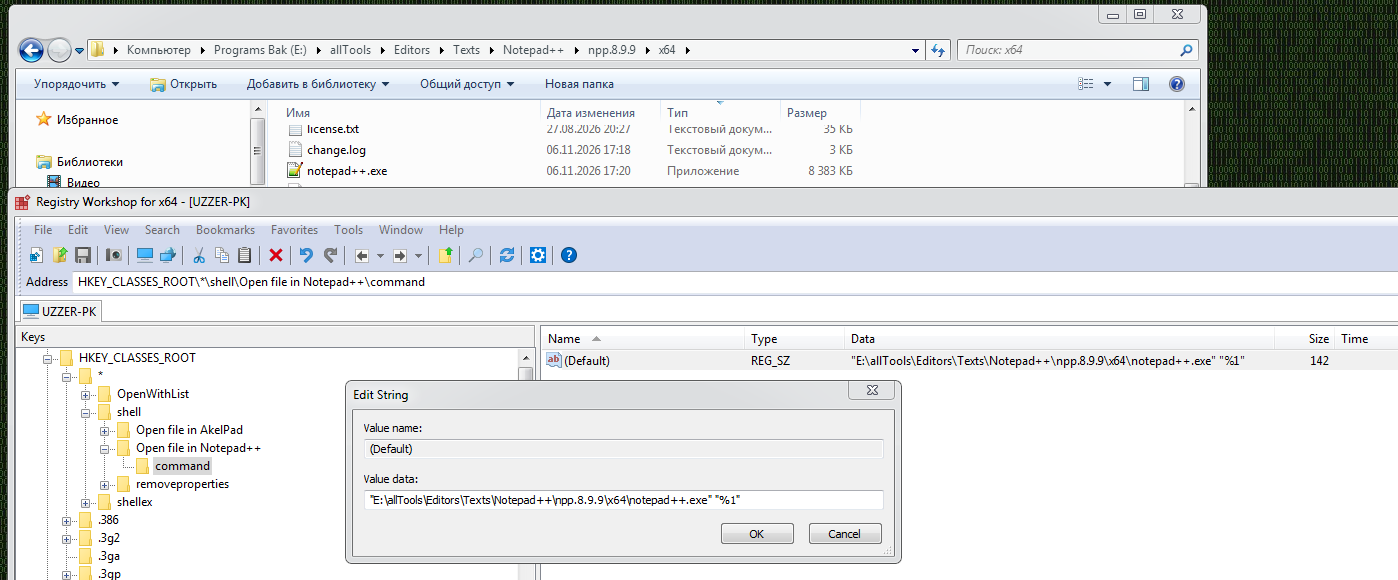
-
Hello guys,
When trying to open Notepad++ 8.9.9’s Plugins Admin… under Wine I’m getting an exception (and Notepad++ closes). Does anyone experience the same issue?
BR
-
-
When trying to open Notepad++ 8.9.9’s Plugins Admin… under Wine I’m getting an exception (and Notepad++ closes). Does anyone experience the same issue?
Could you provide the latest Notepad++ version work with WINE without crash when you launch Plugin Admin?
Hi @donho ,
Version 8.9.8.1 worked fine. -
@pnedev
Cannot reproduce - it works fine for me.
Please create an issue on Github & provide all necessary information there, I (& other devs eventually) will try to reproduce according your information.



Hello! It looks like you're interested in this conversation, but you don't have an account yet.
Getting fed up of having to scroll through the same posts each visit? When you register for an account, you'll always come back to exactly where you were before, and choose to be notified of new replies (either via email, or push notification). You'll also be able to save bookmarks and upvote posts to show your appreciation to other community members.
With your input, this post could be even better 💗
Register Login