Copy text from notepad++ to putty terminal loses formatting.
-
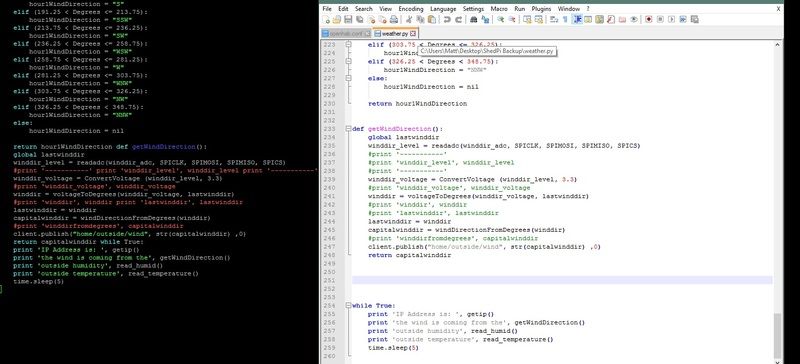
Using Notepad++ with Putty 0.67 SSH terminal everytime i copy code from notpad++ it loses its formatting in weird ways each time i paste. some of its correct then other parts becomes justified and mixed together, removing blank lines in some places and not others, is there a way to copy from notepad++ and paste directly as previously formatted,
I have tried the export to RTF and paste but doesnt seem to do the trick
i am coding in python if that makes any difference.http://i82.photobucket.com/albums/j262/skaterdrake/notpadBug.jpg
-
I doubt it’s the programming language (per se) that makes a difference. It’s probably the settings of your particular terminal, whether you are using tabs or spaces for indenting in NPP, and what the receiving application (not PuTTY; whatever program you’re running in the PuTTY terminal) is expecting and set up for. If I run
vimon linux thru a PuTTY 0.67 SSH terminal, and paste from Notepad++ intovimwith auto-indent turned off, I get exactly what I pasted (if auto-indent is turned on,vimadds extra indenting: this is an example of how settings on the receiving application can affect things).debugging questions
- In Notepad++, what are
Settings>Preferences>Languages>Tab Settings>[Default]>Replace by spaceset to? unchecked (☐) or checked (☑)? What about forTab Settings>Python?- in your existing NPP window, you can turn on
View>Show Symbol>Show Whitespace and TAB, and look for a light-colored dot (SPACE) or a light-colored arrow (TAB) at the beginning of the indent lines, to see what the indent is for that specific file.
- in your existing NPP window, you can turn on
- What program are you running in the PuTTY terminal, that you’re trying to paste into?
- Try an experiment:
- run plane-jane Windows notepad.exe
- type in two copies of the example text (below)
- once indenting using the tab character
- once indenting using four or eight spaces
- copy/paste each (one at a time) into the destination program in PuTTY
- Do they both come out the same (whether both wrong or both right), or is one formatted correctly and the other not
- if they both are wrong, then it’s likely an issue with either your PuTTY settings or with what the receiving program expects
- if the tab-indented version comes out wrong, but the space-indented version is right, you’ll want to set NPP to convert TABs to SPACES
- if the space-indented is wrong but the tab-indented is right (that would surprise me), you want NPP to not convert TABs to spaces
- if both are right from notepad.exe, but it still pastes wrong from Notepad++, then there’s something magical going on with your copy/paste buffer, and you might want to try loading Notepad++ without any plugins (run
notepad++.exe -noPlugin) and copy/paste from NPP again, to see whether some plugin is interfering with the Windows clipboard.
example text
def getWindDirection():
    global lastwinddir
    ...
    return

while True:
    print
    ...
other suggestions
Instead of copy/paste from Windows::Notepad++ to PuTTY::OS::Application, would you be able to use Notepad++'s NppFTP plugin to edit remotely from Windows::Notepad++ to the filesystem on whatever server you’re accessing thru PuTTY? (Or, if you’re used to a standalone FTP/SFTP/… like FileZilla, how about editing on Windows, but then copying to the server using your external FTP program)
- In Notepad++, what are


Hello! It looks like you're interested in this conversation, but you don't have an account yet.
Getting fed up of having to scroll through the same posts each visit? When you register for an account, you'll always come back to exactly where you were before, and choose to be notified of new replies (either via email, or push notification). You'll also be able to save bookmarks and upvote posts to show your appreciation to other community members.
With your input, this post could be even better 💗
Register Login