How to use "installed" icon?
-
Windows 10 Version 1709 64-bit
Notepad++ 7.5.5 64-bitIt seems all the icon posts that I searched through are asking to revert back to some older icon. But I don’t know what they are referring to as I am very new to Notepad++
While installing, I chose the option to add a shortcut to my Desktop. That icon shows the notepad with a lizard in the middle and N++ at the bottom with a poised pencil. [http://www.saladgoat.com/Notepad++_installed.png](link url)
Now I want to pin it to the Start menu. But there, the icon is the notepad with N++ in the middle and the pencil poised near the bottom. [http://www.saladgoat.com/Notepad++_default.png](link url)
I entered into the realm of changing icons and within the notepad++.exe file there are tons of them, including one of just the lizard. But the one with the lizard and the pencil is not there! Where is it? How is it showing on the Desktop, when it doesn’t seem to exist?
Also, in File Explorer, looking at C:\ProgramData\Microsoft\Windows\Start Menu\Programs\Notepad++, in the bottom details pane it shows a larger icon, with the lizard in the middle of the notepad and the poised pencil, but with Notepad++ spelled out. [http://www.saladgoat.com/Notepad++_details_pane.png](link url) Where did that come from?
So yeah, please tell me how to find and use the icon that is being used on my Desktop.
Thanks!
-
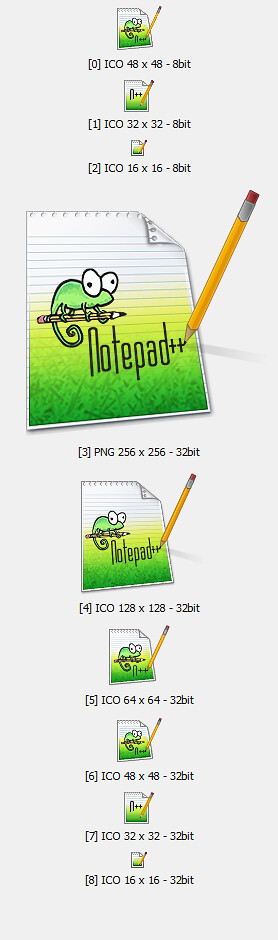
As with most Microsoft Windows related icons the Notepad++ icon contains several images. Windows determines which of those images to use for a specific task (display on taskbar or desktop) depending on e.g. size and color depth.
-
Took me a moment to understand what you were saying but now I get it. That’s too bad. But now I know. Thanks for your response.


Hello! It looks like you're interested in this conversation, but you don't have an account yet.
Getting fed up of having to scroll through the same posts each visit? When you register for an account, you'll always come back to exactly where you were before, and choose to be notified of new replies (either via email, or push notification). You'll also be able to save bookmarks and upvote posts to show your appreciation to other community members.
With your input, this post could be even better 💗
Register Login