Can a UDL delimeter style's Close be made to ignore tabbed new lines?
-
I’m trying to configure a user defined language in such a way that it works well as a task list and I’m getting close, but I’m unsure if what I want to do is feasible. I’ve gotten it to where I can give it an Open (XX) to notate that a line should be changed to a different style to indicate that I’ve completed the task, but I often have additional notes in tabbed lines beneath each task.
Is there a way to have the Delimiter’s Close look not just for end of line, but wait for a new, untabbed line before closing? Currently I’m using ((EOL)) but it, unsurprisingly, stops at the end of the line.
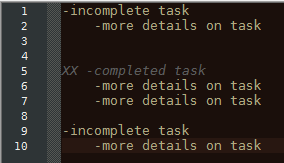
Here’s an example of what I mean. In the image below, tasks 1 and 3 are incomplete but 2 is completed and should be marked accordingly. I’d like the lines containing details on task 2 to also have the same style as the main task 2 line, then return to normal for task 3 since it’s a new, untabbed line.
Can anyone help?
-
Unfortunately, no. The UDL parser is super-simple, and doesn’t have any regex or lookbehind features.
((EOL))is about as fancy as it gets (and you cannot even require it to see two sequential EOL – ie, look for a blank line between). Sorry.However, you can add extra highlighting to a UDL language using regexes via the script
EnhanceUDLLexer.pythat @Ekopalypse shares in this linked post. So if you’re willing to go down the PythonScript-based route, you can add fancier features in that way. -
Ah, oh well. Thanks!
-
if this UDL is just for you what prevents you to use other closing delimiters.
What I’m doing, for example is something like this.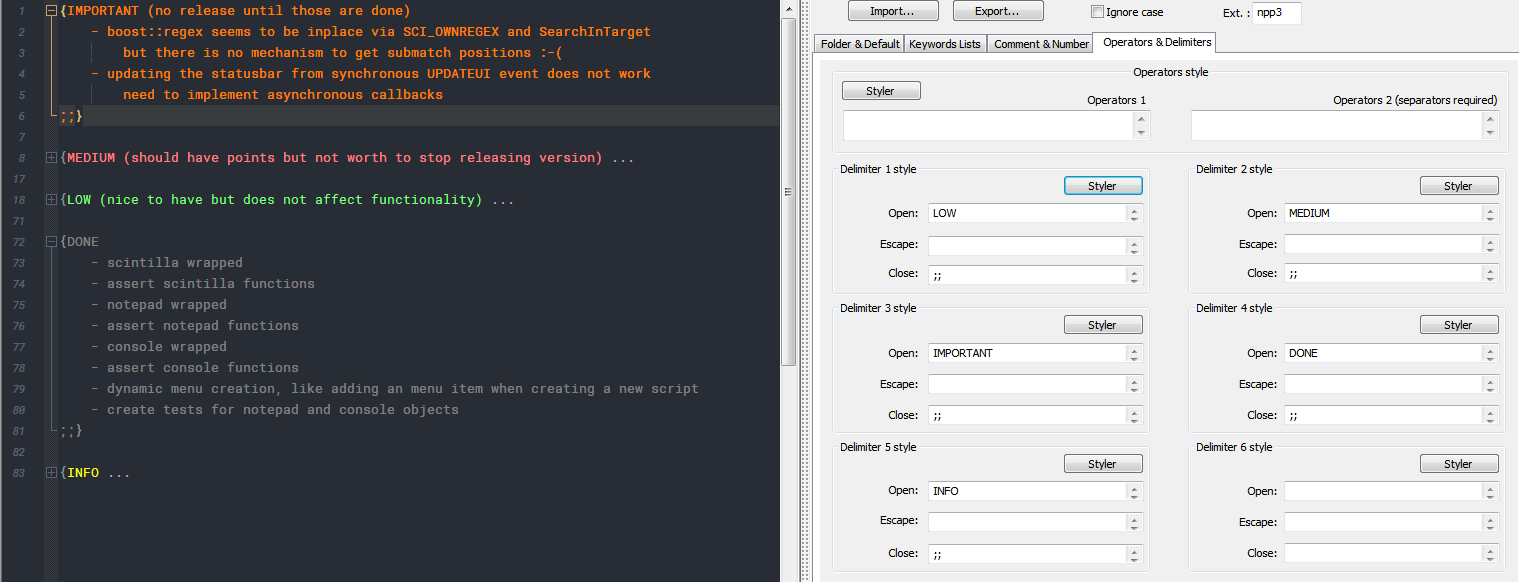
and using
{and}for folding -
@Ekopalypse
That’s…a very good point! It’s more efficient and less cluttered to just have a unique ending delimiter rather than modify the beginning of every line. Thanks!



Hello! It looks like you're interested in this conversation, but you don't have an account yet.
Getting fed up of having to scroll through the same posts each visit? When you register for an account, you'll always come back to exactly where you were before, and choose to be notified of new replies (either via email, or push notification). You'll also be able to save bookmarks and upvote posts to show your appreciation to other community members.
With your input, this post could be even better 💗
Register Login