Community
    • Login

    "MenuIcons" how to use?

    Scheduled Pinned Locked Moved Notepad++ & Plugin Development
    12 Posts 3 Posters 2.4k Views
    Loading More Posts
    • Oldest to Newest
    • Newest to Oldest
    • Most Votes
    Reply
    • Reply as topic
    Log in to reply
    This topic has been deleted. Only users with topic management privileges can see it.
    • Сергей ДрузьС Offline
      Сергей Друзь
      last edited by Сергей Друзь

      Installed the plugin through the plugin manager. Plugin installed normal!
      How do I put icons in “Cotext Menu”, “Toolbar” and in “Menu”?

      Best regards!

      EkopalypseE 1 Reply Last reply Reply Quote 1
      • EkopalypseE Offline
        Ekopalypse
        last edited by

        As far as I know you have to modify the SourcePath in ...\plugins\Config\MenuIcons.ini, means you have to add an additional \MenuIcons folder.
        For me, for example, this looks like this
        SourcePath=D:\...\plugins\MenuIcons\MenuIcons

        1 Reply Last reply Reply Quote 0
        • EkopalypseE Offline
          Ekopalypse @Сергей Друзь
          last edited by

          @Сергей-Друзь

          you mentioned plugin manager, does that mean you are using a npp version <= 7.5.9? If so, ignore what I’ve said. If you use recent version, then, afaik, SourcePath needs to be modified.
          But you have executed Generate list... form MenuIcons option menu, haven’t you?

          Сергей ДрузьС 1 Reply Last reply Reply Quote 0
          • Сергей ДрузьС Offline
            Сергей Друзь @Ekopalypse
            last edited by

            @Ekopalypse
            Thanx for your reply!

            No! I have “Notepad++ V7.8.1 (64-bit)” installed.
            My path is "C:\Program Files\Notepad++\plugins\MenuIcons\MenuIcons"
            Please look my screencast.

            andrecool-68A EkopalypseE 2 Replies Last reply Reply Quote 0
            • andrecool-68A Offline
              andrecool-68 @Сергей Друзь
              last edited by andrecool-68

              @Сергей-Друзь
              I wonder in what program did you record this video?
              Like a Christmas tree))

              Сергей ДрузьС 1 Reply Last reply Reply Quote 0
              • Сергей ДрузьС Offline
                Сергей Друзь @andrecool-68
                last edited by

                @andrecool-68

                Oh, that’s “ZD Soft Screen Recorder”.

                andrecool-68A 1 Reply Last reply Reply Quote 0
                • andrecool-68A Offline
                  andrecool-68 @Сергей Друзь
                  last edited by andrecool-68

                  @Сергей-Друзь
                  Я пользуюсь этой бесплатной программой:
                  https://github.com/NickeManarin/ScreenToGif

                  1 Reply Last reply Reply Quote 1
                  • EkopalypseE Offline
                    Ekopalypse @Сергей Друзь
                    last edited by

                    @Сергей-Друзь

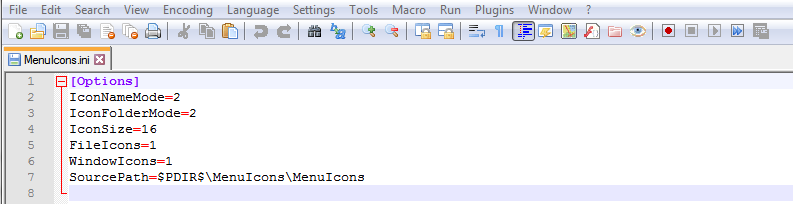
                    My path is “C:\Program Files\Notepad++\plugins\MenuIcons\MenuIcons”

                    but is this also set in MenuIcons.ini?
                    5037e88d-8738-4d4a-8678-d3e073f190dd-image.png

                    Сергей ДрузьС 1 Reply Last reply Reply Quote 0
                    • Сергей ДрузьС Offline
                      Сергей Друзь @Ekopalypse
                      last edited by Сергей Друзь

                      @Ekopalypse

                      I didn’t have a .ini file in my Config folder. I created it with the parameters:

                      [Options]
                      IconNameMode=2
                      IconFolderMode=2
                      IconSize=16
                      FileIcons=1
                      WindowIcons=1
                      SourcePath=$PDIR$\MenuIcons\MenuIcons
                      

                      Also used this Path:

                      C:\Program Files\Notepad++\plugins\MenuIcons\MenuIcons
                      

                      Not working! ☹️

                      EkopalypseE 2 Replies Last reply Reply Quote 0
                      • EkopalypseE Offline
                        Ekopalypse @Сергей Друзь
                        last edited by Ekopalypse

                        @Сергей-Друзь

                        I didn’t have a .ini …

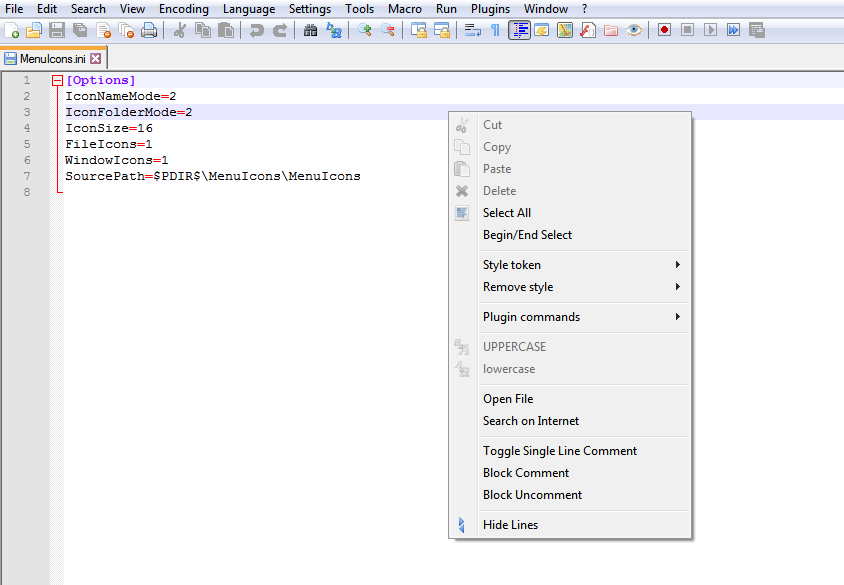
                        I just tried it with a fresh 7.8.1 portable version.
                        Used plugin admin to install the plugin
                        MenuIcons.ini was there.
                        Had to edit this file using a different editor as it was reset on npp exit, but once edited with a different editor it worked.
                        9b3791ac-2091-452f-a0c6-fc80e835c23b-image.png

                        1 Reply Last reply Reply Quote 1
                        • EkopalypseE Offline
                          Ekopalypse @Сергей Друзь
                          last edited by Ekopalypse

                          @Сергей-Друзь

                          do you know sysinternals procmon?
                          Maybe give it a try to see where the plugin is looking for the MenuIcons.ini.

                          Сергей ДрузьС 1 Reply Last reply Reply Quote 1
                          • Сергей ДрузьС Offline
                            Сергей Друзь @Ekopalypse
                            last edited by Сергей Друзь

                            @Ekopalypse

                            Thanx, with procmon i find that .ini file was in another place:

                            C:\Users\USER\AppData\Roaming\Notepad++\plugins\config\
                            

                            I also have an IDE installed in Russian language. In order for the icons to work, I need to translate the files in the folder as well:

                            C:\Program Files\Notepad++\plugins\MenuIcons\MenuIcons\
                            

                            alt text

                            For example:
                            Menu > Edit > Copy
                            Menu > Edit > Paste

                            Translate to:
                            Menu > Правка > Копировать
                            Menu > Правка > Вставить

                            alt text

                            1 Reply Last reply Reply Quote 2

                            Hello! It looks like you're interested in this conversation, but you don't have an account yet.

                            Getting fed up of having to scroll through the same posts each visit? When you register for an account, you'll always come back to exactly where you were before, and choose to be notified of new replies (either via email, or push notification). You'll also be able to save bookmarks and upvote posts to show your appreciation to other community members.

                            With your input, this post could be even better 💗

                            Register Login
                            • First post
                              Last post
                            The Community of users of the Notepad++ text editor.
                            Powered by NodeBB | Contributors