Insert xml row
-
I read another post on here and tried following the instructions to use Regex to do this. But when I do the Find, nothing is found.
My current record looks like:

I need to insert a row between PlanDetail and CustomProperties.
<RemitProvider RemitProviderName=“Payment Center” RemitProviderTIN=“777336666” RemitProviderID=“777336666” />I wasn’t sure if my Find/Replace settings might need a tweak - but I tried suggestions from another thread here and had no luck:
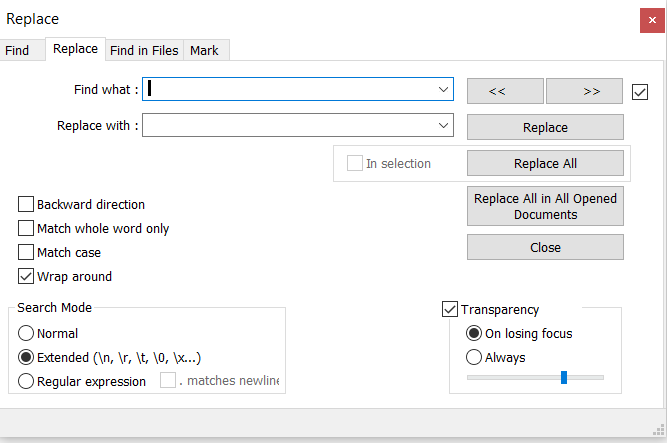
Any help will be greatly appreciated. I’m trying to help someone else on my work team.
Thanks!
-
I’d try a
Find whatof(?-is)(<PlanDetail.+\R)(?=\x20{4}<CustomProperties)and aReplace withof\1<RemitProvider blahblahblah />\r\nReplace by
blahblahblahwith your blahblahblah. :-)You’ll want to change your Search Mode to
Regular expressionfor this. -
Hello, @tj-druid, @alan-kilborn and All
Oh ! Seemingly, Alan beat me to it ;-))
First, just one question :
Is the line
<PlanDetail xsi:nil="true">always identical ? ( as I suppose that you have several lines, beginning with<PlanDetail, in your currentHTMLfile )If the answer is
yes:-
SEARCH
<PlanDetail xsi:nil="true">\r\n -
REPLACE
<PlanDetail xsi:nil="true">\r\n\x20\x20\x20\x20<RemitProvider RemitProviderName="Payment Center" RemitProviderTIN="777336666" RemitProviderID="777336666" />\r\n -
Tick the
Wrap aroundoption -
Select the
Extendedsearch mode -
Click once on the
Replace Allbutton or several times on theReplacebutton
If the line, beginning with
<PlanDetail, may be different : for instance<PlanDetail xsi:nil="false">or<PlanDetail abc:nil="true">), I advice you to prefer the regex mode :-
SEARCH
(?-is)<PlanDetail\x20.+\R(?=\h*<CustomProperties) -
REPLACE
$0\x20\x20\x20\x20<RemitProvider RemitProviderName="Payment Center" RemitProviderTIN="777336666" RemitProviderID="777336666" />\r\n -
Tick the
Wrap aroundoption -
Select the
Regular expressionsearch mode -
Click once on the
Replace Allbutton or several times on theReplacebutton
Best Regards,
guy038
P.S. :
Here are two links to get further documentation :
https://npp-user-manual.org/docs/searching/
https://community.notepad-plus-plus.org/topic/15765/faq-desk-where-to-find-regex-documentation
-
-
@Alan-Kilborn Thank you! I ended up using guy038’s suggestion. But, I did start with yours.
-
@guy038 Thank you so much. I ended up using your second suggestion. I ran into an issue because my validator did not like the new row between PlanDetail and CustomProperties, but I was able to take what you provided and put the row after CustomProperties instead. I was helping a coworker with a temporary work around and she thanks you too! Happy Holidays, I’m sure Santa will give you something good in your stocking - or at least some good Karma!



Hello! It looks like you're interested in this conversation, but you don't have an account yet.
Getting fed up of having to scroll through the same posts each visit? When you register for an account, you'll always come back to exactly where you were before, and choose to be notified of new replies (either via email, or push notification). You'll also be able to save bookmarks and upvote posts to show your appreciation to other community members.
With your input, this post could be even better 💗
Register Login