Selecting, Leaving, Returning, then Copying from Find-Result window
-
I know I’ve done this at least twice now, so it is worth asking about:
Sometimes I’ll mouse-select some text in the Find-Result window, then I’ll go to another application for something, then I’ll return to Notepad++ and want to copy to the clipboard the text I selected earlier (and remains currently selected). There doesn’t seem to be a way to do it because I can’t seem to get input focus back where it needs to be without clicking with the mouse, and that action destroys the selection I had before.
Any hints on how to accomplish this?
-
I think I can answer my own question (is that allowed?..probably, but I can’t upvote it…).
I found that by clicking in the fold margin:
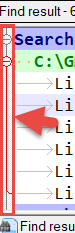
I was able to then ctrl+c copy my previously selected text in Find-Result.
-
Alternatively, I was able to get it to work by Right Clicking on the current selection in the Find-Result window, then cancelling out of the context menu. (Or using the RClick context menu to initiate the copy)
-
@PeterJones said in Selecting, Leaving, Returning, then Copying from Find-Result window:
Right Clicking on the current selection in the Find-Result window, then cancelling out
Ah, yes, that works for me as well.
Or using the RClick context menu to initiate the copy
Well, that doesn’t get me the text I had previously selected (well, it gets me that but also more, so it is not desirable).
-
Press F7?
-
@Ekopalypse said in Selecting, Leaving, Returning, then Copying from Find-Result window:
Press F7?
Also works. Can’t say I’ve ever used the keyboard commands for Find-Result window from the Search window; I always use the mouse.
-
I’m too lazy to take my fingers off the keyboard. :-D
Actually I should experiment if I can work without a mouse connected completely :-) -
I think I still like the click-on-fold-margin the best, and not only because I provided that answer. :-)
@Ekopalypse said in Selecting, Leaving, Returning, then Copying from Find-Result window:
Actually I should experiment if I can work without a mouse connected completely
Maybe you can now that 7.8.3 offers a way to switch to Find window via keyboard without overwriting your previous search term. Of course, if you switch to Find via ctrl+f and then realize you should’ve gone to Replace via ctrl+h… (sure, Esc then ctrl+h does it, but I feel that is rather ugly). [Didn’t verify, but I presume 7.8.3’s option for ctrl+f also works with ctrl+h, and even ctrl+shift+f…hmmm]
I’ve never understood the “full keyboarding” approach, but I respect it. Sure, most text editor use is for (duh) typing text, but occasionally grabbing the mouse gives the wrist a rest from constantly the same activity.
-
@Alan-Kilborn said in Selecting, Leaving, Returning, then Copying from Find-Result window:
Maybe you can now that 7.8.3 offers …
To be honest, I barely use the find window. In my workflow
there is no need to do this often.I’ve never understood the “full keyboarding” approach, … occasionally grabbing the mouse gives the wrist a rest from constantly the same activity.
:-) I don’t have this problem because the coding represents maybe 10% of my working time.
At home, when I program for fun, I constantly have to take my hand off the keyboard,
because I have to take the board off my head all the time, because of the stupid mistakes I make all the time. :-DNot sure this board off my head translated correctly.
Blockhead seems to be the translation for Brett vorm Kopf



Hello! It looks like you're interested in this conversation, but you don't have an account yet.
Getting fed up of having to scroll through the same posts each visit? When you register for an account, you'll always come back to exactly where you were before, and choose to be notified of new replies (either via email, or push notification). You'll also be able to save bookmarks and upvote posts to show your appreciation to other community members.
With your input, this post could be even better 💗
Register Login