Hide/Unhide Non-Bookmarked Lines
-
Hello,
Is there any way to hide and unhide all non-bookmarked lines?
Thank you
-
afaik, not as builtin feature.
A possible solution might be to use a scripting language plugin
and some code similar to the pythonscript below.from Npp import editor bookmark_mask = 1<<24 line = 0 while True: line = editor.markerNext(line, bookmark_mask) if line == -1: break editor.hideLines(line,line) line+=1This is just some demo code demonstrating the feature.
-
The hide lines feature in Notepad++ is “underdeveloped”; I’d stay away from it unless and until it is made better by the developers. BUT…I can see how what you want to do is valuable.
@Ekopalypse OP wanted to hide NON bookmarked lines but AFAICT at a quick look, your P.S. will hide the bookmarked lines instead?
-
@Alan-Kilborn
you are correct and I thought is on bookmarked lines really correct?
Well, non-bookmarked makes sense :-)
Let’s see if OP wants to go that way. -
@Ekopalypse, @Alan-Kilborn Thank you both for your input.
I do indeed wish to hide non-bookmarked lines. Although the code above seems to hide bookmarked lines only - and I don’t know how to unhide them either.
The reasoning is that I have a large database which contains over 24,000 download links - one per line, and I need to go through the painful task of editing each one of them. (I can’t see any other way to modify filenames on one server & modifying the respective link on another server at the same time!)
So to assist with the work, I can highlight all the download links by bookmarking them, and then hiding all other information, which would allow me to sift through the links easier.
-
@Mike-Smith said in Hide/Unhide Non-Bookmarked Lines:
I need to go through the painful task of editing each one of them
24000 things to examine and edit is a huge manual task. Perhaps if you elaborate a bit more and/or show some data, someone here might have some automation hints for you? Maybe it isn’t possible…but hopefully something could be done.
and I don’t know how to unhide them either.
As far as I know, Notepad++'s menus only offers a “Hide Lines”. After you’ve done that one or more times, you’ll see some arrows in the margin, example:
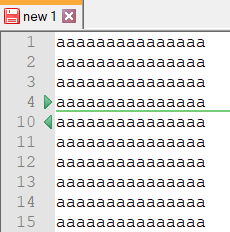
So the way to “unhide” these lines is to click on one of the green arrows. If you have a script that hides a lot of lines, showing them all again when desired is problematic because you’d have to click on a lot of green arrows. At that point the better way would be to simply restart Notepad++ (which doesn’t remember the status of hidden lines when exited and re-run).
I do indeed wish to hide non-bookmarked lines
It seems like you could run your bookmarking operation, then do a “Inverse Bookmark” command, and then run the script @Ekopalypse provided…to get what you want?
-
It seems like you could run your bookmarking operation, then do a “Inverse Bookmark” command, and then run the script @Ekopalypse provided…to get what you want?
Yes, that’s a good idea! I did just that, and it hid everything I didn’t need to edit. Thank you.
24000 things to examine and edit is a huge manual task.
I don’t thing it’s something that can be automated though. The issue is that I have all the download links in one database (which I’m editing through Notepad++), and the files are stored on a seperate server. The task I am currently processing, is to randomize all filenames:
https://www.example.com/74547854787fileone.zip
https://www.example.com/56647979548filetwo.zip
https://www.example.com/01324679462filethree.zip
https://www.example.com/64647452105filefour.zip
So not only do I need to complete the task of randomizing the filenames (A task I’m achieving using Bulk Rename Utility), I have to then ensure the download links are changed to represent the relevant filename.



Hello! It looks like you're interested in this conversation, but you don't have an account yet.
Getting fed up of having to scroll through the same posts each visit? When you register for an account, you'll always come back to exactly where you were before, and choose to be notified of new replies (either via email, or push notification). You'll also be able to save bookmarks and upvote posts to show your appreciation to other community members.
With your input, this post could be even better 💗
Register Login