macro-writing
-
I know, how to record a macro.
But where can I find a description of macro parameters (eg. reserved words ) to put macro definitions into shortcut.xml?
-
Hello, @khk_khk, and All,
Here are some links, in the Official Notepad++ documentation :
https://npp-user-manual.org/docs/macros/
https://npp-user-manual.org/docs/config-files/#macros
https://npp-user-manual.org/docs/searching/#searching-actions-when-recorded-as-macros
Here is my own summary of all the
<Action>tags, of type =3, which define a search/replace operation, in the<Macros>section ofshortcuts.xml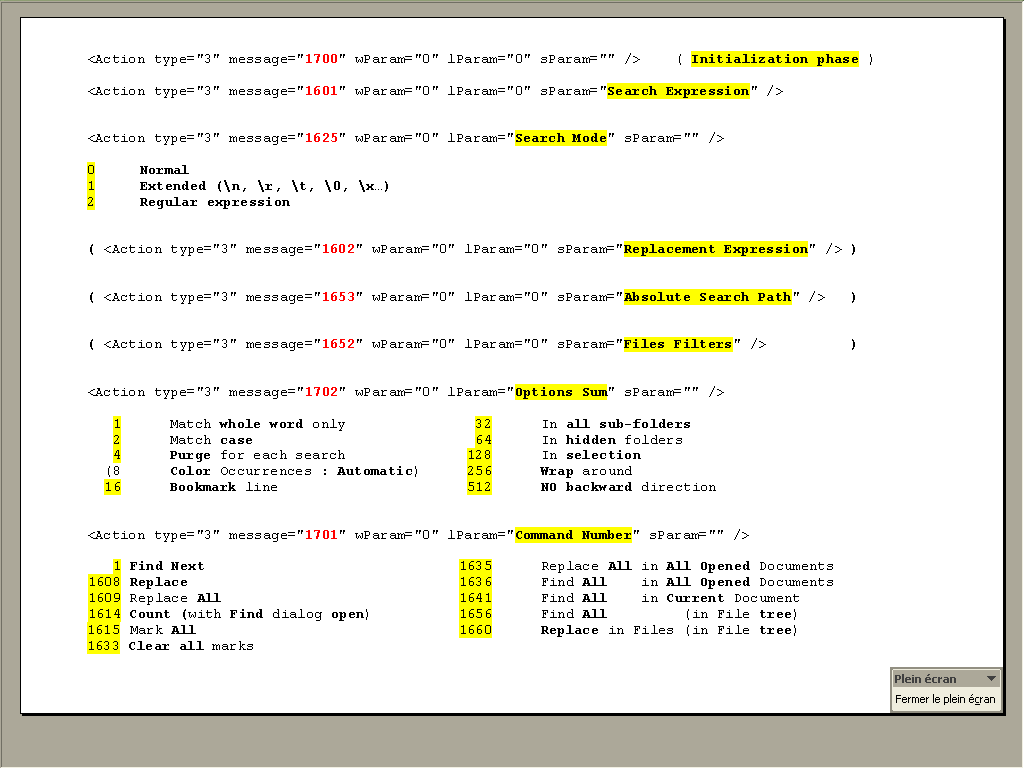
Hope this helps !
Best Regards,
guy038
-
But where can I find a description of macro parameters (eg. reserved words ) to put macro definitions into shortcut.xml?
@guy038’s search/replace info is good…for search/replace.
Oftentimes a macro action is just a Scintilla command, in which case it comes down to a numeric command that is defined in the source code (file: scintilla.h) starting with
SCI_. A good source of availableSCI_commands is on the Scintilla tab page of the Shortcut Mapper.I believe also that some menu id (numeric) commands are also recorded into macros. A good reference for this is the source code file menuCmdID.h.
Probably exhaustive end-user level documentation on all possible commands is beyond the available resources of the Notepad++ dev team. It would be great to have, but…
I know, how to record a macro.
This truly is a novice-to-medium-experience end user’s best way to work with macros. If you want to see what results from an action, record and save a simple macro and then look at it in
shortcuts.xml's macro section.If you want to hand-edit a slightly bigger macro, put together (textually) several of these little test macros you’ve recorded.
-
The discussion is continued HERE.



Hello! It looks like you're interested in this conversation, but you don't have an account yet.
Getting fed up of having to scroll through the same posts each visit? When you register for an account, you'll always come back to exactly where you were before, and choose to be notified of new replies (either via email, or push notification). You'll also be able to save bookmarks and upvote posts to show your appreciation to other community members.
With your input, this post could be even better 💗
Register Login