Range Comand of Numbers in UDLdidn't work
-
Hi Guys,
I’m working long time with Notepad++ and it’s a great tool. Today I’ve started do define an UDL for an internal used skript.
It all works fine until I want to define the Numbers…The goal is to highlight all Numbers without 0 in RED
- So Highlight all in RED (this is easy and was done by define the Style in the section Numbers)
- Don’t Highlight 0 (that’s the hard one…)
I’ve used the Range to advice unsing only a special area, but wihtout sucsess. It seem to me that this command didn’t work anyway (see screenshoot of a test)
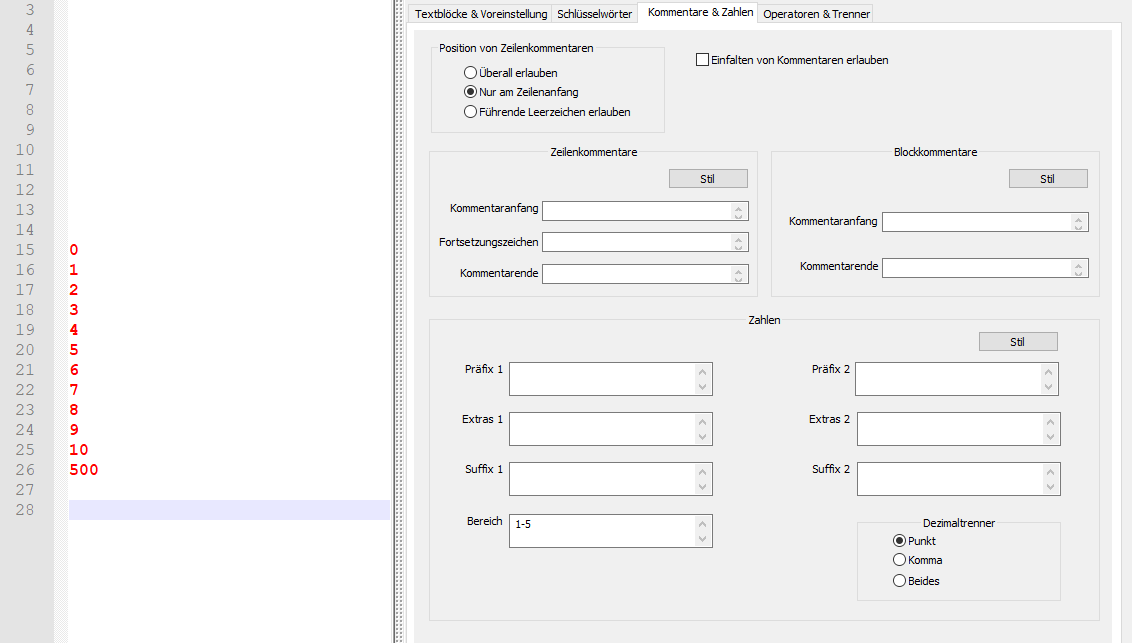
I’ve tried as well 1::5 or 1->5 like deskripted by Ivan (https://ivan-radic.github.io/udl-documentation/numbers/) but without sucsess
The other stuff like Präfix or Suffix works…
scond level would be If I would be able to have all Numbers in RED and the 0 in GREEN. I tried to use Keywords (like I’ve done it before for some comands), but It looks like this didn’t work with Numbers.
I hope someone can show me an easy solution for this
Thanks in advance
-
Hello, @hans-gerch and All,
The
Rangefield ( Bereich ) is not intended to define the range of numbersIt’s just a kind of suffix-prefix symbol(s) which will be highlighted, like the numbers placed right before and, possibly, the numbers located right after
For instance, if that
Rangezone contains- :: __( a single dash, a double colon or a double underscore chars ), this means that, for instance, all the strings, below, will be highlighted inred2-0.5 100::47 0.003__7.785 0000::
Now, I’m not very acquainted with
UDLand I don’t see an obvious way to distinguish the digit0from the other digits ! I’m afraid that it cannot be do with the native N++UDLfeature.However, you could use an enhanced
UDLlexer, which could manage, differently, the0digit from the others. Two conditions :-
Firstly, install the
PythonScriptplugin ( last version1.5.4, using Pythonv2.7.18) -
Secondly, use the
EnhanceUDLLexer.pyPython script, created by @ekopalypse, from that post :
Best Regards,
guy038
-


Hello! It looks like you're interested in this conversation, but you don't have an account yet.
Getting fed up of having to scroll through the same posts each visit? When you register for an account, you'll always come back to exactly where you were before, and choose to be notified of new replies (either via email, or push notification). You'll also be able to save bookmarks and upvote posts to show your appreciation to other community members.
With your input, this post could be even better 💗
Register Login