why notepad++ dosent show my language?
-
im writing my code on notepad++ and when i run the website all i see is question marks.
and writing.
how can i fix it so i could run a website -
It’s probably an encoding issue. When you edited the source code in Notepad++, it probably saved as UTF-8 (which is the default set in a fresh Notepad++, but can be changed using Settings > Preferences > New Document > Encoding
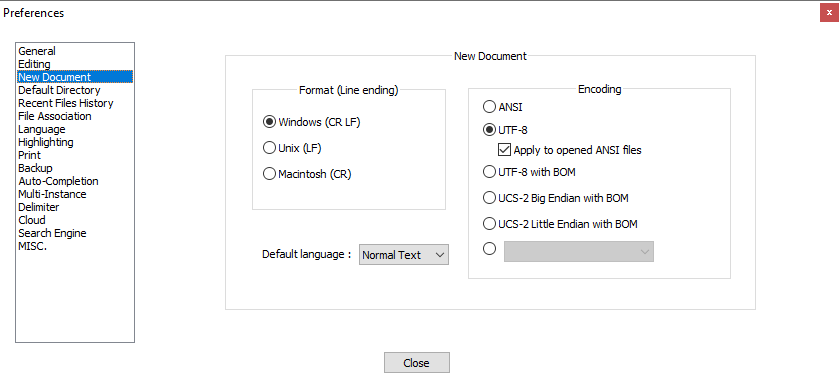
If your webserver is set up to serve some other encoding (like ISO-8859-1) as the default, then fancy characters in a UTF-8-encoded file will not look right at the browser. At which point, you need to setup your server differently (which we cannot help you with), or code your webpage to the right encoding (not really on-topic for here, but since it’s a one-liner:
<meta charset="UTF-8">), or save the file in Notepad++ using the encoding your webserver wants (for example, Encoding > Character Sets > Western European > ISO 8859-1).Alternately, it might be that your browser doesn’t have access to fonts that can display the characters used.
-
To the above, I can advise you to open your file and check the correspondence of encodings (the file encoding and the meta encoding must be the same)
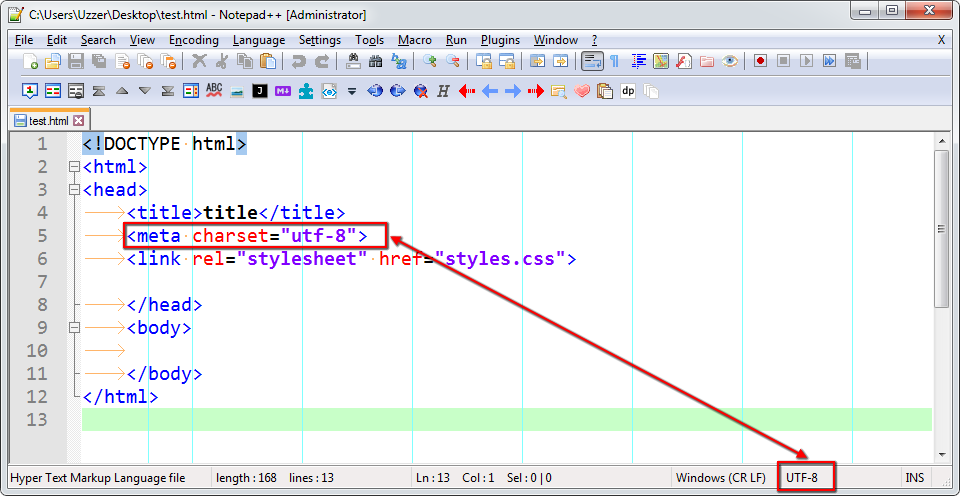
-
The “utf-8” encoding supports Hebrew well))

Hello! It looks like you're interested in this conversation, but you don't have an account yet.
Getting fed up of having to scroll through the same posts each visit? When you register for an account, you'll always come back to exactly where you were before, and choose to be notified of new replies (either via email, or push notification). You'll also be able to save bookmarks and upvote posts to show your appreciation to other community members.
With your input, this post could be even better 💗
Register Login