Community
    • Login

    Intel Hex not higlighting

    Scheduled Pinned Locked Moved Help wanted · · · – – – · · ·
    29 Posts 5 Posters 9.8k Views 1 Watching
    Loading More Posts
    • Oldest to Newest
    • Newest to Oldest
    • Most Votes
    Reply
    • Reply as topic
    Log in to reply
    This topic has been deleted. Only users with topic management privileges can see it.
    • Alan KilbornA Offline
      Alan Kilborn @Ekopalypse
      last edited by

      @David-Griffiths

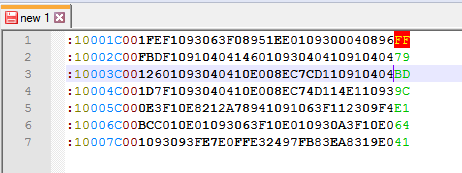
      NPP obviously knows how to calculate the checksum on the end of each line of the Intel Hex file

      It does? Without a plugin doing it?

      EkopalypseE 1 Reply Last reply Reply Quote 0
      • EkopalypseE Offline
        Ekopalypse @Alan Kilborn
        last edited by

        @Alan-Kilborn

        It does? Without a plugin doing it?

        Yes.

        6a071885-a9e4-4650-8e4d-9df8c8f348f0-image.png

        Alan KilbornA 1 Reply Last reply Reply Quote 1
        • Alan KilbornA Offline
          Alan Kilborn @Ekopalypse
          last edited by Alan Kilborn

          @Ekopalypse

          I guess really ambitious lexing! :-)

          Hmmm, when I try it with that data the FF is green like you first showed, not red like your second screenshot.

          EkopalypseE David GriffithsD 2 Replies Last reply Reply Quote 1
          • EkopalypseE Offline
            Ekopalypse @Alan Kilborn
            last edited by

            @Alan-Kilborn said in Intel Hex not higlighting:

            I guess really ambitious lexing!

            Lol
            It would be nice if the builtin lexers would show code which isn’t efficient :-D

            1 Reply Last reply Reply Quote 1
            • David GriffithsD Offline
              David Griffiths @Alan Kilborn
              last edited by David Griffiths

              @Alan-Kilborn Did you change the last digit before the FF from 5 to 6 like Eko did?

              1 Reply Last reply Reply Quote 3
              • guy038G Offline
                guy038
                last edited by guy038

                Hello, @david-griffiths, @ekopalypse, @alan-kilborn and All

                You can find a good documentation on the Intel Hex File Format from below :

                https://developer.arm.com/documentation/ka003292/latest

                https://en.wikipedia.org/wiki/Intel_HEX

                And I deduced that the checksum can be calculated from this formula :

                CheckSum = 256 - ( ∑ Byte Values ) MOD 256

                Each Byte Value represents the decimal value of the next two hexadecimal codes, minus the last two ones, standing for the checksum

                For instance, the fourth line, of your example, is :

                                                         vv----- CheckSum
                :10004C001D7F1093040410E008EC74D114E110939C
                 <-------------------------------------->        Data Range
                

                So its checksum is :

                 
                = 256 - (10h + 00h + 4Ch + 00h + 1Dh + 7Fh + 10h + 93h + 04h + 04h + 10h + E0h + 08h + ECh + 74h + D1h + 14h + E1h + 10h + 93h) mod 256
                
                = 256 - ( 16 +   0  + 76  +  0  + 29 + 127 +  16 + 147 +   4 +   4 + 16  + 224  +  8 + 236 + 116 + 209 +  20 + 225 +  16 + 147) mod 256
                
                = 256 - 1636 mod 256
                
                = 256 - 100
                

                Thus, the checksum of the fourth line is 156 , so 9C


                BTW, it’s work pointing out that the background color of the CHECKSUM and CHECKSUM_WRONG styles of the Intel Hex language are totally transparent ( α = 0 ) So, for instance, the default red background of a wrong checksum is not visible if this line is the current N++ line with usual very pale blue background color !

                Best Regards,

                guy038

                Alan KilbornA David GriffithsD 2 Replies Last reply Reply Quote 1
                • Alan KilbornA Offline
                  Alan Kilborn @guy038
                  last edited by

                  @guy038 said in Intel Hex not higlighting:

                  BTW, it’s work pointing out that the background color of the CHECKSUM and CHECKSUM_WRONG styles of the Intel Hex language are totally transparent ( α = 0 ) So, for instance, the default red background of a wrong checksum is not visible if this line is the current N++ line with usual very pale blue background color !

                  Interesting. What’s the way around that, if any?

                  PeterJonesP 1 Reply Last reply Reply Quote 0
                  • PeterJonesP Offline
                    PeterJones @Alan Kilborn
                    last edited by

                    @Alan-Kilborn said in Intel Hex not higlighting:

                    What’s the way around that, if any?

                    Change the foreground color of CHECKSUM_WRONG to something that contrasts both with its red background color and with your Global Styles > Current Line Background > Background color.

                    Alan KilbornA 1 Reply Last reply Reply Quote 1
                    • Alan KilbornA Offline
                      Alan Kilborn @PeterJones
                      last edited by

                      @PeterJones said in Intel Hex not higlighting:

                      Change the foreground color of CHECKSUM_WRONG to something that contrasts both with its red background color and with your Global Styles > Current Line Background > Background color.

                      Well…yea…but I meant, isn’t there a way to do something to the current-line-background color so that you can just get the red there (or close to it due to blending of colors) for the non-current line case?

                      PeterJonesP 1 Reply Last reply Reply Quote 0
                      • PeterJonesP Offline
                        PeterJones @Alan Kilborn
                        last edited by

                        @Alan-Kilborn

                        isn’t there a way to do something to the current-line-background color so that you can just get the red there (or close

                        I think the problem isn’t that the red has transparency; I think the problem is that the current-line-background has no transparency and is drawn over the red, so the current-line-background is the only visible background. It might be possible if the current-line-transparency could be set to 50% or something of that ilk, but that cannot be done in the GUI.

                        I tried editing stylers.xml to use either the MSB or LSB as an alpha value for the current line background

                                <WidgetStyle name="Current line background colour" styleID="0" bgColor="E8E8FF80" colorStyle="1" fontStyle="0" />
                        or
                                <WidgetStyle name="Current line background colour" styleID="0" bgColor="80E8E8FF" colorStyle="1" fontStyle="0" />
                        

                        But either was interpreted as invalid color, and current-line-background became black.

                        So to add transparency to current line background, it would have to be a codebase edit.

                        Alan KilbornA 1 Reply Last reply Reply Quote 1
                        • Alan KilbornA Offline
                          Alan Kilborn @PeterJones
                          last edited by

                          @PeterJones said in Intel Hex not higlighting:

                          So to add transparency to current line background, it would have to be a codebase edit.

                          I did some searching and found THIS as probably related.

                          1 Reply Last reply Reply Quote 2
                          • David GriffithsD Offline
                            David Griffiths @guy038
                            last edited by

                            @guy038 Thanks Guy. I know how to calculate the checksum but so does N++ and I would like it to be automatically calculated for me when I edit a line.

                            BTW I am still none the wiser as to why my desktop PC only wants to show Intel Hex in monochrome ??

                            Alan KilbornA 1 Reply Last reply Reply Quote 0
                            • Alan KilbornA Offline
                              Alan Kilborn @David Griffiths
                              last edited by

                              @David-Griffiths said in Intel Hex not higlighting:

                              I know how to calculate the checksum but so does N++ and I would like it to be automatically calculated for me when I edit a line.

                              This goes beyond the responsibility N++ signs up for. :-)
                              You could certainly do something for it with a scripting plugin, e.g. Pythonscript.

                              David GriffithsD 1 Reply Last reply Reply Quote 0
                              • David GriffithsD Offline
                                David Griffiths @Alan Kilborn
                                last edited by

                                @Alan-Kilborn Yes I agree it is more than I expected from N++ but as it does know how to calculate the checksum, it would be a very small step to add a right click or such that inserted the correct value, would it not?

                                Alan KilbornA 1 Reply Last reply Reply Quote 0
                                • Alan KilbornA Offline
                                  Alan Kilborn @David Griffiths
                                  last edited by

                                  @David-Griffiths said in Intel Hex not higlighting:

                                  N++ … does know how to calculate the checksum

                                  Notepad++ code has absolutely no idea how to do this checksum.
                                  It isn’t doing it.
                                  The underlying lexer is doing it, which comes from a separate project, called Scintilla.

                                  David GriffithsD 1 Reply Last reply Reply Quote 1
                                  • David GriffithsD Offline
                                    David Griffiths @Alan Kilborn
                                    last edited by

                                    @Alan-Kilborn Thanks for clarifying Alan. My knowledge of the inner workings of N++ needs work :-)

                                    EkopalypseE 1 Reply Last reply Reply Quote 0
                                    • EkopalypseE Offline
                                      Ekopalypse @David Griffiths
                                      last edited by

                                      @David-Griffiths

                                      Sorry, I was busy with some personal matters.
                                      Here’s a python script that hopefully does what you want. If there is something else you might want to have or it doesn’t do what you want it to be done I would kindly ask to use the github issue tracker in my repo.

                                      David GriffithsD 1 Reply Last reply Reply Quote 2
                                      • David GriffithsD Offline
                                        David Griffiths @Ekopalypse
                                        last edited by

                                        @Ekopalypse Thanks for posting this - sorry I only just noticed it. Better late than never :-)
                                        Where should I save the file and how do invoke the script?
                                        Any ideas why I am not seeing the highlighting on my Win10 PC?

                                        Alan KilbornA 1 Reply Last reply Reply Quote 1
                                        • Alan KilbornA Offline
                                          Alan Kilborn @David Griffiths
                                          last edited by Alan Kilborn

                                          @David-Griffiths said in Intel Hex not higlighting:

                                          sorry I only just noticed it. Better late than never

                                          Wow, that was a long layoff…

                                          Where should I save the file and how do invoke the script?

                                          There are some basic instructions for this type of scripting HERE. See the PeterJones Jan 19, 2021 4:12pm posting.

                                          1 Reply Last reply Reply Quote 0
                                          • David GriffithsD Offline
                                            David Griffiths
                                            last edited by

                                            @Alan-Kilborn Thank you Alan. I have installed the PythonScript plugin and created the script.
                                            When I open a file containing 9 lines of Intel Hex and run the script, precisely nothing happens ??
                                            This is on my desktop which does not show the highlighting of the hex file. I then tried on my laptop, which does the highlighting correctly, and the script works.
                                            So back to the original question, why does my desktop not show the highlighting? Both running NPP v8.1.5


                                            PeterJonesP 1 Reply Last reply Reply Quote 0

                                            Hello! It looks like you're interested in this conversation, but you don't have an account yet.

                                            Getting fed up of having to scroll through the same posts each visit? When you register for an account, you'll always come back to exactly where you were before, and choose to be notified of new replies (either via email, or push notification). You'll also be able to save bookmarks and upvote posts to show your appreciation to other community members.

                                            With your input, this post could be even better 💗

                                            Register Login
                                            • First post
                                              Last post
                                            The Community of users of the Notepad++ text editor.
                                            Powered by NodeBB | Contributors